Lightweight, safe-by-default link preview and URL metadata extraction for Node.js, Bun, Deno, and fetch-based edge runtimes. One runtime dependency.
Use linkpeek as a lightweight link-preview-js alternative, modern open-graph-scraper alternative, or TypeScript URL unfurl utility when you need Open Graph, Twitter Card, JSON-LD, and URL metadata for preview cards.





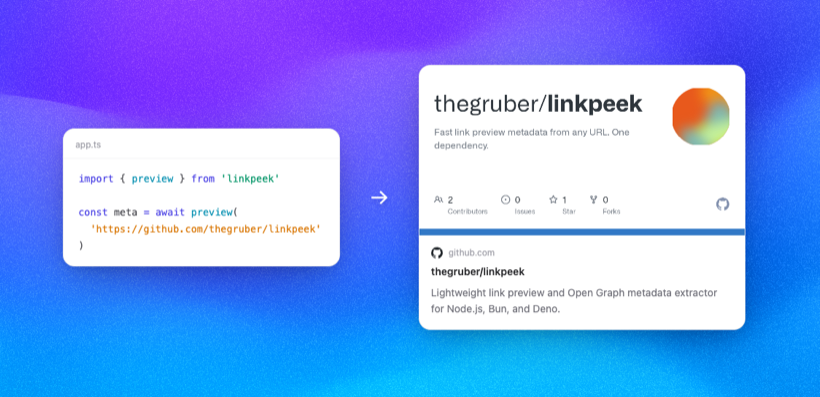
import { preview } from "linkpeek";

const result = await preview("https://www.youtube.com/watch?v=dQw4w9WgXcQ");

result.title;       // "Rick Astley - Never Gonna Give You Up"
result.image;       // "https://i.ytimg.com/vi/dQw4w9WgXcQ/maxresdefault.jpg"
result.siteName;    // "YouTube"
result.favicon;     // "https://www.youtube.com/favicon.ico"
result.description; // "The official video for \"Never Gonna Give You Up\"..."npm install linkpeekRuntime support:
| Runtime | Support |
|---|---|
| Node.js | 22+ |
| Bun | Current stable |
| Deno | import { preview } from "npm:linkpeek" |
| Edge runtimes | Fetch-compatible runtimes such as Cloudflare Workers and Vercel Edge |
CI tests Node 22, Node 24, Node 26, Bun, and Deno.
linkpeek focuses on server-side preview cards: fetch a URL, read only enough HTML for useful metadata, and return a stable result shape without a DOM-heavy scraper stack. It is a small metadata extractor for applications that already have a URL and need a safe preview-card result.
- 1 runtime dependency:
htmlparser2 - Streaming fetch with a strict byte limit
- Head-first SAX parsing with no DOM construction
- Safe defaults: private/internal IP targets blocked by default
- Dual ESM/CJS package output with TypeScript declarations for both module systems
linkpeek is intended for server-side use. Put it behind an API route and return only the metadata your client needs.
- Chat and messaging apps that need Slack-style link cards
- Social feeds, bookmarking tools, and link-curation products
- Newsletter and CMS workflows that preview outbound links
- AI agents or RAG tools that unfurl URLs before summarizing or ranking them
Use linkpeek when you already have a URL and need a small, safe preview-card result for a server-side or edge-runtime app. It is designed for Open Graph, Twitter Card, JSON-LD, canonical URL, favicon, media URL, and oEmbed discovery.
Use a broader scraper package when you need article text extraction, provider-specific scraping rules, text-to-first-URL parsing, or automatic fetching of oEmbed payloads.
Quick comparison:
| Package | Good fit | Tradeoff vs linkpeek |
|---|---|---|
link-preview-js |
Extracting previews from a URL or first URL in text | Broader text-input API; less focused on edge-runtime and safe-by-default fetching |
open-graph-scraper |
Node Open Graph/Twitter Card scraping with broader options | Node-oriented and larger dependency surface |
metascraper |
Rule-based article metadata extraction | More powerful framework; more setup and dependencies |
unfurl.js |
Rich nested metadata with fetched oEmbed support | Richer output; not focused on small edge-runtime preview cards |
See docs/comparison.md for positioning and claim policy.
import { preview, presets } from "linkpeek";

// Default: fast (30 KB limit, head only, no meta-refresh)
const fast = await preview(url);

// Quality: body JSON-LD + image fallback + meta-refresh
const quality = await preview(url, presets.quality);

// Custom: spread a preset and override
const custom = await preview(url, { ...presets.quality, timeout: 3000 });| Preset | What it enables |
|---|---|
presets.fast |
Default behavior: 30 KB, head-only, no meta-refresh |
presets.quality |
200 KB, body JSON-LD, body image fallback, meta-refresh |
Full examples are in examples. These are the shortest versions.
// app/api/preview/route.ts
import { preview } from "linkpeek";
import { type NextRequest, NextResponse } from "next/server";

export async function GET(req: NextRequest) {
  const url = req.nextUrl.searchParams.get("url");
  if (!url) return NextResponse.json({ error: "Missing url" }, { status: 400 });

  try {
    return NextResponse.json(await preview(url));
  } catch (err) {
    return NextResponse.json(
      { error: err instanceof Error ? err.message : "Preview failed" },
      { status: 422 },
    );
  }
}import express from "express";
import { preview } from "linkpeek";
const app = express();
app.get("/api/preview", async (req, res) => {
const url = typeof req.query.url === "string" ? req.query.url : "";
if (!url) return res.status(400).json({ error: "Missing url" });
try {
res.json(await preview(url));
} catch (err) {
res.status(422).json({
error: err instanceof Error ? err.message : "Preview failed",
});
}
});import { preview } from "linkpeek";
export default {
async fetch(request: Request): Promise<Response> {
const url = new URL(request.url).searchParams.get("url");
if (!url) return Response.json({ error: "Missing url" }, { status: 400 });
try {
const result = await preview(url);
return Response.json(result, {
headers: { "Cache-Control": "public, max-age=3600" },
});
} catch (err) {
return Response.json(
{ error: err instanceof Error ? err.message : "Preview failed" },
{ status: 422 },
);
}
},
};Use examples/react-preview-card for a browser component that renders the API response into a preview card.
preview() validates the initial URL and every HTTP redirect before fetching the next target. By default it blocks localhost, private networks, link-local/cloud metadata ranges, multicast/reserved IP ranges, and IPv6 address forms that embed private IPv4 targets.
- Do not forward user cookies, authorization headers, or internal service tokens to arbitrary preview URLs.
headersrejects common credential-bearing header names. - Keep
allowPrivateIPsset tofalseunless the caller is trusted and the network path is intentionally internal. - Treat returned metadata as untrusted text and URLs. linkpeek filters extracted media/canonical/oEmbed URLs to
http:andhttps:. - Runtime
fetchimplementations still own DNS resolution. DNS rebinding protection can vary by platform. - Cache successful previews by normalized URL so repeated page views do not refetch the same target.
- Tune
timeoutandmaxBytesfor your infrastructure. The default preset favors fast preview cards;presets.qualitytrades more bytes for body fallbacks. - Handle
statusCodeand thrown errors with a generic broken-link card instead of blocking the whole page.
preview() throws for invalid input and blocked URLs:
try {
  const result = await preview(url);
} catch (err) {
  // "Invalid URL"
  // "Only http and https URLs are supported"
  // "URLs pointing to private/internal networks are not allowed"
  // "Too many redirects"
  console.error(err instanceof Error ? err.message : err);
}Fetches a URL and extracts link preview metadata. Returns Promise<PreviewResult>.
| Option | Type | Default | Description |
|---|---|---|---|
timeout |
number |
8000 |
Request timeout in milliseconds |
maxBytes |
number |
30_000 |
Maximum bytes to stream |
userAgent |
string |
"Twitterbot/1.0" |
User-Agent sent with requests |
followRedirects |
boolean |
true |
Follow HTTP redirects after validating each target |
headers |
Record<string, string> |
{} |
Extra non-sensitive request headers. Common credential-bearing headers are rejected |
allowPrivateIPs |
boolean |
false |
Allow private/internal IP targets |
followMetaRefresh |
boolean |
false |
Follow one <meta http-equiv="refresh"> redirect when no title is found |
includeBodyContent |
boolean |
false |
Continue scanning <body> for JSON-LD and image fallbacks |
| Field | Type | Description |
|---|---|---|
url |
string |
Final fetched URL |
statusCode |
number |
HTTP status code. parseHTML() returns 0 |
title |
string | null |
og:title -> twitter:title -> JSON-LD -> Dublin Core -> <title> |
description |
string | null |
og:description -> twitter:description -> meta[name=description] -> JSON-LD |
image |
string | null |
Preview image URL |
imageAlt |
string | null |
Image alt text |
imageWidth |
number | null |
og:image:width |
imageHeight |
number | null |
og:image:height |
siteName |
string |
og:site_name -> JSON-LD publisher -> hostname |
favicon |
string | null |
Favicon URL |
mediaType |
string |
og:type, defaults to "website" |
canonicalUrl |
string |
Canonical URL, og:url, or fetched URL |
author |
string | null |
JSON-LD author, author meta, or Dublin Core creator |
locale |
string | null |
og:locale |
lang |
string | null |
HTML language, content-language, or locale prefix |
publishedDate |
string | null |
Article, JSON-LD, or Dublin Core date |
keywords |
string[] | null |
meta[name=keywords] |
video |
string | null |
Safe og:video URL |
audio |
string | null |
Safe og:audio URL |
twitterCard |
string | null |
Twitter card type |
twitterSite |
string | null |
Twitter site handle |
twitterCreator |
string | null |
Twitter creator handle |
themeColor |
string | null |
Theme color |
oEmbedUrl |
string | null |
Discovered oEmbed endpoint URL. Not fetched |
Parses an HTML string directly. Use this when you already have the HTML.
Pass { includeBodyContent: true } to continue into <body> for JSON-LD and image fallbacks; by default it keeps the same head-first behavior as preview().
import { parseHTML } from "linkpeek";

const result = parseHTML(
  "<html><head><title>Hello</title></head></html>",
  "https://example.com",
);

console.log(result.title); // "Hello"npm ci
npm run lint
npm run typecheck
npm run test
npm run build
npm audit
npm run package:check
npm run benchmarkLive network tests are opt-in:
LINKPEEK_LIVE_TESTS=1 npm run testFramework examples are in examples: Next.js, Express, Cloudflare Workers, React, Supabase Edge Functions, and Bun.