




An all-in-one local GUI to visualize, analyze, merge, and rapidly improve your Computer Vision datasets.
If you find Dataset Engine useful, please consider supporting the development!

As a Product/Project Manager building AI-driven apps, I noticed that the biggest bottleneck wasn't the algorithm—it was the data quality and the lack of intuitive tools to manage it locally. I built Dataset Engine to solve a personal need: a 100% local tool that provides total control over the data lifecycle. I needed to:
- Visualize datasets with deep filtering to understand exactly what my model was seeing.
- Merge multiple datasets using custom configurations to prevent class conflicts.
- Clean data by removing duplicates and fixing overlapping labels that ruin training.
- Summarize dataset health through an instant, high-level dashboard.
- Improve models by using my own
best.ptweights to find where the model fails and fixing those specific frames using an intuitive, custom-built editor.
Dataset Engine is an advanced, 100% locally-hosted studio designed to solve the most painful parts of building Object Detection models. Whether you have a messy dataset full of duplicates, need to merge datasets with conflicting class names, or want to rapidly test your YOLO model on a video to find and fix its blind spots—Dataset Engine handles it all through a blazing-fast React interface.
- Zero Cloud Costs: Everything runs locally on your machine. No data leaves your computer, ensuring absolute privacy for sensitive industrial or medical datasets.
- Smart Data Cleaning: Automatically detects completely identical images and overlapping/duplicate bounding boxes, fixing them with a single click.
- Active Learning Loop (Improver): Test your
.ptYOLO weights directly on raw videos. The system auto-extracts frames, runs inference, lets you flag failures, and provides a Photoshop-style canvas to correct the annotations for your next training run. - Instant Health Audit: A high-level dashboard provides immediate insights into class distribution, object density, and split ratios, allowing for data-driven decisions before starting model training.
- Format Agnostic: Natively supports standard YOLO formats, perfectly handling structures like
images/trainandlabels/train, or the typical Roboflow../valid/imagesexports without breaking.
Video.demo.mp4
Gain full transparency into your data assets.
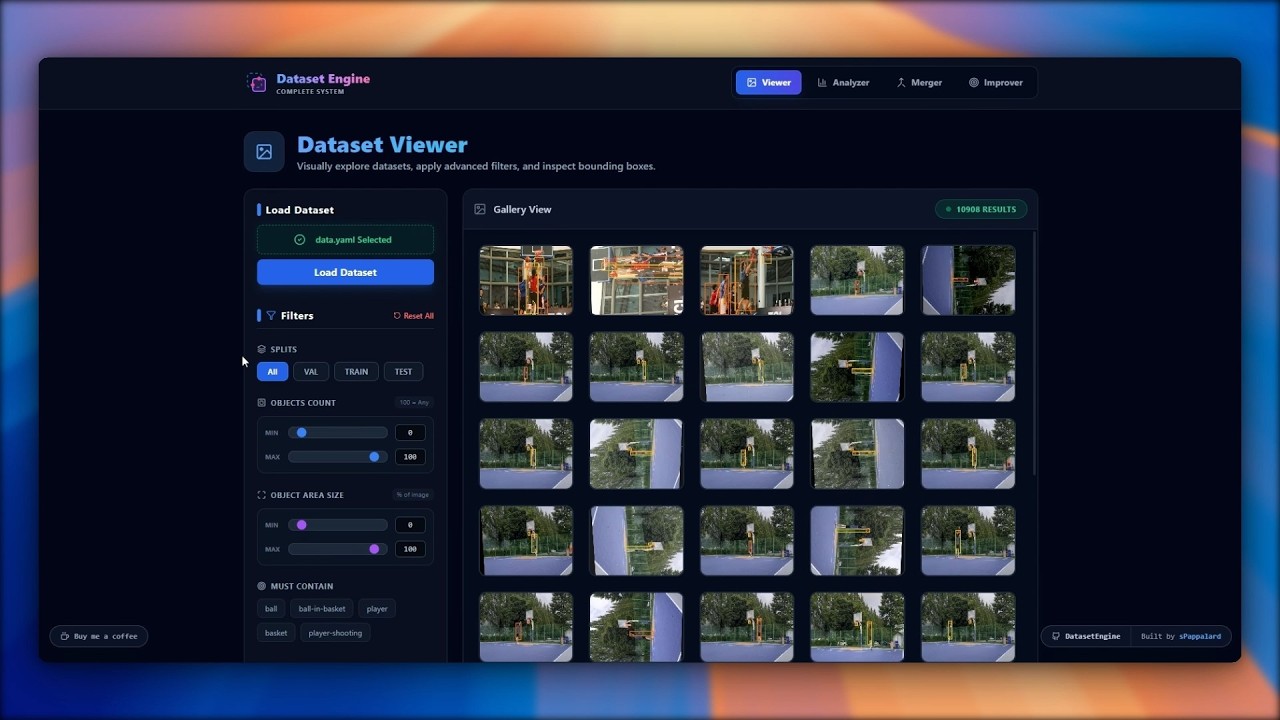
Key Features:
- Deep Filtering: Filter thousands of images instantly by split (
train,val,test), required classes, object count, or even specific bounding box sizes (e.g., "Find images with tiny objects under 1% area"). - Intuitive Inspection: Smooth grid navigation with hover-to-zoom and detailed metadata inspector.
- Local Rendering: High-speed visualization of thousands of local files without latency.
Instant health metrics for data-driven decisions.
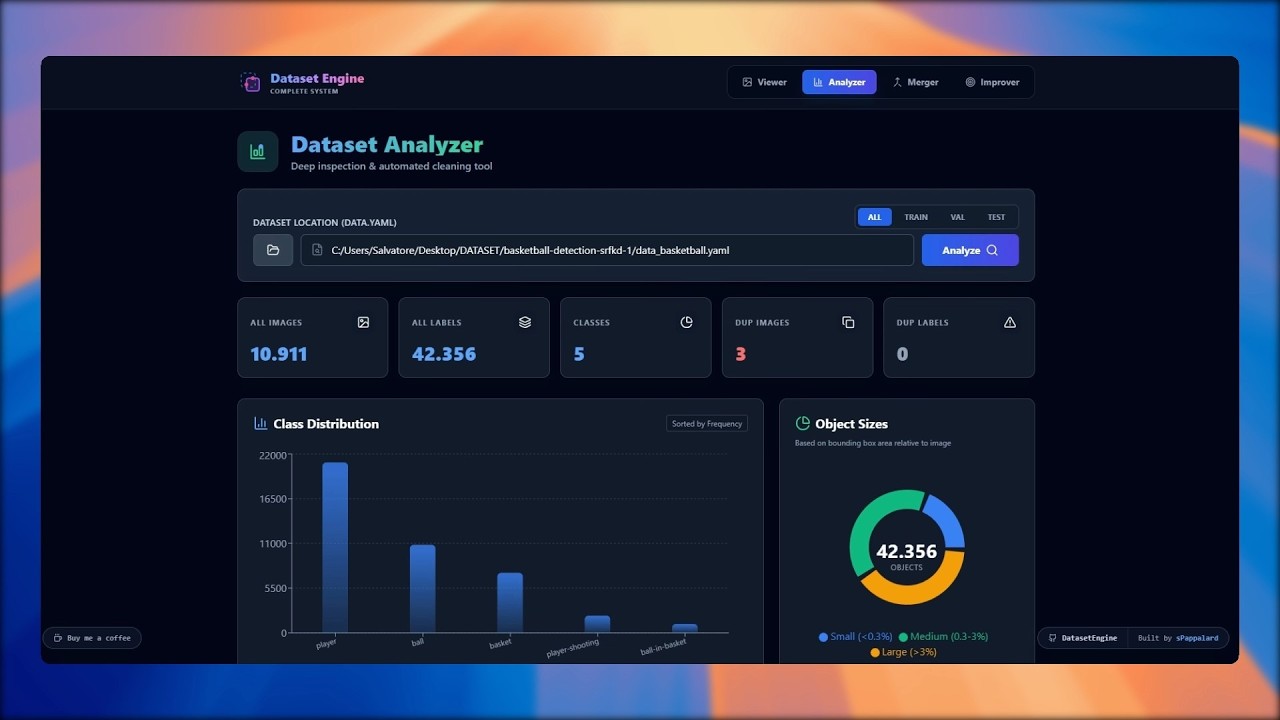
Key Features:
- Distribution Charts: Interactive Recharts graphs showing class imbalances and object size distributions.
- Duplicate Image Detection: Finds exact copy images in your dataset using MD5 hashing and safely removes them while keeping the best annotation.
- Duplicate Label Fixer: Detects overlapping identical bounding boxes (common in bad auto-labeling) and purges them.
- Stratified Stats: Visual verification of how classes are distributed across training and validation sets.
Consolidate disparate data sources into a unified powerhouse.
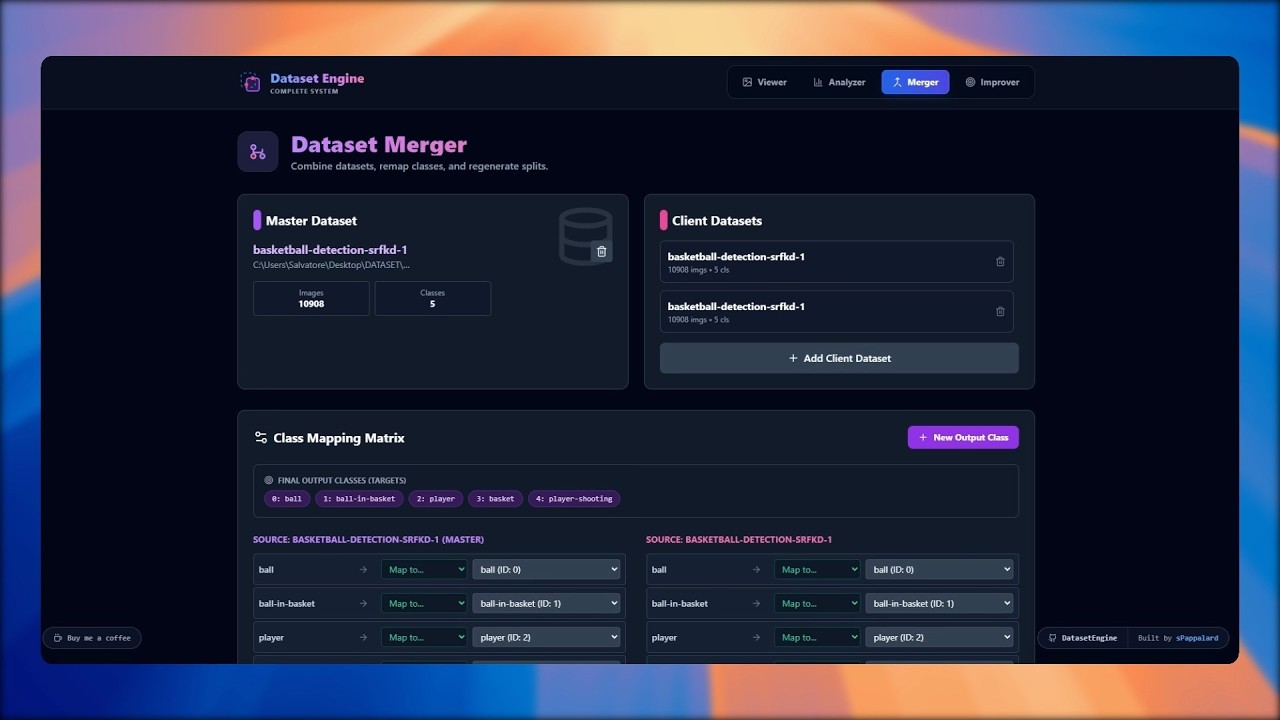
Key Features:
- Visual Re-mapping: Combine multiple datasets. If Dataset A calls it "Car" and Dataset B calls it "Vehicle", map them both to a single output class easily.
- Auto Re-Split: Define your ideal ratio (e.g., 70% Train, 20% Val, 10% Test) and the engine will shuffle and correctly regenerate the dataset structure.
- Safe Copying: Creates a fresh dataset copy with an updated
data.yamlinstead of moving original files.
Target model blind spots and close the active learning loop.
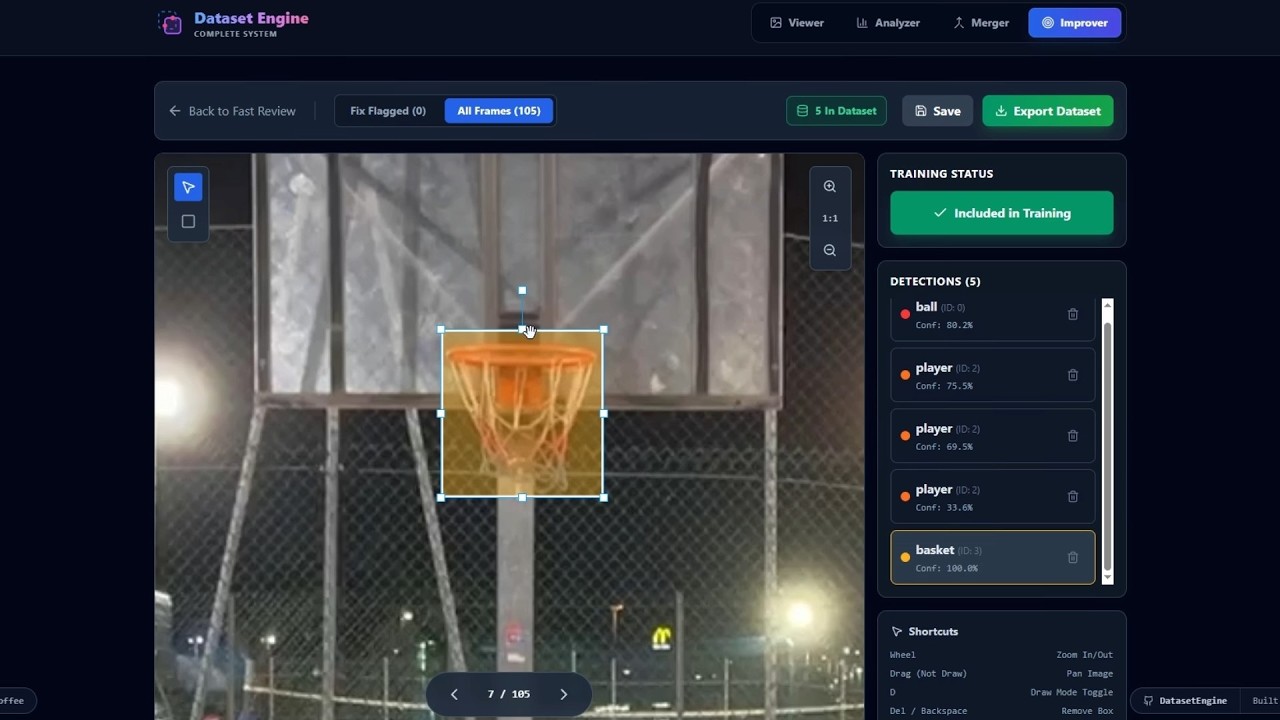
Key Features:
- Weight-Based Triage: Load your
best.pt, run inference on raw video, and flag exactly where the model fails. - Triage Mode: Quickly swipe through predictions and flag frames where the model failed (False Positives/Negatives).
- Annotation Editor: A built-in Konva.js canvas to manually fix bounding boxes, adjust classes, and export the corrected frames as a pristine dataset ready for fine-tuning.
- Direct Export: Convert corrected frames directly into a train-ready format to improve the next version of your model.
- FastAPI: Asynchronous Python web framework for lightning-fast local API endpoints.
- Ultralytics: Core inference engine natively supporting YOLOv8, YOLOv9, YOLOv10, and YOLOv11 (
.ptweights). - OpenCV & PyYAML: For heavy image parsing and
.yamldataset management.
- React 18 + Vite: For a snappy, instant-reload user interface.
- Tailwind CSS: Modern, utility-first styling with a dark "glassmorphism" aesthetic.
- React-Konva: Hardware-accelerated HTML5 Canvas for the bounding-box editor.
- Recharts: For dynamic, interactive data visualization.
dataset-engine/
│
├── backend/                           # FastAPI Backend
│   ├── models/                        # YOLO Model storage
│   ├── routers/                       # API Endpoints (viewer, analyze, etc.)
│   ├── services/                      # Core business logic & file processing
│   ├── main.py                        # FastAPI Entry Point
│   └── requirements.txt               # Python Dependencies
│
├── frontend/                          # React + Vite Frontend
│   ├── public/                        # Static Assets
│   ├── src/
│   │   ├── hooks/                     # Zustand state management
│   │   ├── pages/                     # UI Views (Viewer, Merger, Analyzer, etc.)
│   │   └── App.jsx                    # Routing & Main Layout
│   ├── package.json                   # Node Dependencies
│   ├── tailwind.config.js             # Styling configuration
│   └── vite.config.js                 # Bundler configuration
│
└── README.md                          # You are here!
Follow these steps to set up Dataset Engine on your local machine.
- Python 3.10+
- Node.js 18+ ### 1. Backend Setup
Open a terminal and navigate to the backend folder:
# Navigate to backend
cd backend

# Create a virtual environment (Recommended)
python -m venv venv

# Activate the virtual environment
# On Windows:
venv\Scripts\activate
# On macOS/Linux:
source venv/bin/activate

# Install dependencies
pip install -r requirements.txt

# Start the FastAPI server
uvicorn main:app --reload
The backend should now be running on http://localhost:8000.
Open a new terminal window and navigate to the frontend folder:
# Navigate to frontend
cd frontend

# Install dependencies
npm install

# Start the development server
npm run dev
Open your browser and navigate to http://localhost:5173.
You are ready to manage your datasets!
Dataset Engine is created and maintained by sPappalard.
If you find this project useful, please give it a ⭐ star or support the development!




This project is released under the MIT license.
Copyright (c) 2025 sPappalard.
Permission is hereby granted, free of charge, to any person obtaining a copy
of this software and associated documentation files (the "Software"), to deal
in the Software without restriction, including without limitation the rights
to use, copy, modify, merge, publish, distribute, sublicense, and/or sell
copies of the Software, and to permit persons to whom the Software is
furnished to do so, subject to the following conditions:

The above copyright notice and this permission notice shall be included in all
copies or substantial portions of the Software.

THE SOFTWARE IS PROVIDED "AS IS", WITHOUT WARRANTY OF ANY KIND, EXPRESS OR
IMPLIED, INCLUDING BUT NOT LIMITED TO THE WARRANTIES OF MERCHANTABILITY,
FITNESS FOR A PARTICULAR PURPOSE AND NONINFRINGEMENT. IN NO EVENT SHALL THE
AUTHORS OR COPYRIGHT HOLDERS BE LIABLE FOR ANY CLAIM, DAMAGES OR OTHER
LIABILITY, WHETHER IN AN ACTION OF CONTRACT, TORT OR OTHERWISE, ARISING FROM,
OUT OF OR IN CONNECTION WITH THE SOFTWARE OR THE USE OR OTHER DEALINGS IN THE
SOFTWARE.
Built with ❤️ by @sPappalard