

Cross-platform text data detection for React Native. Uses NSDataDetector on iOS and ML Kit Entity Extraction on Android to detect phone numbers, URLs, emails, dates, and addresses — returning structured results to JavaScript.
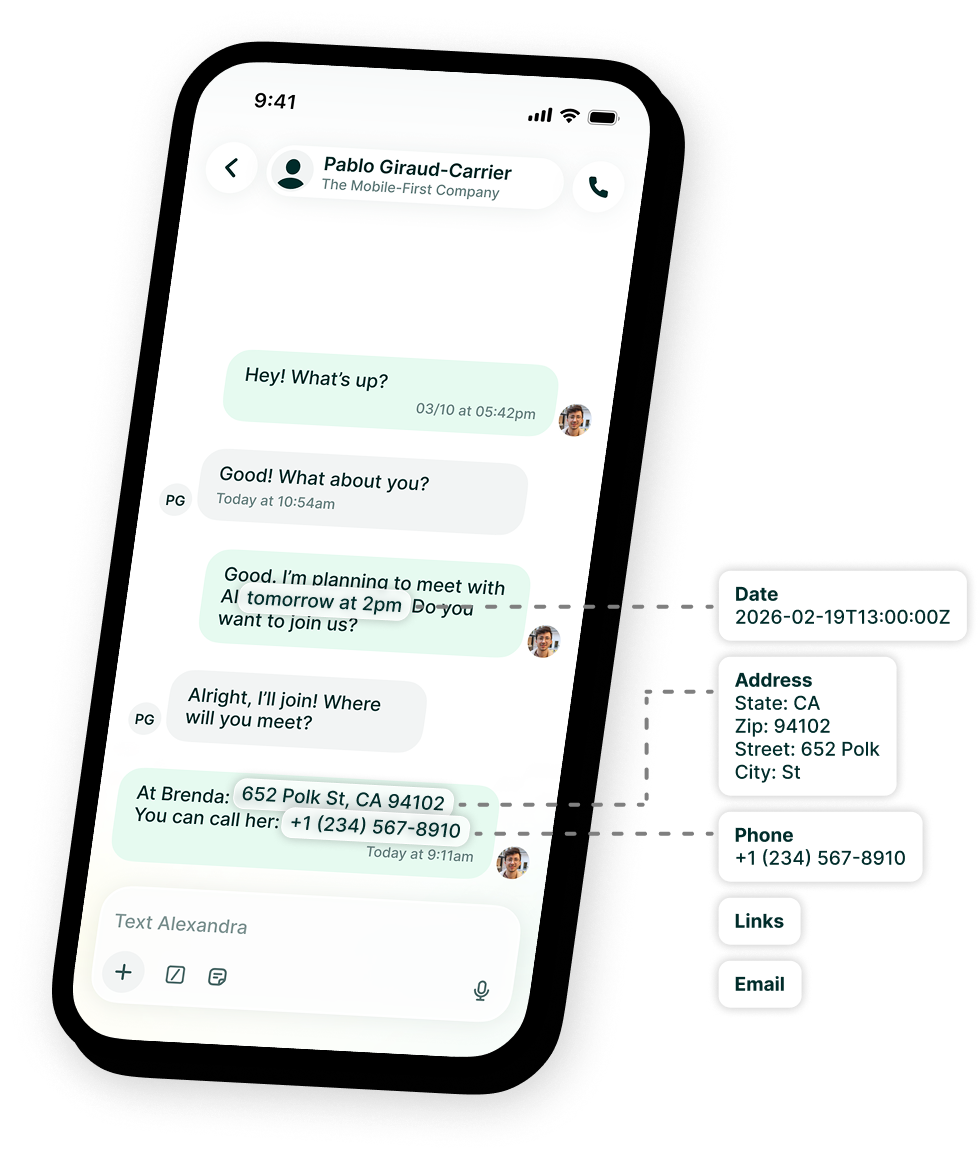
-
Phone numbers — Detect and extract phone numbers
-
URLs — Detect web links
-
Emails — Detect email addresses
-
Addresses — Detect street addresses with parsed components (iOS)
-
Dates — Detect dates and times with ISO 8601 output
-
Native accuracy — Uses native APIs instead of regex
-
React hooks —
useDataDetector(imperative) anduseDetectedEntities(reactive, as-you-type); both track model readiness and auto-download on Android -
Multiple languages — Choose from 15 ML Kit language models on Android
-
Expo Modules API — Built with the modern Expo native module system
npm install react-native-data-detectornpx pod-installThe ML Kit entity extraction model (~5.6MB per language) is downloaded on the user's device at runtime. You can control when this happens using prepareModel() or the useDataDetector hook (which downloads automatically on mount) — for example, to ensure detect() works offline later. If you don't trigger it explicitly, the model is downloaded automatically on the first detect() call.
import { detect, prepareModel } from 'react-native-data-detector';

// Pre-download the ML Kit model at app startup (Android only, no-op on iOS)
await prepareModel();

// Detect all entity types
const entities = await detect('Call me at 555-1234 or email john@example.com');
// [
//   { type: 'phoneNumber', text: '555-1234', start: 14, end: 22, data: { phoneNumber: '555-1234' } },
//   { type: 'email', text: 'john@example.com', start: 32, end: 48, data: { email: 'john@example.com' } }
// ]

// Detect only specific types
const phones = await detect('Call 555-1234 or visit https://example.com', {
  types: ['phoneNumber'],
});
// [
//   { type: 'phoneNumber', text: '555-1234', start: 5, end: 13, data: { phoneNumber: '555-1234' } }
// ]

// Use a specific language model (Android only, ignored on iOS)
const fr = await detect('Appelez-moi au 01 23 45 67 89', { language: 'fr' });There are two hooks for two situations:
useDataDetector— imperative. Tracks model readiness and hands you adetectfunction you call yourself (e.g. once per chat message).useDetectedEntities— reactive. Pass it a (changing) string and it returns the detected entities, debounced and recomputed as the text changes — ideal for as-you-type input.
Both download the model automatically on Android and are no-ops on iOS (always ready).
import { useDataDetector } from 'react-native-data-detector';

function MyComponent() {
  const { detect, status, isReady } = useDataDetector();

  const onAnalyze = async (text: string) => {
    const entities = await detect(text, { types: ['email', 'phoneNumber'] });
    // …
  };

  // status: 'notDownloaded' | 'downloading' | 'ready' | 'error'
  if (!isReady) return <Text>Preparing model… ({status})</Text>;
  // …
}
import { useDetectedEntities } from 'react-native-data-detector';
function LiveInput() {
const [text, setText] = useState('');
const { entities, isDetecting } = useDetectedEntities(text, { debounceMs: 250 });
return (
<>
<TextInput value={text} onChangeText={setText} />
<Text>{entities.length} detected{isDetecting ? '…' : ''}</Text>
</>
);
}Pre-downloads the entity-detection model so detect() can run offline afterwards. On iOS, this is a no-op that resolves immediately — NSDataDetector is built into the OS and requires no model download.
Call this at app startup or before the first detect() call to ensure the model is available offline.
Parameters:
| Parameter | Type | Description |
|---|---|---|
options.language |
ModelLanguage |
Which language model to prepare (Android only, default 'en'). Ignored on iOS. |
Returns: Promise<boolean> — true when the model is ready.
| Platform | Behavior |
|---|---|
| iOS | No-op, resolves true immediately |
| Android | Downloads the ML Kit model (~5.6MB) for the language if not already cached. Requires internet on first call. |
Returns the download status of the model for the given language.
Parameters: options.language — ModelLanguage (Android only, default 'en').
Returns: Promise<ModelStatus> — 'ready' or 'notDownloaded'. On iOS always resolves 'ready'. (A pure query never returns 'downloading' or 'error' — those are only surfaced by the useDataDetector hook.)
Convenience wrapper around getModelStatus. Resolves true when the model for the given language is available.
Parameters: options.language — ModelLanguage (Android only, default 'en').
Returns: Promise<boolean>
React hook that tracks model availability and, on Android, downloads the language model automatically. On iOS the model is always available, so status settles on 'ready'.
Parameters:
| Property | Type | Default | Description |
|---|---|---|---|
options.language |
ModelLanguage |
'en' |
Which language model to use (Android only). Changing it re-checks/prepares the new model. |
options.autoPrepare |
boolean |
true |
Download the model on mount if not already available (Android). |
Returns: UseDataDetectorResult
| Property | Type | Description |
|---|---|---|
detect |
(text, options?) => Promise<DetectedEntity[]> |
Detect entities using the configured language. options.types selects entity types. |
prepare |
() => Promise<void> |
Manually (re)download the configured language model. |
status |
ModelStatus |
'notDownloaded' | 'downloading' | 'ready' | 'error'. |
isReady |
boolean |
true when status === 'ready'. |
error |
Error | null |
The last preparation error, or null. |
Reactive hook: pass a (changing) string and get back the detected entities, recomputed as the text changes. Debounced and cancellation-safe (the latest text wins), so it suits as-you-type input. Manages model readiness internally.
Parameters:
| Property | Type | Default | Description |
|---|---|---|---|
text |
string |
— | The text to detect entities in. |
options.debounceMs |
number |
300 |
Debounce applied to text before detecting. |
options.types |
DetectionType[] |
All types | Which entity types to detect. |
options.language |
ModelLanguage |
'en' |
Which language model to use (Android only). |
options.enabled |
boolean |
true |
When false, detection pauses and the last result is kept. |
options.autoPrepare |
boolean |
true |
Download the model on mount if needed (Android). |
Returns: UseDetectedEntitiesResult
| Property | Type | Description |
|---|---|---|
entities |
DetectedEntity[] |
Entities detected in the debounced text. |
isDetecting |
boolean |
true while a detection for the latest text is in flight. |
status |
ModelStatus |
Current model download state. |
error |
Error | null |
The last detection or model error, or null. |
Detects entities in the given text using native platform APIs.
Parameters:
| Parameter | Type | Description |
|---|---|---|
text |
string |
The text to analyze |
options |
DetectOptions |
Optional configuration |
DetectOptions:
| Property | Type | Default | Description |
|---|---|---|---|
types |
DetectionType[] |
All types | Which entity types to detect |
language |
ModelLanguage |
'en' |
Which language model to use (Android only). Ignored on iOS. |
DetectionType: 'phoneNumber' | 'link' | 'email' | 'address' | 'date'
Returns: Promise<DetectedEntity[]>
| Property | Type | Description |
|---|---|---|
type |
DetectionType |
The type of detected entity |
text |
string |
The matched text substring |
start |
number |
Start index in the original string |
end |
number |
End index (exclusive) in the original string |
data |
Record<string, string> |
Additional structured data (see below) |
| Type | Data fields |
|---|---|
phoneNumber |
{ phoneNumber } |
link |
{ url } |
email |
{ email } |
address |
{ street, city, state, zip, country } (iOS) / { address } (Android) |
date |
{ date } ISO 8601 string |
The language option (type ModelLanguage) selects which Android ML Kit model is used. It is a no-op on iOS, where NSDataDetector is language-agnostic. Each language is a separate ~5.6MB on-device model, downloaded on demand.
| Code | Language | Code | Language | Code | Language |
|---|---|---|---|---|---|
ar |
Arabic | it |
Italian | ru |
Russian |
nl |
Dutch | ja |
Japanese | es |
Spanish |
en |
English | ko |
Korean | th |
Thai |
fr |
French | pl |
Polish | tr |
Turkish |
de |
German | pt |
Portuguese | zh |
Chinese |
| Feature | iOS | Android |
|---|---|---|
| Engine | NSDataDetector | ML Kit Entity Extraction |
| Offline | Always | After prepareModel() or first detect() call |
| Model download | Not needed | ~5.6MB per language, on-device at runtime |
| Language selection | Language-agnostic (option ignored) | 15 selectable language models |
| Address parsing | Structured components | Raw string |
| Date output | ISO 8601 | ISO 8601 |
- iOS 15.1+
- Android API 26+ (minSdk) — required by ML Kit Entity Extraction. Set
minSdkVersion = 26(or higher) in your app; with Expo, useexpo-build-properties. - Expo SDK 50+ or bare React Native with
expo-modules-core
Contributions are welcome! Please open an issue or submit a pull request.
MIT