

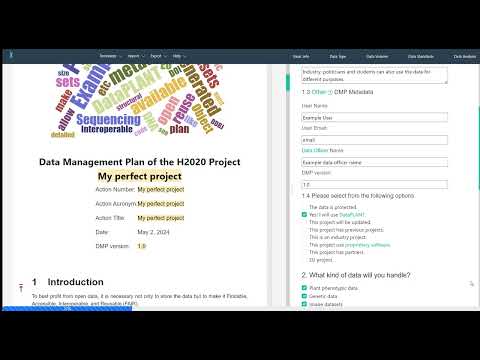
DataPLAN is a user-friendly, serverless Data Management Plan (DMP) generator developed by DataPLANT. It simplifies the creation of DMPs for various research projects and funding programmes, including Horizon Europe, H2020, DFG, BMBF, BMEL, BBSRC, NSF, MSCA, Carl-Zeiss, and more.
The tool incorporates prewritten DMP content tailored for the plant sciences, while aligning with FAIR principles and minimal information standards (MIAME, MinSEQe, MIAPE, MSI, MIAPPE). Users answer wizard-style questions through checkboxes and input fields; the answers are automatically inserted into the selected DMP template and can be exported as Word documents or machine-actionable maDMP (JSON).
A quick introduction is available in this two-minute video:
- Usage
- Features
- Saving & Sharing Your Answers
- Development
- DataPLANT Ecosystem
- Folder Structure
- Publication
- License
- Libraries and Tools
Visit plan.nfdi4plants.org to use DataPLAN directly in your browser. No installation or account is required.
- Download the repository as a ZIP file or clone it:
git clone https://github.com/nfdi4plants/dataplan.git
- Open
index.htmlin any modern web browser.
Note: DataPLAN is a purely client-side application. All data processing happens in your browser; no server backend is needed.
- Template-based DMP generation – Prewritten templates for major funders (Horizon Europe, DFG, BMBF, NSF, BBSRC, etc.) with plant-science-specific defaults.
- Wizard-style UI – Checkboxes and input fields guide users through each DMP section.
- Live preview – See how answers populate the template in real time.
- Multiple export formats – Download the finished DMP as a Word document (
.docx) or as a machine-actionable maDMP (.json). - Embedded maDMP editor – Edit and validate machine-actionable DMP JSON before exporting.
- Data type awareness – Recommendations adapt based on selected data types (genomics, transcriptomics, metabolomics, phenotyping, etc.).
- FAIR-by-design – Built-in references to DataPLANT RDM tools, ontologies, endpoint repositories, and minimal information standards.
- Automatic Storage – Your answers are automatically saved in your browser's
localStorage. - Cross-Device Use – Export your progress as a JSON file and import it on another browser or device to continue editing.
- maDMP Export – Generate a machine-actionable DMP in RDA maDMP format for interoperability with other tools and repositories.
- A modern web browser (Chrome, Firefox, Edge, Safari)
- A local HTTP server (recommended for development and testing)
- Node.js (only required for running Cypress end-to-end tests)
Because modern browsers enforce CORS restrictions on file:// URLs for modules and some APIs, serve the project via a local HTTP server:
# Using Python 3
python -m http.server 8000

# Using Node.js (npx serve)
npx serve -l 8000

# Using PHP
php -S localhost:8000
Then open http://localhost:8000 in your browser.
DataPLAN uses Cypress for end-to-end testing.
# Install Cypress (if not already installed)
npm install cypress --save-dev

# Open the Cypress Test Runner
npx cypress open

# Or run tests headlessly
npx cypress run
Test configuration is located in cypress/cypress.config.js. The base URL is expected to be http://127.0.0.1:8000/.
DataPLAN is one component of the broader DataPLANT research data management (RDM) ecosystem for fundamental plant research. The diagram below illustrates how DataPLAN relates to other DataPLANT tools and services.
graph TD
    subgraph Researchers
        U[Plant Researchers]
    end

    subgraph DataPLAN
        DP[DataPLAN DMP Generator]
    end

    subgraph DataPLANT[DataPLANT RDM Platform]
        ARC[ARC Specification]
        ARCi[ARCitect<br/>GUI for ARCs]
        ARCC[ARC Commander<br/>CLI for ARCs]
        SWATE[Swate<br/>Excel Metadata Annotator]
        DH[DataHUB / PLANTdataHUB<br/>GitLab-based Hosting]
        REG[ARC Registry]
        INV[InvenioRDM<br/>Data Publication & DOIs]
    end

    subgraph Standards
        ISA[ISA Standard]
        CWL[Common Workflow Language]
        ROCrate[RO-Crate / FDO]
        MI[MIAME / MIAPPE / MIAPE]
    end

    U -->|Generates DMP| DP
    DP -->|Recommends| ARC
    DP -->|References| DH
    DP -->|References| SWATE
    DP -->|References| INV
    ARCi -->|Creates & Manages| ARC
    ARCC -->|Creates & Manages| ARC
    SWATE -->|Annotates Metadata for| ARC
    DH -->|Hosts| ARC
    REG -->|Indexes| DH
    DH -->|Publishes to| INV
    ARC -->|Implements| ISA
    ARC -->|Implements| CWL
    ARC -->|Packaged as| ROCrate
    DP -->|Aligns with| MI
| Repository / Service | Relationship | Description |
|---|---|---|
| ARC Specification | Downstream reference | DataPLAN DMPs recommend the Annotated Research Context (ARC) as a FAIR data structure. |
| ARCitect | Downstream reference | DataPLAN mentions ARCitect as the GUI tool for building ARCs. |
| ARC Commander | Downstream reference | DataPLAN mentions ARC Commander as the CLI tool for ARC management. |
| Swate | Downstream reference | DataPLAN recommends Swate for metadata annotation in the DMP. |
| DataHUB / PLANTdataHUB | Downstream reference | DataPLAN references DataHUB as the platform for data storage and collaboration. |
| InvenioRDM | Downstream reference | DataPLAN references InvenioRDM-connected services for data publication and DOI assignment. |
| nfdi4plants.knowledgebase | Sibling / Cross-reference | The Knowledge Base provides documentation and training materials that complement DataPLAN. |
- Planning Phase – Researchers use DataPLAN to draft a DMP before starting a project. The DMP already includes references to DataPLANT tools (ARC, Swate, DataHUB) and standards (MIAPPE, ISA).
- Execution Phase – Researchers follow the DMP by creating ARCs with ARCitect or ARC Commander, annotating metadata with Swate, and syncing to the DataHUB.
- Publication Phase – Completed datasets are published via the DataHUB-connected InvenioRDM instance, receiving DOIs and becoming findable through the ARC Registry.
| Path | Description |
|---|---|
index.html |
Main application entry point |
template.html |
Template page for standalone DMP rendering |
/js/ |
JavaScript modules (main logic, exports, maDMP handling, tours) |
/css/ |
Bootstrap 5 custom stylesheets |
/DMPDocs/ |
DMP template definitions for each funder (JavaScript-based templates) |
/tools/madmp-editor/ |
Embedded machine-actionable DMP (maDMP) JSON editor and validator |
/cypress/ |
End-to-end Cypress tests |
/files/ |
Bibliography and reference files (.bib, .ris, .csv) |
/images/ |
Cover image, logo, and other assets |
citation.cff |
Citation metadata (CFF format) |
DataPLAN is featured as an issue cover in the journal Data:
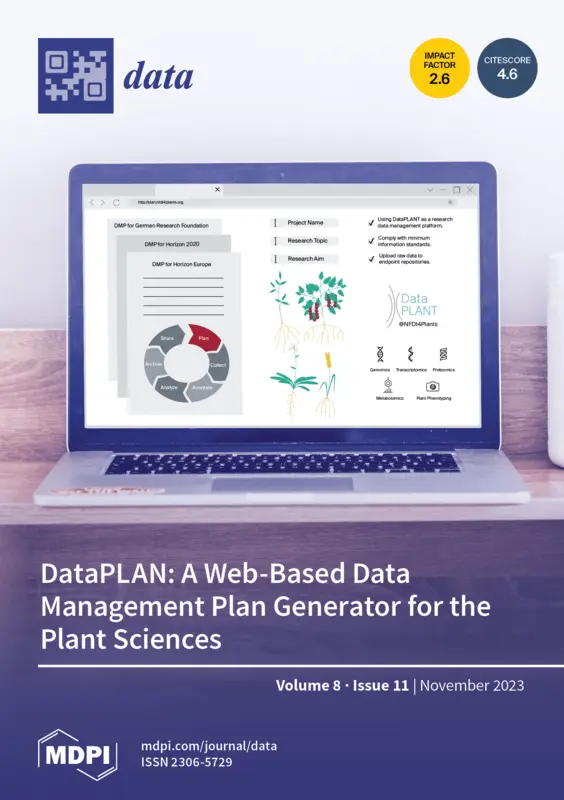

Citation: Zhou, X.; Usadel, B.; Kranz, A. DataPLAN: A Web-Based Data Management Plan Generator for the Plant Sciences. Data 2023, 8, 159. https://doi.org/10.3390/data8110159
This project is licensed under the GPL-3.0 License.
DataPLAN leverages several open-source projects:
- UI Framework: Bootstrap 5
- Onboarding Tours: bs5-intro-tour
- Word Cloud Visualization: d3.js & d3-cloud
- File Downloads: FileSaver.js
- JSON Validation: AJV (via
tools/madmp-editor/) - Testing: Cypress
Thanks to these communities for their contributions!