Advanced color management toolkit for Autodesk 3ds Max



Features • Installation • Usage • Changelog • License • Download
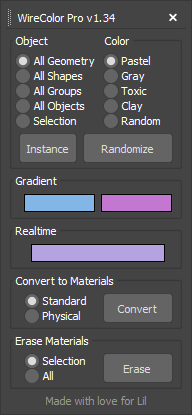
WireColor Pro (formerly ProColor) is a powerful open-source MaxScript tool that revolutionizes color workflow in Autodesk 3ds Max. Designed for 3D artists, designers, and technical artists, it provides intelligent randomization, instance synchronization, gradient mapping, and seamless material conversion—all in an intuitive interface.
Whether you're organizing massive architectural scenes, managing game assets, or creating complex animations, WireColor Pro streamlines your viewport visualization and scene management workflow.

- Five curated color presets: Pastel, Gray, Toxic, Clay, and Random
- Flexible targeting: Apply to Geometry, Shapes, Groups, All Objects, or Selection
- Instance-aware coloring: Maintain consistent colors across duplicated objects
- Undo/Redo support: Experiment freely with full history support
- Smooth color transitions between objects
- Dual color picker for precise control
- Smart selection handling: Works on selection or entire scene
- Real-time preview as you adjust gradient endpoints

- Instant color application with live feedback
- Context-aware behavior: Affects selection or all objects
- No confirmation dialogs: Streamlined workflow for rapid iteration
- One-click material creation from wireframe colors
- Dual material support: Standard and Physical materials
- Auto-naming convention: Organized material library
- Batch processing: Convert multiple objects simultaneously
- Success feedback: Know exactly what was processed
- Quick material removal from selection or all geometry
- Batch operations: Clean up scenes efficiently
- Safe operations: Confirmation and error handling built-in
WireColor Pro is available in two formats to suit different workflows:
Best for: Users who want toolbar integration, hotkey assignment, and permanent installation
- Download
markulie-WireColorProMacro.mcr - Place the file in your 3ds Max macroscripts folder:
C:\Users\[YourUsername]\AppData\Local\Autodesk\3dsMax\[Version]\ENU\usermacros - Restart 3ds Max or go to Customize > Customize User Interface
- Navigate to the Toolbars tab (or Keyboard, Quads, Menus for other options)
- Find the "markulie" category in the list
- Drag "WireColor Pro" to your desired toolbar or assign a hotkey
Benefits:
- Persistent installation across sessions
- Can be added to toolbars, quads, and menus
- Assignable to custom hotkeys
- Stays docked in your workspace
Best for: Testing, one-time use, or portable workflows without permanent installation
- Download
markulie-WireColorPro.ms - Drag and drop the
.msfile directly into any 3ds Max viewport - The dialog opens instantly—no installation required!
Alternative Method:
- Go to Scripting > Run Script in the main menu
- Browse and select
markulie-WireColorPro.ms - Click Open
Benefits:
- No installation needed
- Perfect for network environments
- Easy to share with team members
- Runs immediately without restart
- Open the tool: Click the WireColor Pro button in your toolbar
- Select target objects: Choose what to colorize (or leave empty for all)
- Pick a color scheme: Select from Pastel, Gray, Toxic, Clay, or Random
- Apply: Click "Randomize" and watch your scene transform
- Instance Mode: Enable the "Instance" checkbox to keep all instances of an object the same color—perfect for maintaining consistency across duplicated assets
- Group Coloring: Select "All Groups" to assign unique colors to each group while keeping group members uniform—ideal for scene organization
- Gradient Workflow: Select objects in order (left to right, top to bottom, etc.), then adjust gradient colors for smooth transitions that guide the eye
- Material Workflow: Randomize colors first to establish your scene's color palette, then convert to materials for quick material blocking and rendering
- Keyboard Efficiency: Assign WireColor Pro to a hotkey (like Ctrl+Shift+W) using the .mcr version for instant access
- Color Consistency: Use the same color preset across multiple scenes to maintain a consistent visual style in your projects
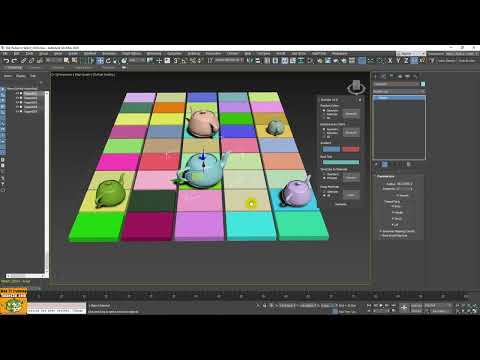


Tutorial (Italian) by Marcello Pattarin
- Complete code refactoring and optimization
- Comprehensive error handling for all operations
- Enhanced user feedback with success/error messages
- Fixed group colorization logic with instance mode
- Improved performance and reduced code redundancy
- Added operation counters for material conversion
- Special dedication added
- Added MaxScript version
- Added "Toxic" and "Clay" color palettes
- Implemented undo/redo functionality
- Added shape-only colorization mode
- Various bug fixes
- Major code refactoring
- Performance improvements
- Instance color consistency enhancement
- Group-based color customization
- Rebranded from "ProColor" to "WireColor Pro"
- Added Pastel color palette
- Fixed viewport auto-redraw
- Memory cleanup on initialization
- Bug fixes
- Converted to MacroScript format
- Batch wirecolor to material conversion
- Bug fixes
- Added wirecolor to material diffuse/base color conversion
- Bug fixes
- Improved material removal functionality
- Removed redundant gray wirecolor assignment
- Bug fixes
- Added material removal feature
- Bug fixes
- Bug fixes
- Bug fixes
- Initial release
Special thanks to:
- Lil
- Nintendo
- Marcello Pattarin
- Sergey Gromoff
This project is licensed under the MIT License.
Copyright (c) 2014-2025 markulie

Permission is hereby granted, free of charge, to any person obtaining a copy
of this software and associated documentation files (the "Software"), to deal
in the Software without restriction, including without limitation the rights
to use, copy, modify, merge, publish, distribute, sublicense, and/or sell
copies of the Software, and to permit persons to whom the Software is
furnished to do so, subject to the following conditions:

The above copyright notice and this permission notice shall be included in all
copies or substantial portions of the Software.

THE SOFTWARE IS PROVIDED "AS IS", WITHOUT WARRANTY OF ANY KIND, EXPRESS OR
IMPLIED, INCLUDING BUT NOT LIMITED TO THE WARRANTIES OF MERCHANTABILITY,
FITNESS FOR A PARTICULAR PURPOSE AND NONINFRINGEMENT.
Latest Release (v1.35) - December 5, 2025
Choose the version that best fits your workflow:
| Format | Download Link | Best For |
|---|---|---|
| MacroScript (.mcr) and MaxScript (.ms) | Zip archive | Permanent installation, toolbar integration, hotkey assignment or drag and drop |
What's the difference?
- .mcr (MacroScript): Integrates into 3ds Max UI permanently. Can be added to toolbars and assigned hotkeys.
- .ms (MaxScript): Standalone script that runs immediately when executed. Perfect for testing or temporary use.
Contributions, issues, and feature requests are welcome! Feel free to check the issues page.
- 🐛 Report bugs or issues you encounter
- 💡 Suggest new features or improvements
- 📖 Improve documentation or create tutorials
- 🌍 Translate the tool or documentation
- ⭐ Star the repository to show your support
- 📢 Share WireColor Pro with the 3ds Max community
WireColor Pro is written in MaxScript and welcomes contributions from developers of all skill levels. Fork the repository, make your changes, and submit a pull request!
Your feedback helps make WireColor Pro better! If you have suggestions, questions, or run into any issues, please:
- Open an issue on GitHub
- Star ⭐ the repository if you find it useful
- Share it with fellow 3ds Max users
Made with love for Lil