












Your Personal AI Assistant; easy to install, deploy on your own machine or on the cloud; supports multiple chat apps with easily extensible capabilities.
Core capabilities:
Every channel — DingTalk, Feishu, QQ, Discord, iMessage, and more. One assistant, connect as you need.
Under your control — Memory and personalization under your control. Deploy locally or in the cloud; scheduled reminders to any channel.
Skills — Built-in cron; custom skills in your workspace, auto-loaded. No lock-in.
What you can do
- Social: daily digest of hot posts (Xiaohongshu, Zhihu, Reddit), Bilibili/YouTube summaries.
- Productivity: newsletter digests to DingTalk/Feishu/QQ, contacts from email/calendar.
- Creative: describe your goal, run overnight, get a draft next day.
- Research: track tech/AI news, personal knowledge base.
- Desktop: organize files, read/summarize docs, request files in chat.
- Explore: combine Skills and cron into your own agentic app.
[2026-03-02] We released v0.0.4! See the v0.0.4 Release Notes for the full changelog.
- [v0.0.4] FEAT: Telegram channel; OpenAI & Azure OpenAI providers; Ollama SDK; coding-plan provider; model connection testing; heartbeat monitoring panel; CORS configuration; audio file support for DingTalk & Feishu.
- [v0.0.4] FEAT: Token-based memory compaction; file block processing; embedding configuration; normalized tool_choice behavior.
- [v0.0.4] BUGFIX: Windows file paths; empty tool calls; console workspace UI; Ollama URL & connectivity; MCP transport; browser resource leak; static asset MIME types; API headers; Playwright Docker; heartbeat parsing; media message queuing.
- [v0.0.4] RELS: Installation scripts with PowerShell; Docker guide; channel CLI docs; Feishu SOCKS proxy; MCP & runtime docs; FAQ (EN/ZH); skill-writing guide; CONTRIBUTING; console docs; website improvements.
- [v0.0.4] COMM: Special thanks to all new contributors: @ekzhu, @fancyboi999, @zhaozhuang521, @hobostay, @dhbxs, @longway-code, @ydlstartx, @LudovicoYIN, @fenixc9, @dittotang, @forestxieCode, @yongtenglei, @kerwin612, @luixiao0, @gongpx20069.
Recommended reading:
- I want to run CoPaw in 3 commands: Quick Start → open Console in browser.
- I want to chat in DingTalk / Feishu / QQ: Quick Start → Channels.
- I don’t want to install Python: One-line install handles Python automatically, or use ModelScope one-click for cloud.
- News
- Quick Start
- API Key
- Local Models
- Documentation
- Roadmap
- Contributing
- Install from source
- Why CoPaw?
- Built by
- License
If you prefer managing Python yourself:
pip install copaw
copaw init --defaults
copaw app
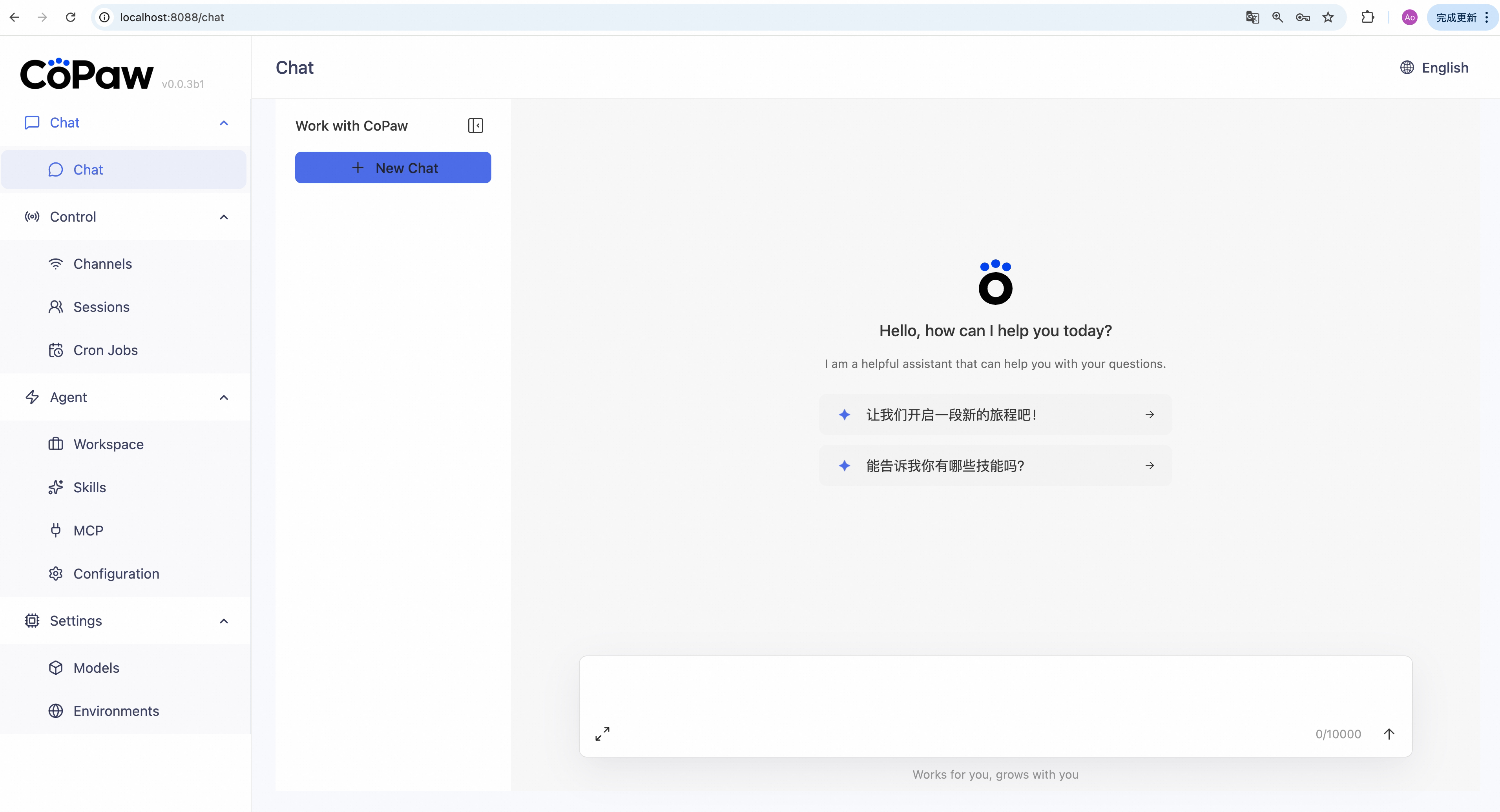
Then open http://127.0.0.1:8088/ in your browser for the Console (chat with CoPaw, configure the agent). To talk in DingTalk, Feishu, QQ, etc., add a channel in the docs.
No Python required — the installer handles everything:
macOS / Linux:
curl -fsSL https://copaw.agentscope.io/install.sh | bashTo install with Ollama support:
curl -fsSL https://copaw.agentscope.io/install.sh | bash -s -- --extras ollamaTo install with multiple extras (e.g., Ollama + llama.cpp):
curl -fsSL https://copaw.agentscope.io/install.sh | bash -s -- --extras ollama,llamacppWindows (PowerShell):
irm https://copaw.agentscope.io/install.ps1 | iexThen open a new terminal and run:
copaw init --defaults   # or: copaw init (interactive)
copaw app
Install options
macOS / Linux:
# Install a specific version
curl -fsSL ... | bash -s -- --version 0.0.2

# Install from source (dev/testing)
curl -fsSL ... | bash -s -- --from-source

# With local model support
bash install.sh --extras llamacpp    # llama.cpp (cross-platform)
bash install.sh --extras mlx         # MLX (Apple Silicon)
bash install.sh --extras llamacpp,mlx

# Upgrade — just re-run the installer
curl -fsSL ... | bash

# Uninstall
copaw uninstall          # keeps config and data
copaw uninstall --purge  # removes everything
Windows (PowerShell):
# Install a specific version
irm ... | iex; .\install.ps1 -Version 0.0.2

# Install from source (dev/testing)
.\install.ps1 -FromSource

# With local model support
.\install.ps1 -Extras llamacpp      # llama.cpp (cross-platform)
.\install.ps1 -Extras mlx           # MLX
.\install.ps1 -Extras llamacpp,mlx

# Upgrade — just re-run the installer
irm ... | iex

# Uninstall
copaw uninstall          # keeps config and data
copaw uninstall --purge # removes everythingImages are on Docker Hub (agentscope/copaw). Image tags: latest (stable); pre (PyPI pre-release).
docker pull agentscope/copaw:latest
docker run -p 8088:8088 -v copaw-data:/app/working agentscope/copaw:latest
Also available on Alibaba Cloud Container Registry (ACR) for users in China: agentscope-registry.ap-southeast-1.cr.aliyuncs.com/agentscope/copaw (same tags).
Then open http://127.0.0.1:8088/ for the Console. Config, memory, and skills are stored in the copaw-data volume. To pass API keys (e.g. DASHSCOPE_API_KEY), add -e VAR=value or --env-file .env to docker run.
The image is built from scratch. To build the image yourself, please refer to the Build Docker image section in scripts/README.md, and then push to your registry.
No local install? ModelScope Studio one-click cloud setup. Set your Studio to non-public so others cannot control your CoPaw.
To run CoPaw on Alibaba Cloud (ECS), use the one-click deployment: open the CoPaw on Alibaba Cloud (ECS) deployment link and follow the prompts. For step-by-step instructions, see Alibaba Cloud Developer: Deploy your AI assistant in 3 minutes.
If you use a cloud LLM (e.g. DashScope, ModelScope), you must set an API key before chatting. CoPaw will not work until a valid key is configured.
Where to set it:
copaw init— When you runcopaw init, the command has a step to configure the LLM provider and API key. Follow the prompts to choose a provider and enter your key.- Console — After
copaw app, open http://127.0.0.1:8088/ → Settings → Models. Select a provider, fill in the API Key field, then activate that provider and model. - Environment variable — For DashScope you can set
DASHSCOPE_API_KEYin your shell or in a.envfile in the working directory.
Tools that need extra keys (e.g. TAVILY_API_KEY for web search) can be set in Console Settings → Environment variables, or see Config for details.
Using local models only? If you use Local Models (llama.cpp or MLX), you do not need any API key.
CoPaw can run LLMs entirely on your machine — no API keys or cloud services required.
| Backend | Best for | Install |
|---|---|---|
| llama.cpp | Cross-platform (macOS / Linux / Windows) | pip install 'copaw[llamacpp]' or bash install.sh --extras llamacpp |
| MLX | Apple Silicon Macs (M1/M2/M3/M4) | pip install 'copaw[mlx]' or bash install.sh --extras mlx |
| Ollama | Cross-platform (requires Ollama service) | pip install 'copaw[ollama]' or bash install.sh --extras ollama |
After installing, download a model and start chatting:
copaw models download Qwen/Qwen3-4B-GGUF
copaw models # select the downloaded model
copaw app # start the server
You can also download and manage local models from the Console UI.
| Topic | Description |
|---|---|
| Introduction | What CoPaw is and how you use it |
| Quick start | Install and run (local or ModelScope Studio) |
| Console | Web UI for chat and agent config |
| Channels | DingTalk, Feishu, QQ, Discord, iMessage, and more |
| Heartbeat | Scheduled check-in or digest |
| Local Models | Run models locally with llama.cpp or MLX |
| CLI | Init, cron jobs, skills, clean |
| Skills | Extend and customize capabilities |
| FAQ | Common questions and troubleshooting tips |
| Memory | Context management and long-term memory |
| Config | Working directory and config file |
Full docs in this repo: website/public/docs/.
| Area | Item | Status |
|---|---|---|
| Horizontal Expansion | More channels, models, skills, MCPs — community contributions welcome | Seeking Contributors |
| Existing Feature Extension | Display optimization, download hints, Windows path compatibility, etc. — community contributions welcome | Seeking Contributors |
| Compatibility & Ease of Use | App-level packaging (DMG, EXE) | In Progress |
| One-click deployment: built-in deps, dev extras, install/upgrade tutorials | In Progress | |
| Release & Contributing | Contributing docs and test framework | In Progress |
| Responsive handling of community contributions | In Progress | |
| Contributing guidance for vibe coding agents | Planned | |
| Bugfixes & Enhancements | Message collapse/hide in UI | Planned |
| Skills and MCP runtime install, hot-reload improvements | Planned | |
| Context management and compression (long tool outputs, lower token usage) | Planned | |
| Multimodal support | In Progress | |
| Security | Shell execution confirmation | Planned |
| Tool/skills security | Planned | |
| Configurable security levels (user-configurable) | Planned | |
| Multimodal | Voice/video calls and real-time interaction | Long-term Planning |
| Multi-agent | Built on AgentScope, native multi-agent workflows | Long-term Planning |
| Sandbox | Deeper integration with AgentScope Runtime sandboxes | Long-term Planning |
| Self-healing | Daemon agent for automated recovery and health monitoring | Long-term Planning |
| CoPaw-optimized local models | LLMs tuned for CoPaw's native skills and common tasks; better local personal-assistant usability | Long-term Planning |
| Small + large model collaboration | Local LLMs for sensitive data; cloud LLMs for planning and coding; balance of privacy, performance, and capability | Long-term Planning |
| Cloud-native | Deeper integration with AgentScope Runtime; leverage cloud compute, storage, and tooling | Long-term Planning |
| Skills Hub | Enrich the AgentScope Skills repository and improve discoverability of high-quality skills | Long-term Planning |
Status: In Progress — actively being worked on; Planned — queued or under design, also welcome contributions; Seeking Contributors — we strongly encourage community contributions; Long-term Planning — longer-horizon roadmap.
We are building CoPaw in the open and welcome contributions of all kinds! Check the Roadmap above (especially items marked Seeking Contributors) to find areas that interest you, and read CONTRIBUTING to get started. We particularly welcome:
- Horizontal expansion — new channels, model providers, skills, MCPs.
- Existing feature extension — display and UX improvements, download hints, Windows path compatibility, and the like.
Join the conversation on GitHub Discussions to suggest or pick up work.
git clone https://github.com/agentscope-ai/CoPaw.git
cd CoPaw
pip install -e .- Dev (tests, formatting):
pip install -e ".[dev]" - Console (build frontend):
cd console && npm ci && npm run build, thencopaw appfrom project root.
CoPaw represents both a Co Personal Agent Workstation and a "co-paw"—a partner always by your side. More than just a cold tool, CoPaw is a warm "little paw" always ready to lend a hand (or a paw!). It is the ultimate teammate for your digital life.
AgentScope team · AgentScope · AgentScope Runtime · ReMe
| Discord | DingTalk |
|---|---|
 |
 |
CoPaw is released under the Apache License 2.0.