A modern rewrite of the original Angular/Electron Dashboard — rebuilt from scratch with pure vanilla JavaScript and Electron 34. No Angular, no React, no build step required for development.
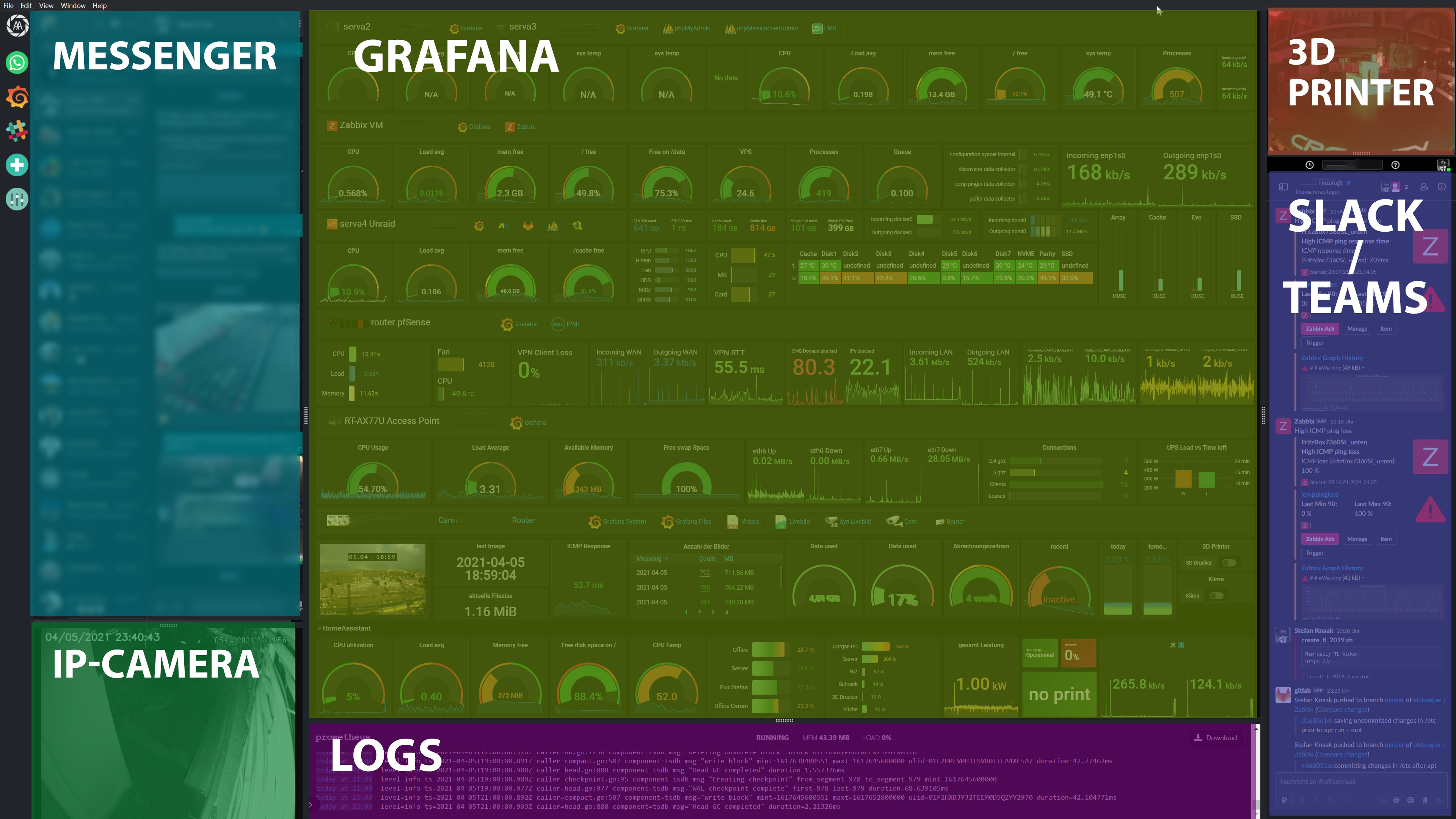
Display any website in a fully resizable multi-panel layout. Designed for IT professionals who want a single-window overview of their tools — Grafana, Slack, WhatsApp, Jira, GitHub, and more.
-
3-column × 2-row grid — up to 6 panels, all resizable via drag handles (Split.js)
-
Per-panel position config — assign each panel to a specific column (1–3) and row (1–2) via the UI
-
Sidebar — one icon/button per panel, click to toggle visibility
-
Custom icons — panels support individual icon images in the sidebar
-
Dark / Light mode — switchable via Settings
-
Custom CSS injection — inject CSS into any webview after page load
-
Persistent config — layout, sizes, and panel URLs saved automatically to disk
-
Add / Edit / Delete panels — full panel management via the Manage Panels modal
-
Firefox user agent — all webviews identify as Firefox 135 for maximum site compatibility
-
External links — new-window / popup links open in the system default browser
-
RTSP camera streams via go2rtc (auto-downloaded from GitHub on first use)
- go2rtc WebRTC:
ffmpeg:{url}#video=copy#audio=opusfor H264 passthrough + AAC→Opus transcoding - Dynamic port allocation for go2rtc API/RTSP/WebRTC ports
- Audio toggle button on camera panels (click to mute/unmute)
- Volume control via mouse wheel on audio icon (10% steps, shows % label briefly)
- go2rtc WebRTC:
-
Menu bar hidden by default; right-click context menu exposes DevTools, reload, zoom, cache clear
-
External links from panels open in system default browser
-
Config saved to userData via IPC (load/save/delete)
Download the latest installer from the Releases page and run it. No Node.js or any other dependency required — the Electron runtime and everything needed is bundled into the installer.
| Tool | Version |
|---|---|
| Node.js | 18+ |
| npm | 9+ |
On Windows with NVM, prefix your PATH:
PATH="/c/Users/<you>/AppData/Roaming/nvm/v18.x.x:$PATH"
git clone https://github.com/corgan2222/Dashboard.git
cd Dashboard
npm installnpm start
node_modules/is excluded from git but is recreated locally bynpm install. On Windows, ifnpm startfails to find Electron, you can launch the binary directly (it exists afternpm install):node_modules\electron\dist\electron.exe .
Push a version tag and GitHub builds all three platforms automatically, then creates a Release with all installers attached:
git tag v2.01
git push --tags
The workflow (.github/workflows/release.yml) runs three parallel jobs on windows-latest, ubuntu-latest and macos-latest and publishes the result to the GitHub Releases page.
You can also trigger it manually from GitHub → Actions → Build & Release → Run workflow.
# Windows (NSIS installer, x64)
npm run build:win

# Linux (AppImage)
npm run build:linux

# macOS (DMG)
npm run build:mac
Output is placed in the dist/ folder.
The dashboard config is saved automatically at:
| Platform | Path |
|---|---|
| Windows | %APPDATA%\it-dashboard\dashboard-config.json |
| Linux | ~/.config/it-dashboard/dashboard-config.json |
| macOS | ~/Library/Application Support/it-dashboard/dashboard-config.json |
Each panel entry in the config supports:
| Field | Type | Description |
|---|---|---|
name |
string | Display name |
site |
string | URL to load in the webview |
col |
1–3 | Which column to place this panel in |
row |
1–2 | Which row within the column |
visible |
bool | Whether the panel is shown |
size |
number | Percentage size within its column (set by drag) |
icon |
string | Optional path to sidebar icon image |
To reset to defaults, use Settings → Reset to Default inside the app, or delete the config file.
| Component | Technology |
|---|---|
| Shell | Electron 34 |
| UI | Vanilla JavaScript (no framework) |
| Layout | Split.js 1.6.5 |
| Styling | CSS custom properties (dark/light theme) |
| Persistence | JSON file via Electron IPC |
| Webviews | Electron <webview> tag |
.
├── main.js          # Electron main process, window creation, IPC handlers
├── preload.js       # Context bridge (exposes safe APIs to renderer)
├── index.html       # App shell — sidebar, modals, layout
├── renderer.js      # All UI logic, Split.js, panel rendering
├── styles.css       # CSS custom-property theming
├── assets/          # Icons and images
└── package.json     # Dependencies and electron-builder config
- Max 3 columns, max 2 rows per column (6 panels total)
- Some sites block embedding in webviews (X-Frame-Options / CSP) — this is a site restriction, not an app bug
Original project: corgan2222/Dashboard (Angular + Electron) This version is a clean rewrite using vanilla JS and Electron 34.