Auto-update Docker containers and manage their lifecycle via interactive Telegram bot, Web UI, Discord, or webhooks. Auto-rollback on failed updates. 16 languages. Telegram is optional — runs fully headless.




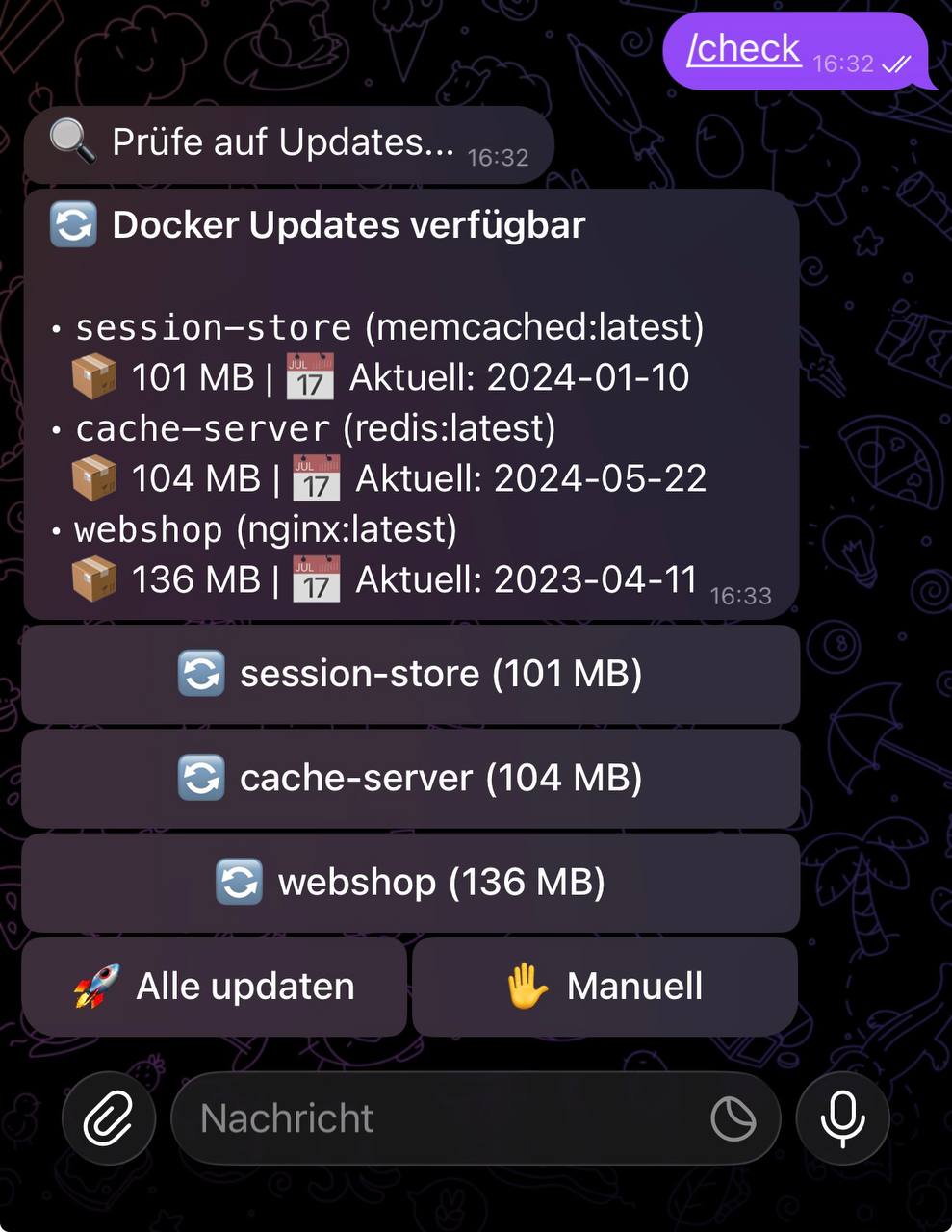
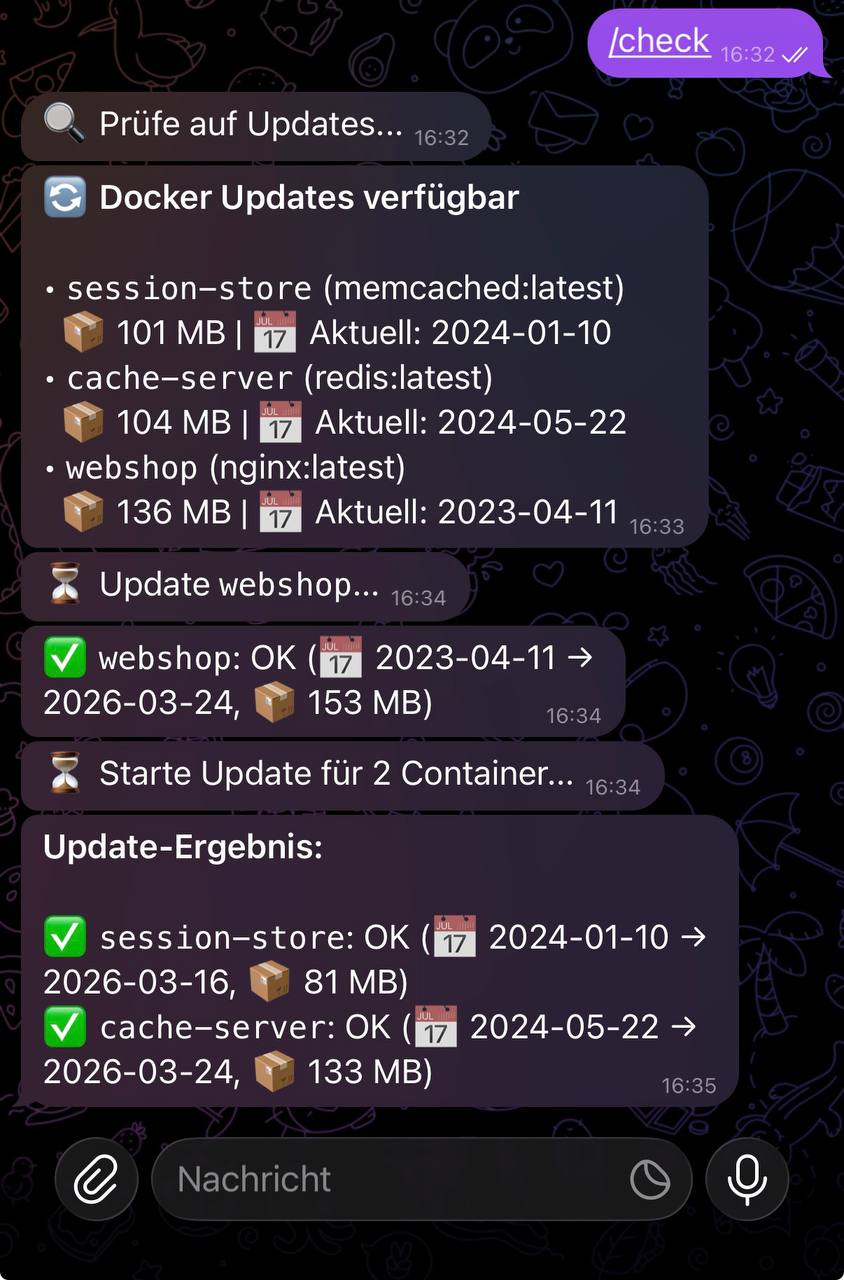
Most Docker auto-update tools either set-and-forget like Watchtower (no human in the loop, no veto) or notify-only like Diun (heads-up but you SSH in to apply it). Docksentry does both, plus interactive control from your phone or browser:
- Tap "Update all" in Telegram or "Bulk update" in the Web UI — updates apply, results stream back
- Container groups — update Gluetun first, restart the Sonarr / Radarr / qBittorrent stack after it's healthy
- Lifecycle commands —
/status nginxshows state + inline[🔁 Restart] [🟥 Stop]buttons. One tap to fix a hung container without leaving the chat - Auto-rollback if the new container fails its healthcheck (respecting the image's own
start_period) - Maintenance mode to pause everything while you tinker with the host (
/maintenance 2h) - Multi-bot setup for several Docker hosts in one Telegram group, each labelled so you can tell them apart
Telegram is optional — Web UI alone is plenty for a single-host setup. Discord and generic webhook channels work in parallel.
- Automatic update detection — compares image digests on a configurable cron schedule
- Web UI — dashboard with status, logs, history, settings, pin/unpin, auto-update toggles, manual update triggers, image cleanup, self-update
- Telegram bot (optional) — full interactive control with inline buttons and 14 commands
- Discord notifications — rich embeds for updates, successes, and failures
- Generic webhooks — JSON POST to Ntfy, Gotify, Home Assistant, or any HTTP endpoint
- Headless mode — run without Telegram; Web UI + Discord/Webhook is enough
- Per-container auto-update — selected containers update without confirmation
- Pin/Freeze containers — exclude containers from updates
- Auto-rollback — failed updates automatically restore the previous container
- Docker Compose support — native
docker compose pull/upfor Compose stacks - Self-update — the bot can update itself automatically
- Persistent settings — Web UI changes survive restarts
- Multi-language — 16 languages, switchable at runtime
- Lightweight — Python standard library only, zero external dependencies
You need at least one of: Web UI, Telegram, Discord webhook, or generic webhook. The most popular setup is Web UI + Telegram.
docker run -d \
  --name docksentry \
  --restart unless-stopped \
  -e WEB_UI=true \
  -e WEB_PORT=8080 \
  -p 8080:8080 \
  -v /var/run/docker.sock:/var/run/docker.sock \
amayer1983/docksentry:latest- Message @BotFather →
/newbot→ copy the token - Send a message to your bot, then open
https://api.telegram.org/bot<TOKEN>/getUpdatesand find yourchat.id - Run:
docker run -d \
  --name docksentry \
  --restart unless-stopped \
  -e BOT_TOKEN=your-bot-token \
  -e CHAT_ID=your-chat-id \
  -e WEB_UI=true \
  -p 8080:8080 \
  -v /var/run/docker.sock:/var/run/docker.sock \
amayer1983/docksentry:latestservices:
docksentry:
image: amayer1983/docksentry:latest
container_name: docksentry
restart: unless-stopped
environment:
- BOT_TOKEN=your-bot-token
- CHAT_ID=your-chat-id
- CRON_SCHEDULE=0 18 * * *
- TZ=Europe/Berlin
volumes:
- /var/run/docker.sock:/var/run/docker.sock
- docksentry_data:/data
# Optional: mount your compose project directories so Docksentry
# can call `docker compose up` for compose-managed containers.
# When not mounted (or path doesn't match), Docksentry falls back
# to a standalone `docker run` recreate from the container's
# inspect data — works for almost everything but loses some
# compose-only metadata. See "Compose-managed containers" below.
# - /opt/stacks:/opt/stacks:ro
# - /mnt/dockerdata:/mnt/dockerdata:ro
security_opt:
- no-new-privileges:true
volumes:
docksentry_data:When a container was started by docker compose, its inspect data records the host-side path of the compose file (e.g. /opt/stacks/myapp/docker-compose.yml). Docksentry runs inside its own container and can't see that path unless you mount it.
| Mount setup | Update path |
|---|---|
| Compose dirs mounted at the same paths inside Docksentry | docker compose pull + docker compose up -d --no-deps <service> (preserves all compose semantics) |
| Compose dirs not mounted | Falls back to standalone docker run recreate from inspect data — preserves capabilities, devices, sysctls, mounts, env, ports, labels, network mode, network aliases, fixed IPs, MAC, resource limits, healthcheck overrides, etc. |
The standalone fallback is comprehensive. As of v1.19.0 it covers everything _build_run_args() knows to read from docker inspect:
- Network state:
--network(primary),--network-alias(compose service hostnames likedb,redis,broker),--ip/--ip6(fixed IPs),--mac-address,--link. Additional networks (containers attached to >1 network) getdocker network connectafter run, preserving aliases/IPs per network. - Capabilities / devices / sysctls / tmpfs / extra-hosts / DNS / security-opts (Gluetun-style stacks).
- Resource limits: memory, CPU, pids, oom, blkio, ulimits, group-add.
- Lifecycle: stop-signal, stop-timeout, auto-remove (when no restart policy).
- Process config: working-dir, domainname, tty, stdin, healthcheck override.
- Image-default-aware Cmd / Entrypoint — only restores container-level Cmd/Entrypoint when they actually differ from the new image's defaults, so image updates that change CMD aren't locked to the old value.
If you have compose-specific orchestration (depends_on chains, profiles, multiple compose files merged via -f, project-level network options beyond defaults), mounting your compose dirs is still the cleanest path to keep those intact.
The log line Compose file not found: <path> — falling back to standalone is the marker that the fallback is being taken. Not an error per se, just informational. If you see it on every update and want the compose path instead, mount the relevant host directory read-only into Docksentry.
Audit mode (debug): run with DEBUG=true and Docksentry logs [audit] HostConfig.<key> / [audit] Config.<key> for any inspect field that's non-default but not restored on recreate. Future Docker versions adding new keys surface here — please report any sightings as an issue so we can extend coverage.
Docksentry has no Podman-specific code, but Podman implements the Docker REST API — so for many setups, pointing Docksentry at a Podman socket Just Works™. This is experimental: we don't test against Podman in CI and we don't have a Podman test bed. Surfaced by @LeeNX in #23.
The trick: mount the Podman socket at the path Docksentry expects the Docker socket. No env var changes, no different image.
sudo systemctl enable --now podman.socket
# creates /run/podman/podman.sockservices:
docksentry:
image: amayer1983/docksentry:latest
volumes:
- /run/podman/podman.sock:/var/run/docker.sock:ro
- docksentry_data:/data
environment:
- WEB_UI=true
# ... rest of your configsystemctl --user enable --now podman.socket
# creates /run/user/$UID/podman/podman.sockservices:
docksentry:
image: amayer1983/docksentry:latest
volumes:
- /run/user/1000/podman/podman.sock:/var/run/docker.sock:ro
- docksentry_data:/data
environment:
- WEB_UI=true/status,/check,/updates,/history— read-only inspection via the Docker REST APIdocker pullof registry images,docker stop,docker rm,docker rename,docker start,docker run- Container groups, the
restart_dependentscascade - The v1.18.10 17-field HostConfig recreate (Podman's inspect carries the same
HostConfig.CapAdd,Devices,Sysctlsstructure — see release notes)
- Rootless Podman with complex UID mappings. Docksentry's #16 PID-1 self-protection reads container IDs from cgroup paths, which behave differently rootless. May misidentify the running container.
- Quadlets / systemd-managed Podman containers. Completely different paradigm — containers are managed by systemd, the update cycle is a
.containerfile edit +systemctl restart, notdocker stop+docker run. Out of scope for the v1.x line. podman-compose-specific labels. Podman Compose uses some compose-project labels with slightly different formats. Compose-detection might miss them and fall back to the standalone recreate (which is comprehensive after v1.18.10 but loses compose-project orchestration).- Multi-arch. Docksentry's image is published as
amd64andarm64. Raspberry Pi 4/5 and most other ARM SBCs work. Pi 3 (armv7) is not currently built.
If you try this and something breaks, open a new issue with:
- Your Podman version (
podman --version) - Rootful or rootless
- Architecture (
uname -m) - The exact failure mode (Telegram message, log line, web UI screenshot)
Concrete failure modes let us add targeted Podman-specific fixes; vague "doesn't work" can't be acted on.
| Command | Description |
|---|---|
/status |
Container overview with health, uptime, images |
/status <name> |
Per-container detail with inline Stop/Restart/Start buttons |
/check |
Manually trigger an update check |
/updates |
Show pending updates |
/start <name> |
Start a stopped container |
/stop <name> |
Stop a running container |
/restart <name> |
Restart a container |
/logs <name> |
Show last 30 log lines of a container |
/pin <name> |
Pin container — excluded from updates |
/unpin <name> |
Unpin container |
/autoupdate <name> |
Toggle auto-update per container |
/history |
Show update history |
/cleanup |
Remove old unused images |
/selfupdate |
Update the bot itself (latest) |
/selfupdate <version> |
Pin to a specific version (e.g. /selfupdate 1.17.4) |
/selfupdate previous |
Roll back to the previous release |
/changelog |
Show what's new in versions ahead of yours (fetched from GitHub) |
/debug |
Toggle debug mode |
/lang <code> |
Switch language |
/settings |
Show current configuration |
/help |
Show all commands |
Partial name matching:
/pin ngimatchesnginx.
At least one of BOT_TOKEN+CHAT_ID, WEB_UI=true, DISCORD_WEBHOOK, or WEBHOOK_URL must be configured — otherwise Docksentry has no way to notify or be controlled.
Quoting env values in
docker-compose.yml: Docker Compose passes env values literally, soBOT_TOKEN="abc123"lands as the string"abc123"(quotes included) in Docksentry — which breaks Telegram API calls,int()parsing onWEB_PORT, etc. Since v1.19.1 Docksentry strips matching outer"…"and'…'quote pairs automatically, but the cleanest fix is to leave the quotes off entirely:BOT_TOKEN=abc123.
| Variable | Default | Description |
|---|---|---|
BOT_TOKEN |
Telegram Bot API token (optional — set together with CHAT_ID to enable Telegram) |
|
CHAT_ID |
Telegram chat ID (optional — set together with BOT_TOKEN) |
|
CRON_SCHEDULE |
0 18 * * * |
Cron expression for scheduled checks |
EXCLUDE_CONTAINERS |
Comma-separated names to exclude | |
AUTO_SELFUPDATE |
false |
Auto-update the bot on each check |
AUTO_CLEANUP |
false |
Run image cleanup after every successful auto-update |
CLEANUP_GRACE_HOURS |
24 |
Cleanup only removes images unused for at least this long (1–8760h) |
CLEANUP_BACKUP_LOCAL_ONLY |
false |
Before deletion, save unused locally-built images (no registry digest) to /data/cleanup-backups/ |
CLEANUP_BACKUP_DAYS |
7 |
How long backup tarballs are kept (1–365 days) |
DISK_WARN_PERCENT |
85 |
Notify when disk usage exceeds this percentage (50–100) |
DISK_WARN_AUTO_CLEANUP |
false |
Automatically run cleanup when disk warning fires |
QUIET_HOURS_START |
Quiet-hours window start (HH:MM). Auto-notifications in this window are dropped. | |
QUIET_HOURS_END |
Quiet-hours window end (HH:MM). Manual command replies always go through. | |
WEEKLY_REPORT_ENABLED |
false |
Send a once-a-week summary report to all configured channels |
WEEKLY_REPORT_WEEKDAY |
0 |
Day of week for the report (0=Mon, 6=Sun) |
WEEKLY_REPORT_HOUR |
9 |
Hour of day for the report (0-23, local time) |
LANGUAGE |
en |
Bot language (16 available) |
WEB_UI |
false |
Enable web dashboard |
WEB_PORT |
8080 |
Web UI port |
WEB_PASSWORD |
Web UI password (Basic Auth) | |
TELEGRAM_TOPIC_ID |
Telegram topic/thread ID (for groups with topics) | |
TELEGRAM_ALLOWED_USERS |
Optional whitelist — comma-separated Telegram user IDs allowed to control the bot. Empty = anyone in the configured chat. See Group / Topic setup below. | |
BOT_LABEL |
Optional prefix prepended to every outgoing notification (Telegram, Discord, webhook). Useful when multiple Docksentry instances share a chat / channel so you can tell which host a message is from. See Multi-bot setup below. Max 32 chars. | |
DISCORD_WEBHOOK |
Discord webhook URL | |
WEBHOOK_URL |
Generic webhook URL (JSON POST) | |
TZ |
Europe/Berlin |
Timezone |
DOCKER_HOST |
Docker API endpoint (for socket proxy) | |
DOCKER_API_VERSION |
Force Docker API version (e.g. 1.43 for Synology/older Docker) |
|
DOCKER_STOP_TIMEOUT |
60 |
Minimum seconds to allow docker stop to take before falling back to docker kill. The effective wait is max(this, container.Config.StopTimeout). Raise for slow-shutdown apps (some DBs, log aggregators). |
DOCKER_USERNAME / DOCKER_PASSWORD |
Docker Hub (or other registry) credentials. Bypasses the anonymous pull rate limit (100 / 6h / IP). We run docker login once at startup. |
|
DOCKER_AUTH_CONFIG |
Path to an existing config.json with stored credentials (alternative to USERNAME/PASSWORD). Mount your host's ~/.docker/config.json read-only and point at it. |
|
DOCKER_REGISTRY |
docker.io |
Registry to log into. Set to ghcr.io, quay.io, an internal Harbor, etc. when using DOCKER_USERNAME/PASSWORD. |
HEALTHCHECK_MAX_STARTING |
600 |
Max seconds to wait for a freshly-updated container to leave starting health-state. Slow apps (GitLab, Nextcloud, Mastodon, large Postgres) may need more. We also respect the image's own Healthcheck.StartPeriod — the effective wait is max(this, start_period × 1.5). If a container is still starting after the wait, Docksentry leaves it running (no rollback) and Docker's own healthcheck takes over. |
DOCKSENTRY_IPV6 |
false |
Enable IPv6 outbound connections (default: IPv4-only to avoid Network unreachable in containers without IPv6 routing) |
All settings except BOT_TOKEN and CHAT_ID can also be changed via the Web UI and persist across restarts. Telegram is fully optional — if BOT_TOKEN/CHAT_ID are unset, Docksentry runs headless (Web UI + Discord/Webhook).
Synology / NAS users: If Docksentry shows 0 containers, add
DOCKER_API_VERSION=1.43to your environment variables.
If you want to use Docksentry in a Telegram group (so multiple people see the notifications) instead of a private chat:
⚠️ Make sure it's a Group, not a Channel. Telegram's "New Channel" creates a broadcast-only chat — admins post, members read, nobody can send/commands. The bot will happily post its startup message there butgetUpdatesalways returns empty because there are no incoming messages. Use New Group in the Telegram app (not New Channel). A working group ID is negative — typically-100…for supergroups or shorter negatives (-52…etc.) for basic groups; both work.
- CHAT_ID is the group ID, not your personal user ID. Find it by sending a message in the group and visiting
https://api.telegram.org/bot<TOKEN>/getUpdates. - Add the bot to the group with permission to post and read messages. Disable group privacy in @BotFather →
/setprivacy→Disable, otherwise the bot only sees messages that mention it directly — so commands like/statuswon't trigger.💡
/setprivacyis per-chat-membership cached. If you toggle it in BotFather after the bot is already in the group, the new setting doesn't apply to that existing membership —docker compose down/upof Docksentry does not clear it. You have to kick the bot from the group and add it again. This trips most people up on first setup. - Topics (Forum groups): if the group has topics enabled, set
TELEGRAM_TOPIC_IDto the topic where the bot should post. The ID is the integer after the last slash in a topic URL (right-click a topic → Copy link). - Restrict who can control the bot (optional but recommended for shared groups): set
TELEGRAM_ALLOWED_USERSto a comma-separated list of personal user IDs. Without it, any group member can click "Update all". Find user IDs the same way as the chat ID —from.idin thegetUpdatesresponse.
environment:
  - BOT_TOKEN=123456:abc...
  - CHAT_ID=-1001234567890           # the group ID
  - TELEGRAM_TOPIC_ID=42             # only needed for Forum groups
- TELEGRAM_ALLOWED_USERS=11111111,22222222 # only these users can issue commandsIf you have several Docker hosts (different boxes, VMs, Proxmox LXCs, …), v2.0's real multi-host support is on the roadmap — but until then you can already control multiple instances from a single Telegram group by running one Docksentry per host, each with its own bot token from @BotFather, labelling each instance with BOT_LABEL:
Why a separate token per host? Telegram allows exactly one polling consumer per bot token — two instances sharing the same token fight over
getUpdatesand one of them gets evicted with a 409 Conflict every poll.BOT_LABELis only a visual prefix in messages; it doesn't change the underlying bot identity (the token is the identity). Create one bot per host with/newbotin @BotFather and use a distinct token per instance.
# Host pve1
environment:
  - BOT_TOKEN=...token-for-bot-1...
  - CHAT_ID=-1001234567890                  # shared group ID, same for all hosts
  - TELEGRAM_ALLOWED_USERS=11111111         # your own user ID — lock down control
  - BOT_LABEL=🖥 pve1                       # prefixes every notification
# Host pve2
environment:
- BOT_TOKEN=...token-for-bot-2...
- CHAT_ID=-1001234567890 # same group
- TELEGRAM_ALLOWED_USERS=11111111
- BOT_LABEL=🖥 pve2Issue /status in the shared group and each bot replies with its label prefix:
🖥 pve1 · *Container Status:* …
🖥 pve2 · *Container Status:* …
🖥 pve3 · *Container Status:* …
The label also flows into Discord embeds (added to title + footer) and the generic webhook payload (bot_label field), so downstream automations can route per-host.
Targeting one bot vs. broadcasting to all:
In the same group you can choose whether a command hits all bots or just one by including or omitting the bot's Telegram @username:
| Form | Behaviour |
|---|---|
/check |
All bots respond (broadcast) |
/check@pve1-bot |
Only the bot whose Telegram username is pve1-bot responds; the others silently ignore |
Common pattern: broadcast /selfupdate so all hosts update together; target /status@pve2-bot jellyfin when you want a quick check on just one host without three bots' worth of "not found" noise. The bot's @username is what you set in BotFather when you created it (separate from BOT_LABEL, which is purely the visual prefix in messages).
Setup checklist:
- In @BotFather, run
/newbotonce per host — each Docksentry instance needs its own bot token.BOT_LABELalone is not enough; sharing one token across instances causes a Telegram 409 Conflict. - Create a private Telegram group, add yourself and all bots (one per host).
- For each bot, in @BotFather →
/setprivacy→ Disable, so bots see/commandsin groups (groups have privacy mode on by default, which restricts bots to messages that mention them directly). - Find the group ID (send a message in the group, visit
https://api.telegram.org/bot<TOKEN>/getUpdates, look forchat.id). - Configure each Docksentry instance with: a distinct
BOT_TOKEN(from step 1), the sameCHAT_ID(the group ID), and a distinctBOT_LABEL.
Security note — please read:
- Set
TELEGRAM_ALLOWED_USERSto your own user ID. Without it, any group member can trigger/cleanup,/selfupdate, "Update all", etc. against every host — accidentally adding a colleague to the group would hand them control over everything. - Keep the group private. Disable invite links or rotate them, and audit membership occasionally. The group is now a single point of trust.
- Be aware: privacy-mode off means each bot sees every human message in the group. Don't use the same group for casual chat — keep it ops-only.
- Telegram's own Bot API filters out bot-to-bot communication, so bots can't accidentally trigger each other's commands.
This is a stepping stone, not a replacement for v2.0 multi-host: you still maintain N bot tokens, N Docksentry containers, N updates. But it makes "single chat, all hosts" usable today.
Enable with WEB_UI=true. Provides status dashboard, container logs, update history, and full settings management — all in a dark-themed, mobile-responsive interface.
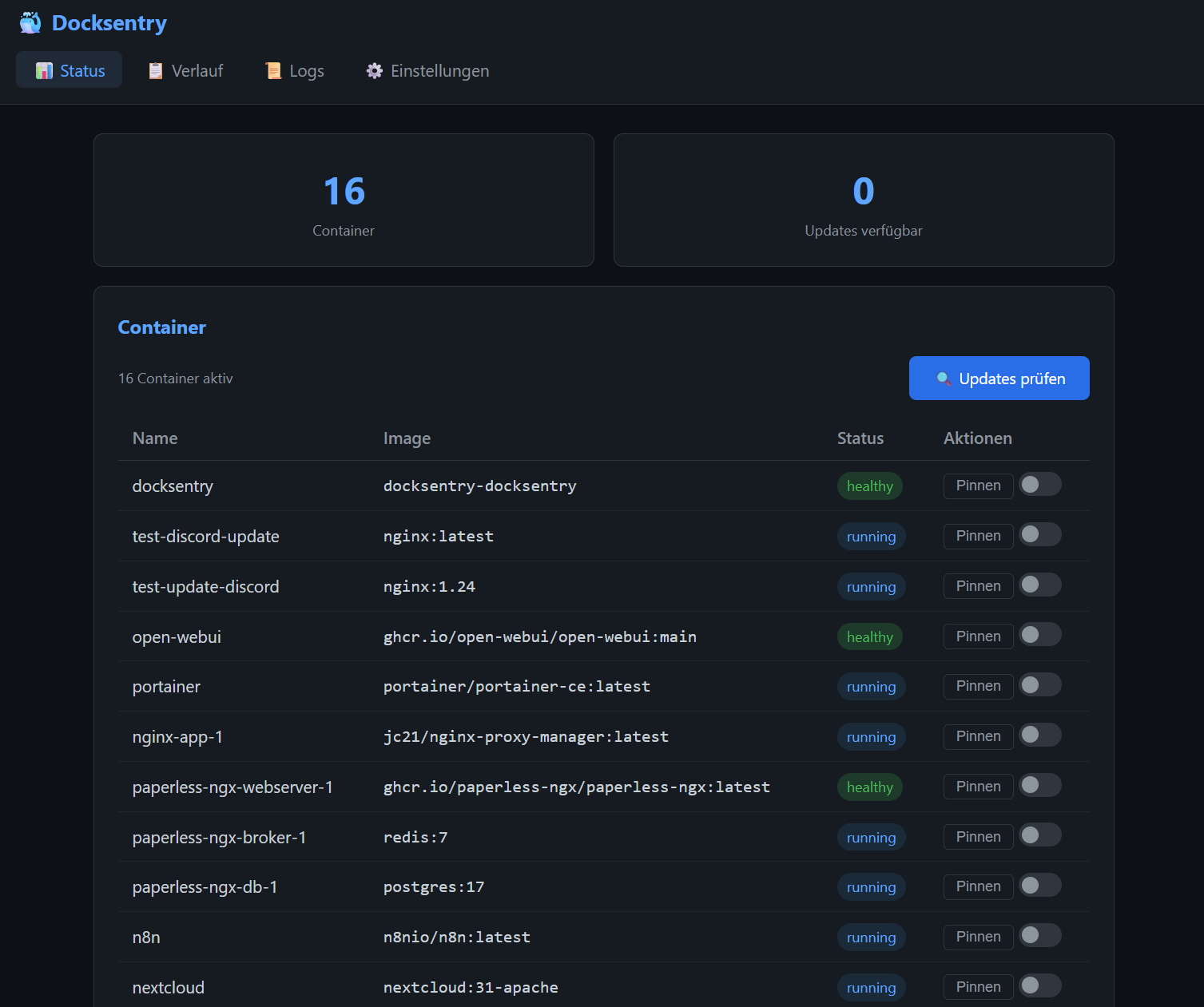
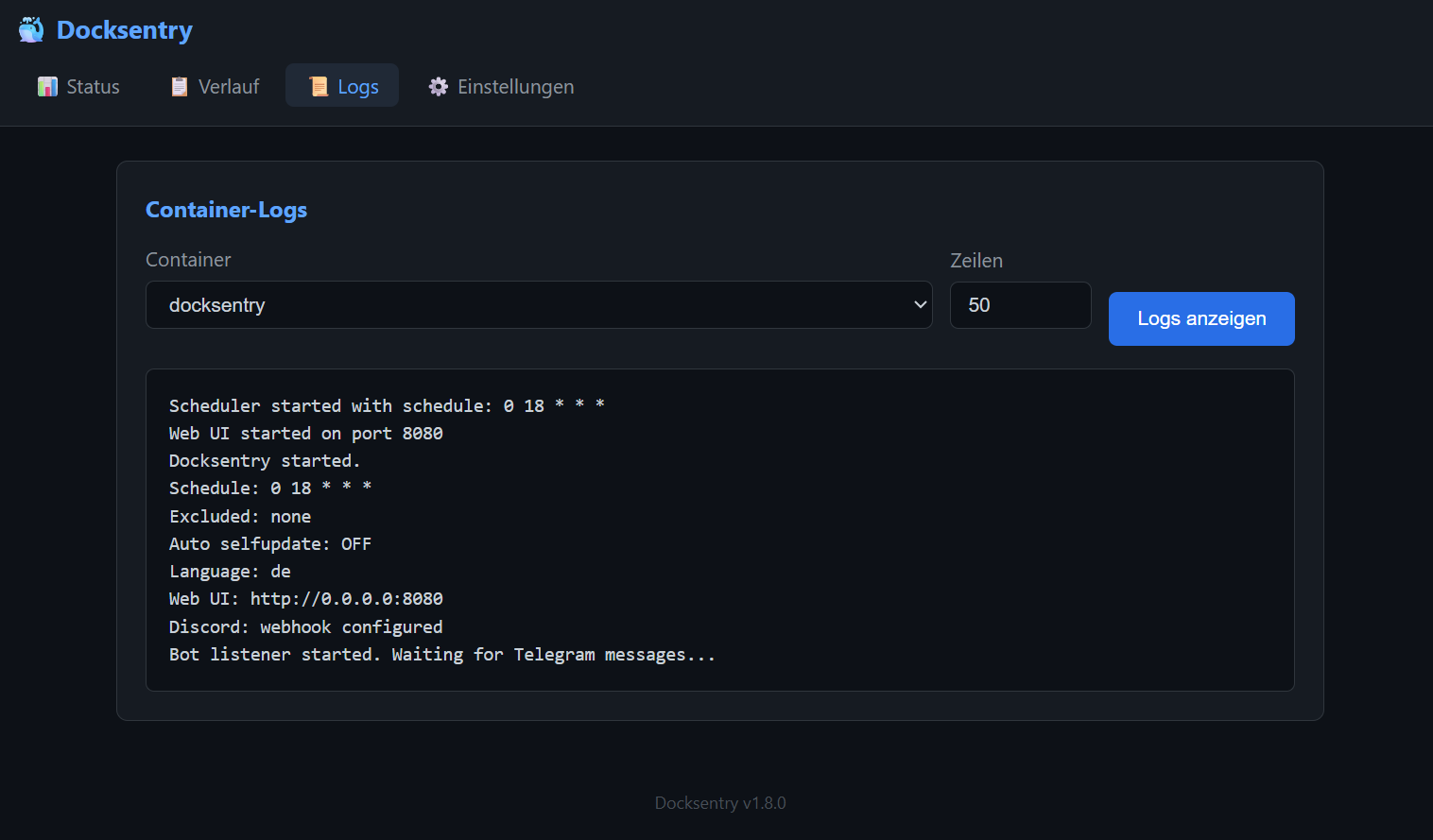
See Web UI Documentation for details.
Docksentry ships with its own HEALTHCHECK baked into the image since v1.16.1. It runs every 60 seconds and checks whichever surface(s) you have configured, in priority order:
- Web UI socket — when
WEB_UI=true, a successful TCP connect to127.0.0.1:<WEB_PORT>is sufficient (the listener being up implies the scheduler thread is alive). This is the cheapest and most deterministic check. - Telegram Bot API — when
BOT_TOKEN+CHAT_IDare set but Web UI is off, the healthcheck callsgetMeagainstapi.telegram.orgto confirm the bot can still reach upstream. - Webhook-only / headless — when only
DISCORD_WEBHOOKorWEBHOOK_URLis set, there's nothing local to probe; the healthcheck exits 0 (Docker's normal process supervision is the actual signal). - Misconfigured — no surface configured → exit 1 (matches
main.py's startup refusal).
Verify on your host:
docker inspect docksentry | jq '.[0].State.Health'
docker ps        # should show "(healthy)" after ~3 minutes of uptime
Podman caveat (#31): some Podman versions don't auto-execute image-defined HEALTHCHECK directives. If
podman psdoesn't show(healthy)for Docksentry but does for other containers, your Podman is one of them. Workaround: add--health-cmd "python3 /app/healthcheck.py"to yourpodman run/ compose-equivalent. The script is bundled inside the image at that path.
| Channel | Updates | Results | Interactive |
|---|---|---|---|
| Telegram | buttons | detailed | full control |
| Discord | rich embeds | rich embeds | via Web UI |
| Webhook | JSON | JSON | via Web UI |
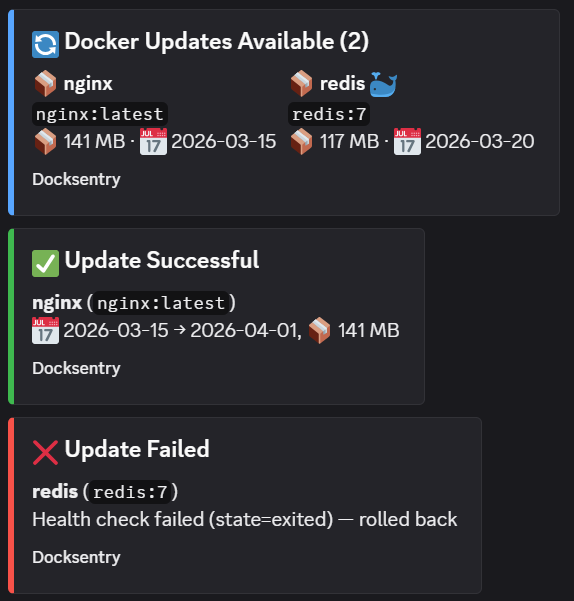
See Notification Setup for Discord and Webhook configuration.
| Topic | Link |
|---|---|
| Update Workflow & Rollback | docs/updates.md |
| Web UI | docs/web-ui.md |
| Notification Channels | docs/notifications.md |
| Docker Compose Support | docs/compose.md |
| Security & Socket Proxy | docs/security.md |
| Multi-Language | docs/languages.md |
Docksentry is actively developed — see the CHANGELOG for what shipped in each release.
v1.x — ongoing. Continued bug fixes and smaller features driven by user feedback in #2. Recent: container groups, maintenance mode, container notes, group/topic auth, restart-dependents for VPN-sidecar stacks.
v2.0 — bigger release, ahead. Two large items planned to land together rather than trickled out:
- Multi-host management — one Docksentry instance managing several Docker hosts, with per-host pending queues, hostname-prefixed notifications, and a host selector in the Web UI.
- Interactive Discord bot — slash-commands, buttons and the same control surface the Telegram bot offers today.
Both need a real release window rather than a weekend hack, so v2.0 will wait until there's enough user feedback and momentum to justify the refactor. If multi-host or the Discord bot is something you'd actually use, the most useful thing you can do is ⭐ the repo or mention Docksentry to someone who'd benefit — that's the signal I'm watching to decide when to start.
Wishlist input and "+1"s welcome on #2.
- Feature ideas? Open an Issue with the label
enhancement - Found a bug? Open an Issue with steps to reproduce
- Translations? Submit a PR for
app/lang/*.json - Vote on the roadmap: Community Roadmap (Issue #2)
Docksentry is free and open source. If it saves you time and you'd like to support continued development, you can sponsor the project on GitHub:

Sponsorships fund: faster bug-fixes, more registry integrations, multi-host support, and keeping the lights on. No feature is paywalled — Docksentry stays free.
MIT License - see LICENSE