- Install nodejs and npm
- In source directory 'npm install' to install dependencies
- Clone the repo
- Add a
.envfile with all the required environmental variables (see below for required environmental variables and descriptions) node app.jsopens the test server on port 3000 of your machine
All variables below are required before the website will run properly
MONGO_URI=""
XENONNT_COLLECTION=""
XEDOCS_COLLECTION=""
PERSONAL_ACCESS_TOKEN=""
CALLBACK_URL=""
GITHUB_CLIENT_ID=""
GITHUB_SECRET_KEY=""
LDAP_BIND_DN=""
LDAP_BIND_CREDENTIALS=""
LDAP_URI=""
EXPRESS_SESSION=""
ENVS_URL=""
ERROR_FILE=""
MONGO_URI: a String with the URI with credentials to access the MongoDB used for most of the processes. This should allow connection to access to every collection needed on this website.
XENONNT_COLLECTION: a String with the name of the database that that has access to the following collections: users, runs, and contexts
XEDOCS_COLLECTION: a String with the name of the database that has access to the following collections: processing_requests and processing_jobs
The following are the credentials that allow the website to use logging in through LNGS. LDAP_BIND_DN: a String LDAP_BIND_CREDENTIALS: a String LDAP_URI`: a String
For more information on how this works and what it is see: https://www.passportjs.org/packages/passport-github2/ This requires the creation of a Github OAuth app in order to use.
Note: For this app, enable device flow is not necessary. The callback URL should go to /auth/github/callback
CALLBACK_URL: a String with the callback URL
GITHUB_CLIENT_ID: a String with the Github Client ID
GITHUB_SECRET_KEY: a String with the Github secret key
EXPRESS_SESSION: a String with a secret key that allows for the use of express sessions to store user information
ENVS_URL: String with a url where a list of environments can be found. Currently not in use because the environments are retrieved from the contexts collection
ERROR_FILE: String with the name of the file where errors will be printed to
PERSONAL_ACCESS_TOKEN: a String with the personal access token needed to access account information using octokit.
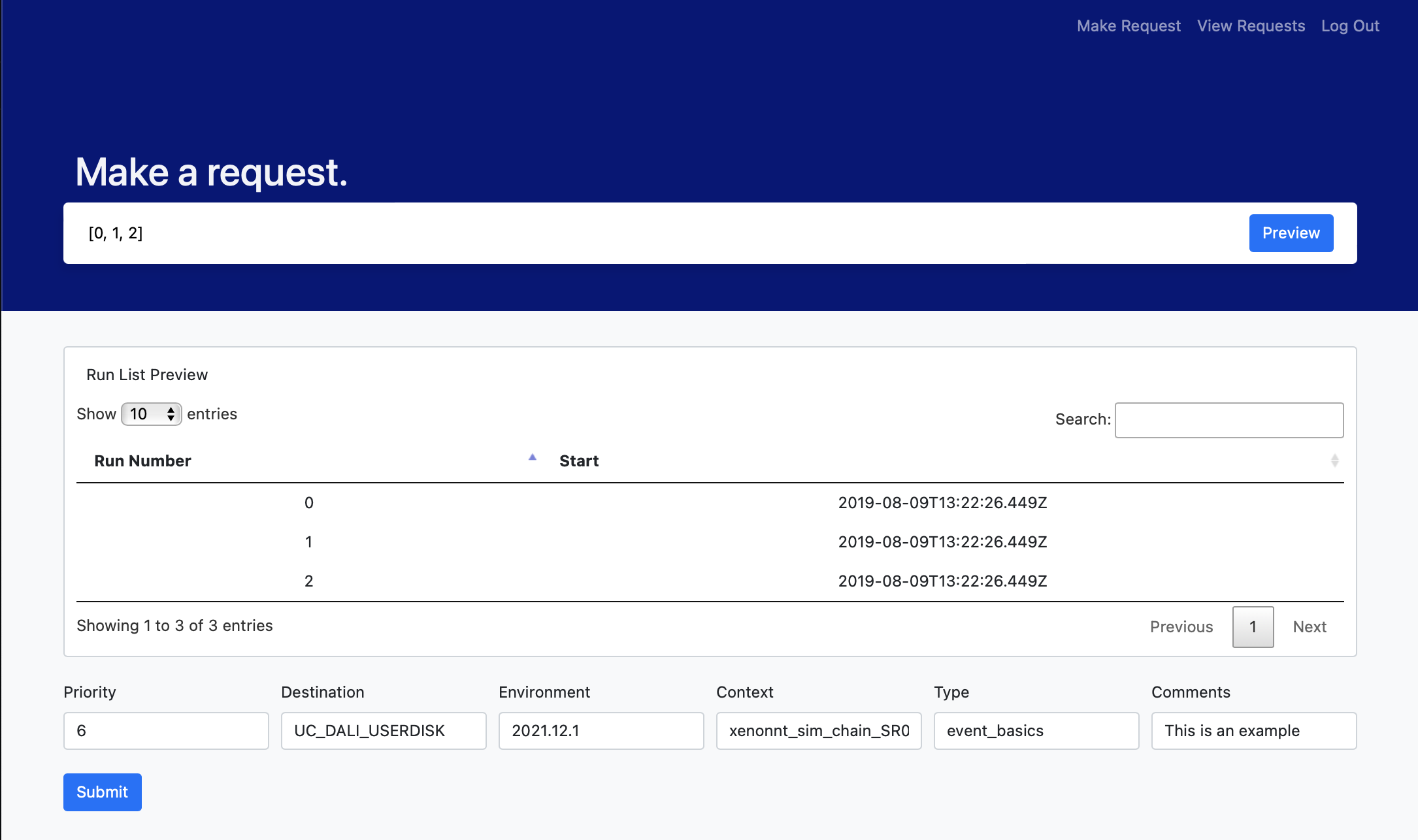
This web app will be built using Node.js, Express, MongoDB and an ejs templating engine. Bootstrap will be used as the framwork to help build the frontend. The computing reprocessing requests will consist of two pages: one to allow users to submit a reprocessing request and one to allow users to view all requests and their relevant information. Each page is shown below.

{
  _id: ObjectID
  data_type: String
  lineage_hash: String
  run_id: String
  destination: String
  user: String
  request_date: Date
  priority: Integer
  comments: String
}
{
  _id: ObjectID
  job_id: UUID
  destination: String
  env: String
  context: String
  data_type: String
  run_id: String
  lineage_hash: String
  location: String
  submission_time: Date
  completed: Boolean
  progress: Integeer
  error: String
}
In order to access the website, the user will first need to authenticate with a Github ID or an LNGS ID.
In order to have access to both LDAP authentication and Github authentication, the webapp will use Passport.js (similar to the current DAQ website).
To ensure that the user should have access to the website, a call will be made to the users collection to check whether that user or github id is associated
with the account of someone who is currently in the XENON collaboration.

The query box will accept a run number, a list of run numbers, or a BSON query. The BSON query will have to be a valid BSON query to the runs collection.
Examples of valid queries:
34598[39023, 39024, 39025, 39026]{"run_number": 42665}


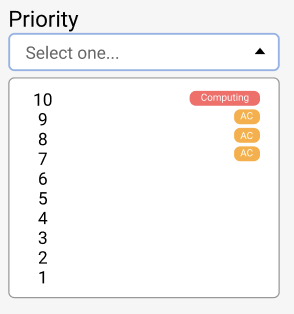
The priority drop down ranges from 1-10 where priorities 6-9 are reserved for users with 'AC' permissions and priority 10 is reserved for users with
'Computing' permissions. These permissions will be stored as separate fields in the users collection and the drop down will only show the user the priorities
they have access to. In order to do this, the permissions associated with the user will be stored in the request body when the user authenticates.
Currently, the program assumese that computing permissions are a field computing: true and AC permissions are ac: true.
Additionally, there will are drop downs for environment, context, data type, and destination. These drop downs adjust contextually based on the user's previous selection (e.g. selecting a certain environment will influence the options available in the context drop down and the context choice will influence the available data types). Destination is automatically set to UC_DALI_USERDISK but can be changed at any point. There is an empty text box for any comments.

The user will only be able to submit once all required fields have been completed. Clicking the submit button will send a post request which then adds this information into the processing_requests collection that will add a new document to the collection in the format of the above schema for each run ID inputted. If the post request fails, an error message will be shown; otherwise the user will be redirected to submit anotheer query if they wish.
The run list table will utilize DataTables to create a table with all requests and their relevant information. Each row in the table will be populated with the information returned from getting the the documents stored in the processing_jobs collection.
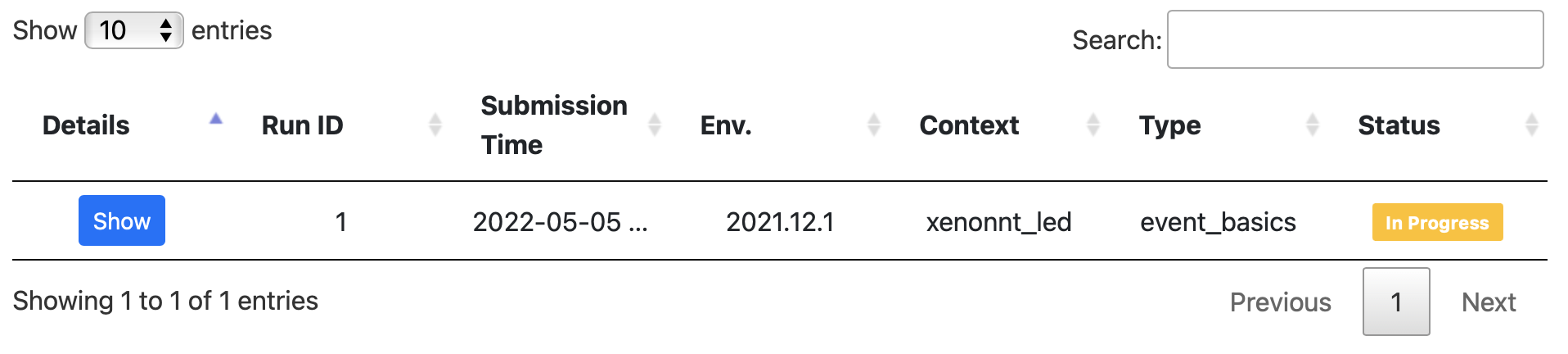
Clicking the detail button will allow users to see the full information that is stored for each document in the processing_jobs collection
 =>
=>

Status flags are determined based off the progress, completed, and error fields for each request. A request will show as "submitted" if progress == 0 and
completed == false. It will show as "in progress" if 0 < progress < 100 and completed == false and error: {exists: false}. It will show as "completed" if
completed == true and progress == 100. Otherwise, if the error field exists, it will show as "error" and the error message will be printed in the table.
