TypeScript, type-safe, opinionated port of Python's Uniface: A comprehensive library for face detection, recognition, landmark analysis, age, and gender detection.
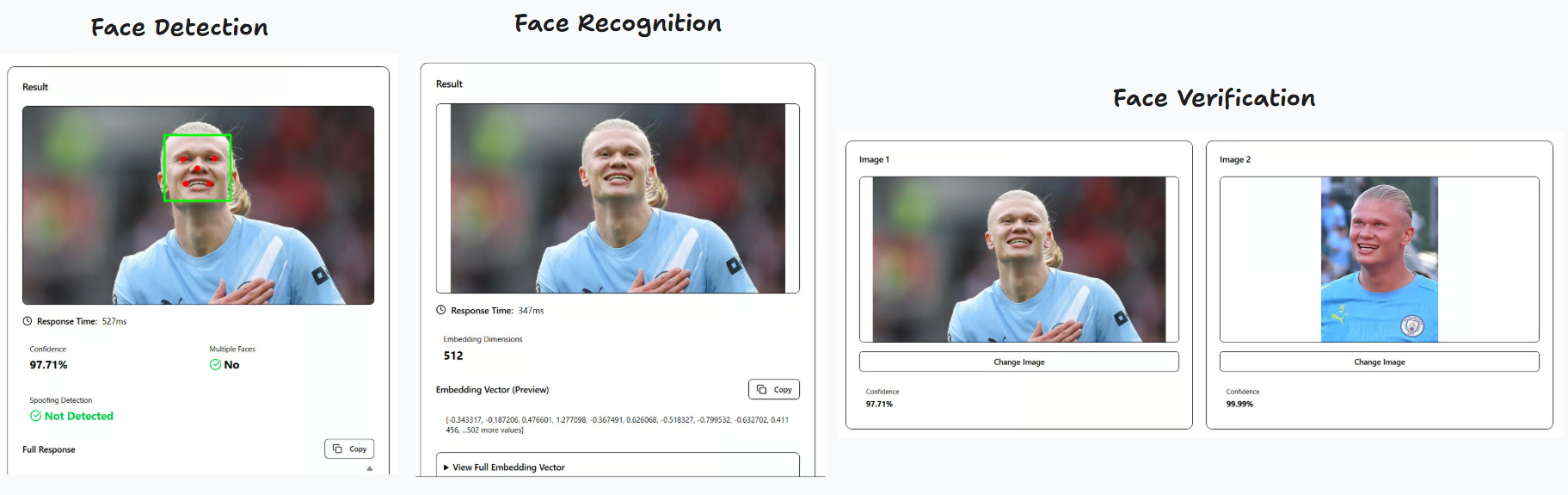
Demos:
- Client-side (browser): https://pt-perkasa-pilar-utama.github.io/ppu-uniface/
- Server-side (Next.js): https://github.com/PT-Perkasa-Pilar-Utama/ppu-uniface-demo
The code pattern is highly inspired by Uniface, however we do not offer model variations. We stick to predetermined opinionated models and functionality to achieve a minimum footprint.
- Face Detection: Using RetinaNet (like Uniface) with basic 5 landmark points
- Face Recognition: Using FaceNet512 (unlike Uniface, we opted for this, ported from Deepface)
- Face Verification: Using Cosine similarity (unlike Deepface which offers euclidean, euclideanL2, and angular)
- Face Alignment: Automatic face alignment based on eye landmarks
- Anti-Spoofing Face: Following Deepface implementation, using Mini-FaceNet
- Web Support: Can run entirely in the browser using
onnxruntime-web
Customization will be added as we go along. Feel free to open an issue for feature requests.
bun add ppu-unifaceor
npm install ppu-unifaceIt is recommended to do warmup initialize first to download all the models needed to run for the first time.
import { Uniface } from "ppu-uniface";

const uniface = new Uniface();
await uniface.initialize();

const image1 = await Bun.file("path/to/image1.jpg").arrayBuffer();
const image2 = await Bun.file("path/to/image2.jpg").arrayBuffer();

const result = await uniface.verify(image1, image2);
console.log(result);

await uniface.destroy();const result = await uniface.verify(image1, image2, { compact: true });
// Returns: { multipleFaces, spoofing, verified, similarity }const result = await uniface.verify(image1, image2, { compact: false });
// Returns: { detection, recognition, verification }// Override detection threshold for both faces in verification
const result = await uniface.verify(image1, image2, {
compact: true,
detection: {
threshold: { confidence: 0.5 },
},
});// Override verification threshold for this specific verification call
const result = await uniface.verify(image1, image2, {
compact: true,
threshold: 0.85, // Falls back to model-level threshold (0.7) if not provided
});
// Or with direct embedding comparison
const verification = await uniface.verifyEmbedding(
face1.embedding,
face2.embedding,
0.85 // Optional threshold override
);const detection = await uniface.detect(imageBuffer);
console.log(detection);
// Returns: { box, confidence, landmarks, multipleFaces }// Override confidence threshold for this detection call
const detection = await uniface.detect(imageBuffer, {
threshold: { confidence: 0.5 },
});
// Override both thresholds
const detection = await uniface.detect(imageBuffer, {
threshold: {
confidence: 0.8,
nonMaximumSuppression: 0.3,
},
});const recognition = await uniface.recognize(imageBuffer);
console.log(recognition.embedding);
// Returns: { embedding: Float32Array(512) }const face1 = await uniface.recognize(image1);
const face2 = await uniface.recognize(image2);
const verification = await uniface.verifyEmbedding(
face1.embedding,
face2.embedding
);
console.log(verification);
// Returns: { similarity, verified, threshold }import { LoggerConfig } from "ppu-uniface";
LoggerConfig.verbose = true;import {
RetinaNetDetection,
FaceNet512Recognition,
CosineVerification,
alignAndCropFace,
} from "ppu-uniface";
const detector = new RetinaNetDetection();
await detector.initialize();
const recognizer = new FaceNet512Recognition();
await recognizer.initialize();
const verifier = new CosineVerification();
const detection = await detector.detect(imageBuffer);
if (detection) {
const alignedFace = await alignAndCropFace(imageBuffer, detection);
const embedding = await recognizer.recognize(alignedFace);
console.log(embedding);
}
await detector.destroy();
await recognizer.destroy();ppu-uniface runs entirely in the browser using onnxruntime-web. No server required.
npm install ppu-uniface onnxruntime-webimport { Uniface } from "ppu-uniface/web";
const uniface = new Uniface();
await uniface.initialize();
// Use with an image ArrayBuffer (from fetch, FileReader, canvas, etc.)
const detection = await uniface.detect(imageArrayBuffer);
const recognition = await uniface.recognize(imageArrayBuffer);
const verification = await uniface.verify(image1, image2);
const spoofing = await uniface.spoofingAnalysisWithDetection(imageArrayBuffer);
await uniface.destroy();<script type="importmap">
{
"imports": {
"onnxruntime-web": "https://cdn.jsdelivr.net/npm/onnxruntime-web@1.23.2/dist/ort.all.bundle.min.mjs",
"onnxruntime-common": "https://cdn.jsdelivr.net/npm/onnxruntime-common@1.23.2/dist/ort-common.min.mjs",
"ppu-ocv/web": "https://cdn.jsdelivr.net/npm/ppu-ocv@2/index.web.js",
"ppu-uniface/web": "https://cdn.jsdelivr.net/npm/ppu-uniface@3/web/index.js"
}
}
</script>
<script type="module">
import { Uniface } from "ppu-uniface/web";
const uniface = new Uniface();
await uniface.initialize();
// ... use uniface methods
</script>Note: First initialization downloads ONNX models (~100MB total). Subsequent loads use browser cache.
You can customize the models by passing options to the Uniface constructor or individual model constructors.
Model-level options configured during initialization:
| Option | Type | Default | Description |
|---|---|---|---|
threshold.confidence |
number |
0.7 |
Minimum confidence score for face detection |
threshold.nonMaximumSuppression |
number |
0.4 |
IoU threshold for non-maximum suppression |
topK.preNonMaximumSuppression |
number |
5000 |
Maximum detections before NMS |
topK.postNonMaxiumSuppression |
number |
750 |
Maximum detections after NMS |
size.input |
[number, number] |
[320, 320] |
Input dimensions [height, width] |
Override detection thresholds on a per-call basis (available for detect(), verify(), verifyWithDetections(), and spoofingAnalysisWithDetection()):
| Option | Type | Default | Description |
|---|---|---|---|
threshold.confidence |
number |
Model-level or 0.7 |
Minimum confidence score for face detection |
threshold.nonMaximumSuppression |
number |
Model-level or 0.4 |
IoU threshold for non-maximum suppression |
| Option | Type | Default | Description |
|---|---|---|---|
size.input |
[number, number, number, number] |
[1, 160, 160, 3] |
Input tensor shape [batch, height, width, channels] |
size.output |
[number, number] |
[1, 512] |
Output tensor shape [batch, embedding_size] |
| Option | Type | Default | Description |
|---|---|---|---|
threshold |
number |
0.7 |
Similarity threshold for verification |
| Option | Type | Default | Description |
|---|---|---|---|
threshold |
number |
0.5 |
Similarity threshold for verification |
enable |
boolean |
true |
Enable the anti-spoofing analysis |
const uniface = new Uniface({
  detection: {
    threshold: {
      confidence: 0.9,
    },
    size: {
      input: [640, 640],
    },
  },
  verification: {
    threshold: 0.8,
  },
});Main service class for face detection, recognition, and verification.
initialize(): Promise<void>- Initializes all modelsdetect(image: ArrayBuffer | Canvas, options?: DetectOptions): Promise<DetectionResult | null>- Detects face in image with optional threshold overridesrecognize(image: ArrayBuffer | Canvas): Promise<RecognitionResult>- Generates face embeddingverify(image1, image2, options?: UnifaceVerifyOptions): Promise<UnifaceFullResult | UnifaceCompactResult>- Verifies if two images contain the same person (supports detection and verification threshold overrides viaoptions.detectionandoptions.threshold)verifyWithDetections(input1, input2, options?: UnifaceVerifyOptions): Promise<UnifaceFullResult | UnifaceCompactResult>- Verifies with pre-computed detections (supports detection and verification threshold overrides viaoptions.detectionandoptions.threshold)verifyEmbedding(embedding1, embedding2, threshold?: number): Promise<VerificationResult>- Compares two embeddings directly with optional threshold overridespoofingAnalysisWithDetection(image: ArrayBuffer | Canvas, options?: DetectOptions): Promise<SpoofingResult | null>- Analyzes spoofing with automatic detection and optional threshold overridesdestroy(): Promise<void>- Releases all model resources
{
  threshold?: {
    confidence?: number; // Default: 0.7
    nonMaximumSuppression?: number; // Default: 0.4
  };
}{
box: { x: number; y: number; width: number; height: number };
confidence: number;
landmarks: number[][]; // 5 points: left eye, right eye, nose, left mouth, right mouth
multipleFaces: boolean;
}{
embedding: Float32Array; // 512-dimensional vector
}{
similarity: number; // 0-1
verified: boolean;
threshold: number; // Default: 0.7
}{
compact: boolean; // Default: true
detection?: DetectOptions; // Optional detection threshold overrides
threshold?: number; // Optional verification threshold override (falls back to model-level threshold, default: 0.7)
}{
multipleFaces: {
face1: boolean | null;
face2: boolean | null;
}
spoofing: {
face1: boolean | null;
face2: boolean | null;
}
verified: boolean;
similarity: number;
}{
detection: {
face1: DetectionResult | null;
face2: DetectionResult | null;
}
recognition: {
face1: RecognitionResult;
face2: RecognitionResult;
}
spoofing: {
face1: SpoofingResult | null;
face2: SpoofingResult | null;
}
verification: VerificationResult;
}The library automatically downloads and caches the following models on first use:
- RetinaFace MobileNet V2 (~12.5MB) - Face detection
- FaceNet512 (~89.63MB) - Face recognition
Models are cached in ~/.cache/ppu-uniface/ for faster subsequent loads.
bun run benchmarkFeel free to compare it to Deepface.
bun testThe library includes comprehensive unit tests covering:
- Face detection with RetinaNet
- Face recognition with FaceNet512
- Cosine similarity verification
- Full integration tests
Typical performance on modern hardware:
- Detection: ~50-150ms per image
- Recognition: ~30-80ms per aligned face
- Full Verification: ~100-300ms for two images
- Runtime: Bun or Node.js 18+
- Dependencies:
onnxruntime-node- ONNX model inferenceppu-ocv- Computer vision utilities
- Runtime: Modern browser with WebAssembly support
- Dependencies (loaded via CDN or npm):
onnxruntime-web- ONNX model inference (WASM)ppu-ocv/web- Computer vision utilities (browser build)
Contributions are welcome! Please feel free to submit a Pull Request.
- Fork the repository
- Create your feature branch (
git checkout -b feature/amazing-feature) - Commit your changes (
git commit -m 'Add some amazing feature') - Push to the branch (
git push origin feature/amazing-feature) - Open a Pull Request
MIT
- Uniface - Original Python implementation
- Deepface - Face recognition framework
- InsightFace - Face analysis toolkit
- minivision-ai - Minivision-ai Silent Anti-Spoofing
- Anti-spoofing detection
- Face detection customization options
- Browser support (ONNX Web)