
Your codebase, reimagined as a 3D city you can fly through.
Live Demo · Features · Quick Start · Architecture · Roadmap · Report Bug





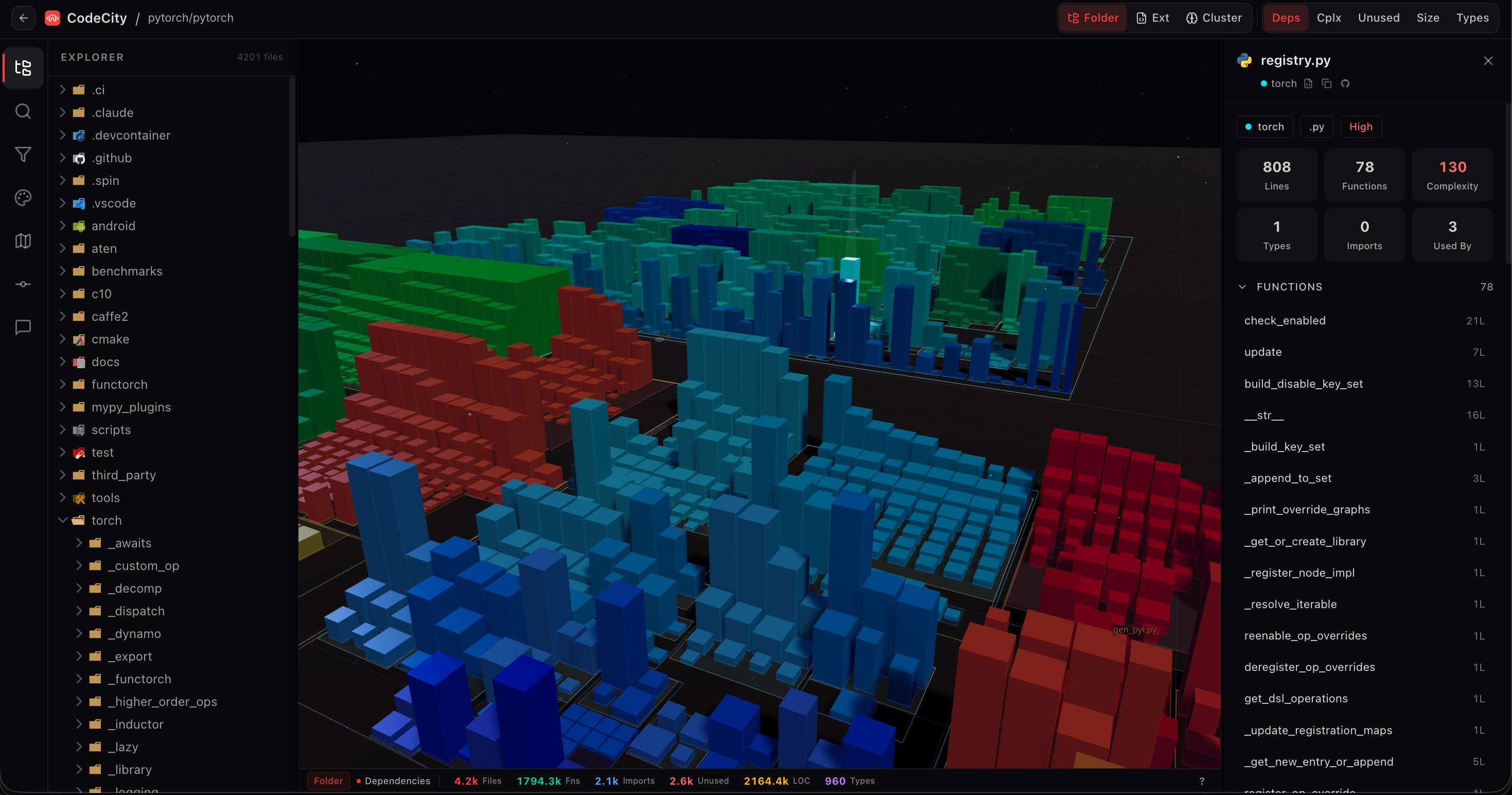
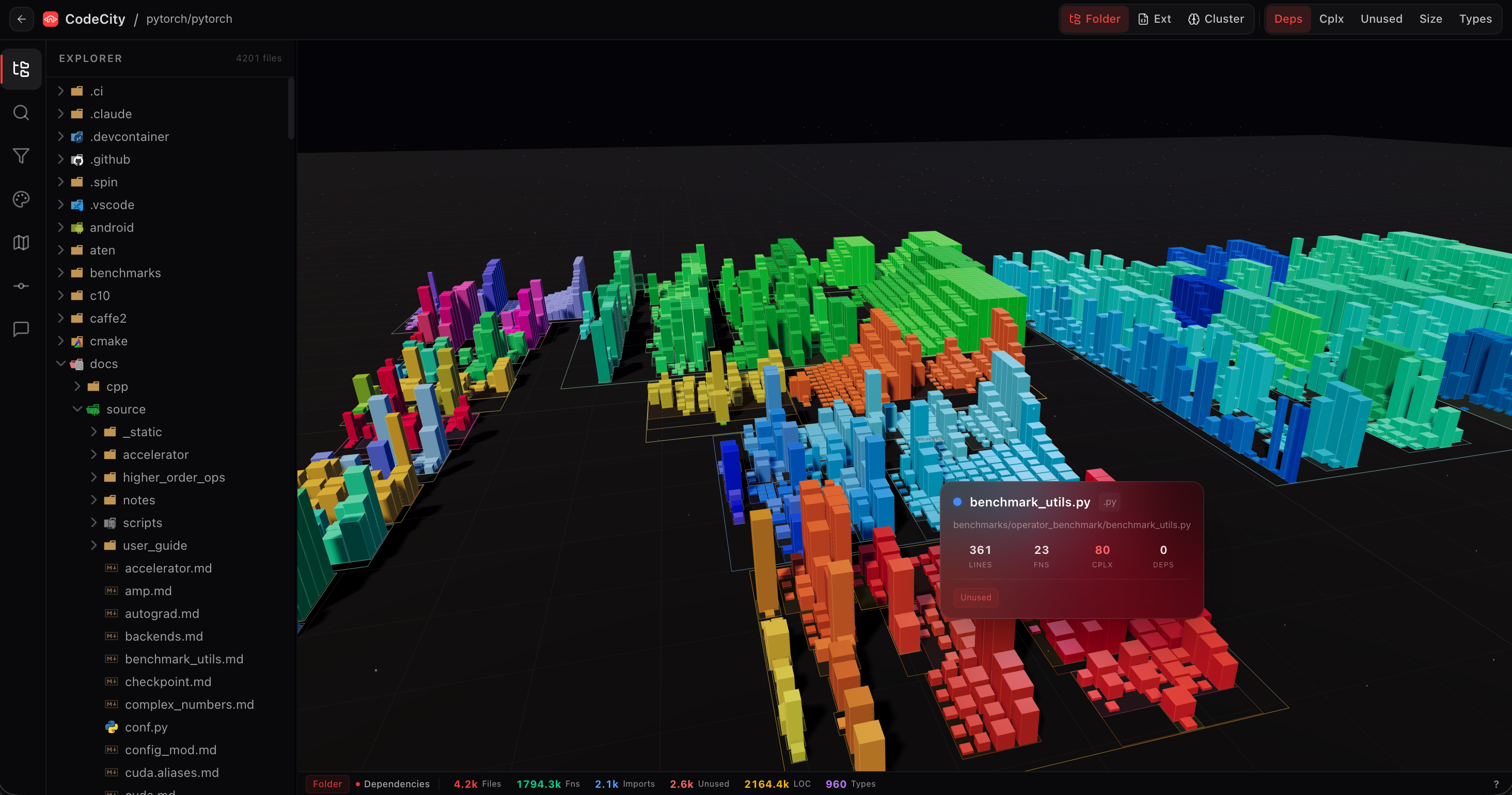
Reading a new codebase from a file tree is like trying to understand a city from a spreadsheet of addresses. CodeCity turns your repo into an actual city you can fly through — files become buildings, directories become districts, imports become glowing pipes between structures.
- Paste a URL, get a city. No install, no CLI, no desktop app. Works in the browser on any public GitHub repo.
- Spatial intuition beats text search. Complexity, module boundaries, and coupling become visible the moment the scene loads — no grep required.
- AST-grade accuracy. The dependency graph comes from real
ts-morphAST parsing, not regex over import strings. - Built for big repos. Analyses run as durable background jobs on Inngest with Redis-tracked progress, so a 50k-file monorepo doesn't time out the request.
Unlike static code-viz tools like CodeCharta or the original academic CodeCity, CodeCity is a zero-install web app with real-time WebGL rendering, click-to-inspect buildings, and a background-job pipeline built for repos that would crash a desktop tool.
Click to expand
There are plenty of ways to visualize a codebase. None of them do the job CodeCity does, because each was built for a different question:
| Tool | What it answers | Where it runs | CodeCity's difference |
|---|---|---|---|
| Sourcegraph | "Where is this symbol used?" | Self-hosted or cloud | Text-first; no spatial model of the repo |
| GitHub dependency graph | "Which packages do we depend on?" | github.com | Package-level, not file-level imports |
| Gource | "How has this repo evolved over time?" | Desktop binary | Historical animation, no structural snapshot |
| CodeCharta / CodeCity (2007 paper) | "What does my codebase look like as a city?" | Eclipse plugin / desktop | ✅ Same metaphor — but desktop-only, static renders, no click-to-inspect, no background jobs |
| Repo file tree on GitHub | "What files exist?" | github.com | Flat, no relationships, no complexity signal |
| CodeCity (this project) | "What is the shape of this codebase and how are its parts connected?" | Browser (zero install) | AST-parsed dependency pipes, WebGL orbit, durable background analysis |
A generic graph-rendering library (D3 force graph, Cytoscape) could draw a node-edge diagram of your repo. It would not answer the question CodeCity was built for: "give me spatial intuition for a codebase I've never seen." That requires:
- A stable metaphor — buildings have height, districts have color, pipes have direction. The brain already knows how to read a city, so it reads your code as fast as it reads a skyline.
- Structural ground truth, not heuristics — height comes from real file metrics, not guessed complexity; pipes come from AST-parsed imports, not regex over
from '...'lines.@codecity/coreusests-morphso the graph is semantically correct. - A background pipeline — big repos take time. Inngest step functions keep progress durable across retries; Upstash Redis streams status to the UI so the user never stares at a spinner wondering if it died.
- Zero-install distribution — the whole point of a code city is "I'm about to touch this repo, show me what it looks like." That moment is killed by
brew installor Eclipse. Paste-a-URL is the only shape that fits.
Honest trade-offs. Use Sourcegraph if you want symbol-level code search. Use Gource if you want to watch a repo grow over time. Use GitHub's tree if you just want to browse files. Use CodeCity when you're joining a new codebase and need to feel its shape in 60 seconds.
- WebGL cityscape — Three.js + React Three Fiber +
@react-three/drei+ postprocessing - Orbit controls — click, drag, scroll to navigate; click any building to inspect the file
- Semantic heights — building height mapped to file complexity, not just LOC
- District colors — one color per language, auto-detected from repo contents
- AST-parsed import graph via
ts-morphin@codecity/core - Animated glowing pipes connect buildings that import from each other
- Directional flow — pipe direction shows "who imports whom"
- Complexity per file drives building geometry
- Language distribution visualized as colored districts
- Monorepo-aware — subprojects become neighborhoods
- Paginated lazy-loading of commit history
- File-change highlighting — buildings pulse on recently-touched files
- Paste-a-URL UX — no CLI, no install, no auth for public repos
- Inngest background jobs — durable step functions survive retries and long analyses
- Upstash Redis progress — real-time status pushed to the UI
- Target: city rendered in under 60 seconds for typical repos
- Browse prebuilt 3D visualizations of popular open-source repos
- Great onboarding — users see what the tool can do before pasting their own URL
- Firebase Auth — GitHub + Google OAuth
- Admin panel — user management, content moderation, platform settings
- MCP server — AI agents can drive the analyzer programmatically
| Layer | Technology |
|---|---|
| Frontend | Next.js 15 (App Router) · React 19 · TypeScript 5.7 |
| 3D Engine | Three.js · React Three Fiber · @react-three/drei · postprocessing |
| Styling | Tailwind CSS v4 · Sora · IBM Plex Mono |
| Animation | Framer Motion |
| UI Components | shadcn/ui via @codecity/ui workspace package |
| State | Zustand (client) · React Query (server) |
| Database | Neon Postgres (@neondatabase/serverless) |
| Cache | Upstash Redis (@upstash/redis) — analysis progress |
| Auth | Firebase Authentication (GitHub + Google) |
| Background Jobs | Inngest — durable step functions |
| Analysis Engine | @codecity/core — AST parsing via ts-morph |
| Monorepo | Turborepo + pnpm workspaces |
| AI Integration | MCP server (apps/mcp-server) |
| Deployment | Vercel |
codecity/
├── apps/
│   ├── web/                  # Next.js 15 app (frontend + API routes)
│   │   ├── src/
│   │   │   ├── app/          # App Router pages & API routes
│   │   │   ├── components/
│   │   │   │   ├── city/     # 3D visualization (scene, panels, tooltip, store)
│   │   │   │   ├── dashboard/# Project list, explore tab, sidebar
│   │   │   │   ├── home/     # Landing page sections
│   │   │   │   └── ui/       # Shared UI primitives
│   │   │   └── lib/          # DB, auth, analysis, Redis, Firebase
│   │   └── public/           # Static assets (logo, demo, 3D textures)
│   └── mcp-server/           # MCP server for AI agent integrations
├── packages/
│   ├── core/                 # Analysis engine (AST parsing, dep graphs)
│   └── ui/                   # Shared component library + design tokens
├── turbo.json                # Turborepo task config
├── vercel.json               # Vercel deployment config
└── pnpm-workspace.yaml       # Workspace definition
 User pastes a GitHub URL
          │
          ▼
 ┌─────────────────────┐
 │  Next.js API route  │ ──▶ enqueue Inngest job
 └─────────────────────┘
          │
          ▼
 ┌─────────────────────┐     ┌──────────────────┐
 │   Inngest step fn   │ ◀──▶│  Upstash Redis   │  progress pings
 │  1. fetch repo tree │     └──────────────────┘
 │  2. @codecity/core  │
 │     • ts-morph AST  │
 │     • dep graph     │
 │     • file metrics  │
 │  3. persist results │ ──▶ Neon Postgres
 └─────────────────────┘
          │
          ▼
 ┌─────────────────────┐
 │  WebGL scene (R3F)  │  buildings = files, pipes = imports
 │  click-to-inspect   │
 └─────────────────────┘
Key design decisions
- 🧱 Analysis is a separate package (
@codecity/core) so you can reuse the engine without the frontend. - ⏳ Background jobs, not request-scoped parsing — big repos would blow through a request timeout. Inngest steps survive retries, Redis streams progress to the UI.
- 🗺 AST over regex —
ts-morphgives semantically correct imports. Regex would choke on re-exports, barrel files, and dynamicimport(). - 🎨 Design tokens in
@codecity/ui— shared across the web app and any future surfaces.
- Node.js 20+ and pnpm 9+
- Neon Postgres database
- Upstash Redis instance
- Firebase project with GitHub + Google providers enabled
git clone https://github.com/omkarbhad/codecity.git
cd codecity
pnpm install
cp .env.example .env.local
# fill in .env.local — see "Environment Variables" belowpnpm dev # Turborepo dev — web app on http://localhost:3000
pnpm build # Build all packages and apps
pnpm type-check # Typecheck the whole monorepoSet SKIP_AUTH="true" in .env.local to bypass Firebase during local development.
| Variable | Required | Description |
|---|---|---|
DATABASE_URL |
✅ | Neon Postgres connection string |
NEXT_PUBLIC_FIREBASE_API_KEY |
✅ | Firebase API key |
NEXT_PUBLIC_FIREBASE_AUTH_DOMAIN |
✅ | Firebase auth domain |
NEXT_PUBLIC_FIREBASE_PROJECT_ID |
✅ | Firebase project ID |
NEXT_PUBLIC_FIREBASE_STORAGE_BUCKET |
✅ | Firebase storage bucket |
NEXT_PUBLIC_FIREBASE_MESSAGING_SENDER_ID |
✅ | Firebase messaging sender ID |
NEXT_PUBLIC_FIREBASE_APP_ID |
✅ | Firebase app ID |
KV_REST_API_URL |
✅ | Upstash Redis REST URL |
KV_REST_API_TOKEN |
✅ | Upstash Redis REST token |
GITHUB_TOKEN |
— | GitHub PAT for higher API rate limits |
ADMIN_EMAIL |
— | Email for admin panel access |
SKIP_AUTH |
— | Set to "true" to bypass auth in local dev |
CodeCity's visual language is tuned for spatial legibility over a dark scene:
| Token | Value |
|---|---|
| Background | #06060b — deep space dark |
| Primary accent | #ff3d3d — electric red |
| Sans font | Sora |
| Mono font | IBM Plex Mono |
| District palette | Cyan · Green · Blue · Yellow · Purple · Orange · Teal |
| UI style | Glassmorphic panels with backdrop blur over the 3D scene |
All tokens live in @codecity/ui and are consumed via Tailwind v4.
- Public repo analysis
- WebGL cityscape with click-to-inspect
- AST-parsed dependency pipes
- Inngest background pipeline
- Commit timeline
- MCP server for AI agents
- Private repo support (authenticated GitHub token)
- Real-time collaboration — multiple users in the same city
- Export city as image or video
- VS Code extension
- More parsers — Rust, Go, Java
- City diff — compare two branches or repos
- Embeddable README widget
Got an idea? Open an issue or start a discussion.
Contributions are what make open source amazing. Any contribution you make is greatly appreciated.
- Fork the project
- Create your feature branch —
git checkout -b feature/amazing-feature - Commit your changes —
git commit -m 'Add amazing feature' - Push to the branch —
git push origin feature/amazing-feature - Open a Pull Request
See CONTRIBUTING.md for detailed guidelines.
👉 New here? Look for good first issue labels.
- Richard Wettel & Michele Lanza — for the original CodeCity concept paper (2007) that inspired this web-native reimagining
- Three.js & React Three Fiber — WebGL rendering
ts-morph— AST analysis that makes the dependency graph honest- Inngest — durable background jobs
- Neon · Upstash · Vercel — infrastructure
- shadcn/ui — component primitives