


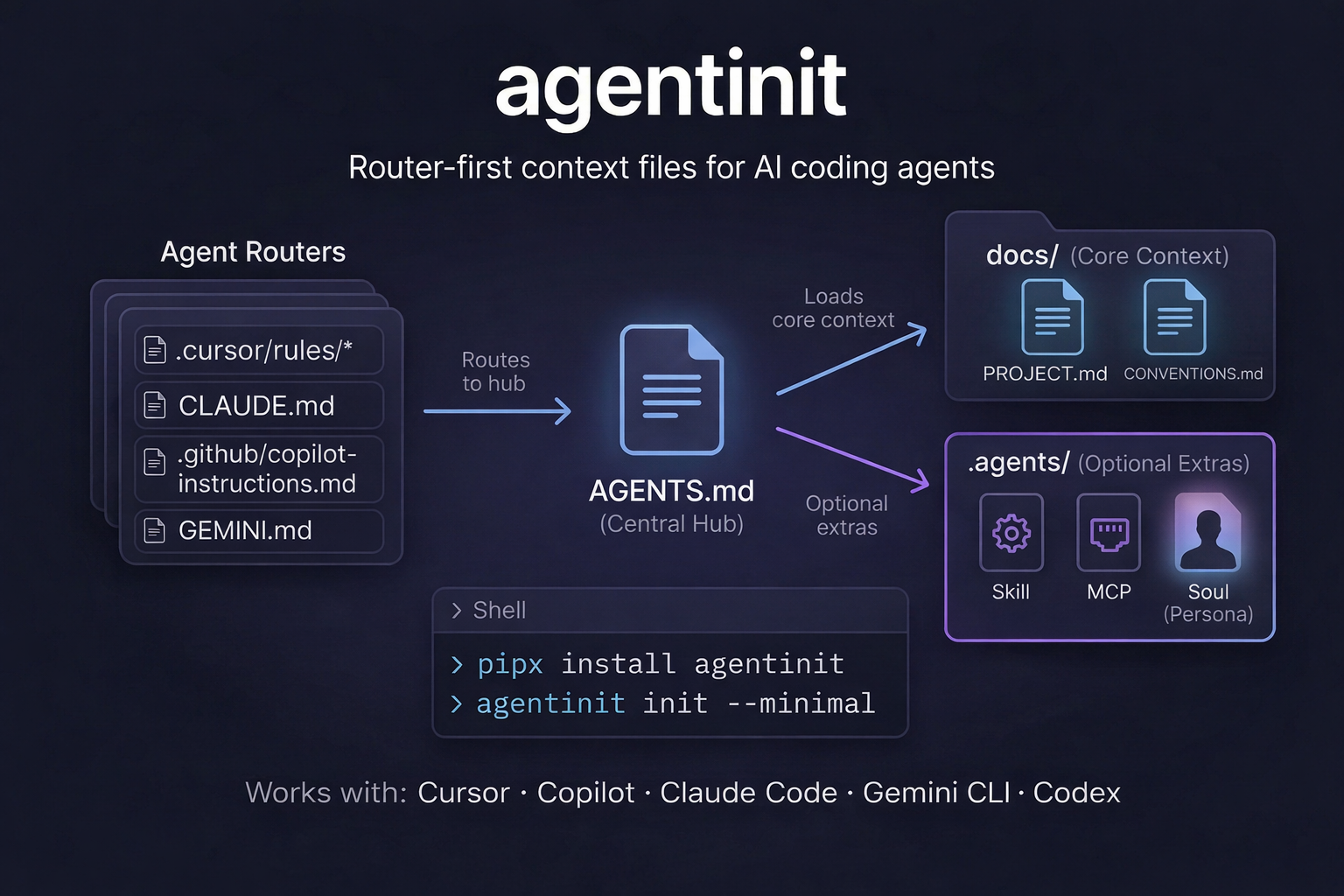
Scaffold hardened, router-first context files so your AI coding agents stop guessing and start delivering.
Pure Python standard library. No runtime dependencies. Generates 2026-ready manifests for Claude Code, Cursor, Copilot, Gemini CLI, and Windsurf.
# 1. Install via pipx (recommended)
pipx install agentinit

# 2. Initialize hardened context in your project
cd your-project
agentinit init --minimalInstead of giant, token-heavy instruction files, agentinit implements a hierarchical context strategy. It creates a machine-readable map of your project and enforces autonomy via Hardened Mandates.
your-project/
├── llms.txt               # The "robots.txt" for AI (Discovery Index)
├── AGENTS.md              # The central hub with Hardened Mandates
├── CLAUDE.md              # Claude Code router
├── GEMINI.md              # Gemini CLI router
└── docs/
    ├── PROJECT.md         # What this project is
    ├── CONVENTIONS.md     # How to work in it
    └── STATE.md           # Persistent working memory (AI-readable)
Next steps: Open docs/PROJECT.md and docs/CONVENTIONS.md and fill them in.
Next session: Your agent will find llms.txt, read your rules in AGENTS.md, and follow the mandates to autonomously maintain docs/STATE.md and docs/TODO.md.
Some agents only scan tracked files. If your agent says it can't find your context:
-
Track everything: Add the manifests so your agent can see them.
git add llms.txt AGENTS.md CLAUDE.md GEMINI.md docs/ git add .agents/ # if you added extras -
Verify ignores: Run
git status --ignoredto see if your.gitignoreis hiding them.
Minimal .gitignore exceptions
!llms.txt
!AGENTS.md
!CLAUDE.md
!GEMINI.md
!docs/PROJECT.md
!docs/CONVENTIONS.md
!docs/TODO.md
!docs/DECISIONS.md
!docs/STATE.md
!.agents/
!.agents/**
Agents can do more than just read conventions. Inject modular, hardened resources directly into your project.
# View available resources
agentinit add --list

# Add specific capabilities
agentinit add skill code-reviewer
agentinit add security
agentinit add soul "YourAgentName"
Resources in .agents/ are automatically linked in AGENTS.md and use Imperative Mandates (MUST ALWAYS, MUST NEVER) to ensure compliance and zero-sycophancy.
Token limits matter. agentinit includes a validator to prevent context bloat, broken links, and missing information.
# View line budgets, broken references, and missing details
agentinit status

# Perfect for CI (exits non-zero on violations)
agentinit status --checkAfter running agentinit init, paste this to your favorite AI agent:
Read the entire repository. Fill in
docs/PROJECT.mdanddocs/CONVENTIONS.mdusing only facts found in the repo (package files, configs, source code, CI). Do not invent commands. If information is missing, writeTODO: <what's needed>. Updatedocs/STATE.mdanddocs/TODO.mdto reflect our current progress. Do not modify any other files.
📚 Advanced Usage & Commands
agentinit init— Add missing files to an existing directory.agentinit minimal— Shortcut forinit --minimal.agentinit status— Check health, line budgets, and broken links.agentinit add <type> <name>— Add modular resources (skills, mcp, security, soul).agentinit new <project>— Create a new directory and scaffold files.agentinit remove— Safely remove or archive agent files.
--detect— Auto-detect stack and commands from package files (e.g.,package.json,pyproject.toml).--yes/-y— Runs non-interactively and skips the wizard.--purpose "<text>"— Prefill the project purpose non-interactively.
💡 Why Hardened Context?
- Agent Autonomy: Explicit mandates (
YOU MUST ALWAYS read state.md) transform the agent from a chatbot into a disciplined project maintainer. - AI-Discovery Index:
llms.txtensures any tool (Cursor, Windsurf, Claude) immediately understands your project map. - Progressive Disclosure: Keeps the context window high-signal by loading deep details only when relevant.
- Zero Sycophancy: Mandates force the agent to skip "I'd be happy to help!" and jump straight to the technical solution.
⚙️ Installation & Development
Requires Python 3.10+.
# Install (pipx is recommended)
pipx install agentinit

# Update
pipx upgrade agentinitpip install -e . --group dev
python3 -m pytest tests/ -vMIT