Advanced computer vision technology to prevent accidents caused by driver fatigue
- Overview
- Features
- Technical Architecture
- System Flow
- Installation
- Usage
- Configuration
- How It Works
- Performance Considerations
- Troubleshooting
- Contributing
- License
- Acknowledgments
SleepDriver is a state-of-the-art drowsiness detection system that monitors eye state in real-time to detect signs of driver fatigue. When drowsiness is detected, the system triggers audible alerts to prevent accidents.
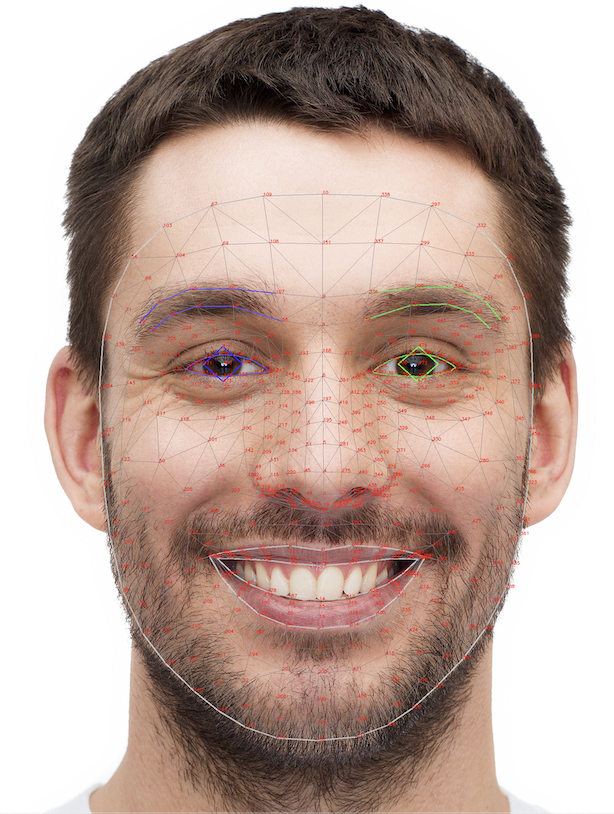
The system uses MediaPipe's Face Mesh technology to accurately track facial landmarks and calculate the Eye Aspect Ratio (EAR), providing reliable drowsiness detection even in challenging lighting conditions and varying head positions.
- Real-time Face & Eye Tracking: Uses MediaPipe's 468-point face mesh for precise landmark detection
- Advanced Drowsiness Detection: Calculates Eye Aspect Ratio (EAR) with temporal smoothing for reliable fatigue monitoring
- Immediate Alerts: Triggers audio alarms when drowsiness is detected
- Customizable Sensitivity: Easily adjust thresholds to match individual users and environments
- Debug Visualization: Real-time display of face mesh, eye landmarks, and metrics for system tuning
- Event Logging: Records drowsiness events for post-analysis and system improvement
- Cross-platform: Works on Windows, macOS, and Linux
SleepDriver implements a multi-stage pipeline for drowsiness detection:
┌────────────┐    ┌────────────┐    ┌────────────┐    ┌─────────────┐    ┌────────────┐
│  Video     │───▶│ MediaPipe  │───▶│  Eye       │───▶│ Drowsiness  │───▶│  Alert     │
│  Capture   │    │ Face Mesh  │    │  Analysis  │    │ Detection   │    │  System    │
└────────────┘    └────────────┘    └────────────┘    └─────────────┘    └────────────┘
-
Video Capture:
- Reads frames from the camera
- Applies pre-processing for optimal face detection
-
Face Mesh Detection:
- Uses MediaPipe's Face Mesh model (468 landmarks)
- Provides 3D face topology with sub-pixel precision
-
Eye Analysis:
- Extracts eye-specific landmarks (16 points per eye)
- Calculates EAR (Eye Aspect Ratio) for both eyes
- Applies temporal smoothing to reduce noise
-
Drowsiness Detection:
- Monitors EAR across consecutive frames
- Applies thresholding with hysteresis for stability
- Maintains state machine for drowsiness events
-
Alert System:
- Generates audible alerts with PyGame
- Visual indicators on the interface
- Optional logging of events
The following flowchart illustrates the system's operation:
┌─────────────┐
│  Start      │
└──────┬──────┘
       ▼
┌──────────────┐
│ Capture Frame│
└──────┬───────┘
       ▼
┌──────────────┐
│ Detect Face  │◄────┐
│ Landmarks    │     │
└──────┬───────┘     │
       │             │
       ▼             │
┌──────────────┐     │
│ Extract Eye  │     │
│ Landmarks    │     │
└──────┬───────┘     │
       │             │
       ▼             │
┌──────────────┐     │
│ Calculate    │     │
│ EAR Value    │     │
└──────┬───────┘     │
       │             │
       ▼             │
┌──────────────┐     │
│ Apply        │     │
│ Smoothing    │     │
└──────┬───────┘     │
       │             │
       ▼             │
┌──────────────┐     │
│ EAR <        │     │
│ Threshold?   │     │
└──────┬───────┘     │
       │             │
       ▼             │
┌──────────────┐     │
│ Increment    │     │
│ Counter      │     │
└──────┬───────┘     │
       │             │
       ▼             │
┌──────────────┐     │
│ Counter >    │ No  │
│ Frames?      ├─────┘
└──────┬───────┘
       │ Yes
       ▼
┌──────────────┐
│ Trigger      │
│ Alarm        │
└──────┬───────┘
       │
       ▼
┌──────────────┐
│ Next Frame   │
└──────────────┘
- Python 3.8 or higher
- Webcam or camera device
- Speakers for alert sounds
-
Clone the repository:
git clone https://github.com/IhabProjects/sleepDriver.git cd sleepDriver -
Install required dependencies:
pip install -r requirements.txt
-
Test the installation:
python test_installation.py
| Package | Version | Purpose |
|---|---|---|
| opencv-python | ≥4.5.0 | Computer vision and image processing |
| numpy | ≥1.20.0 | Numerical operations and array manipulation |
| pygame | ≥2.0.0 | Audio playback for alerts |
| mediapipe | ≥0.8.10 | Face mesh landmark detection |
| matplotlib | ≥3.4.0 | Optional visualization and debug plots |
Run the system with default settings:
python sleep_detector.pypython sleep_detector.py --ear 0.15 --frames 25 --debug| Argument | Description | Default Value |
|---|---|---|
--ear |
Eye aspect ratio threshold | 0.17 |
--frames |
Consecutive frames to trigger alarm | 20 |
--camera |
Camera index to use | 0 (first camera) |
--log |
Enable logging of drowsiness events | False |
--debug |
Show debug information and visualization | False |
--silent |
Run without sound alerts | False |
While the application is running:
| Key | Action |
|---|---|
q |
Quit the application |
d |
Toggle debug mode |
r |
Reset counters |
Adjust system parameters in config.py:
# Eye detection thresholds
EYE_AR_THRESHOLD = 0.22       # Lower value = more sensitive
EYE_AR_CONSEC_FRAMES = 25     # Lower value = faster alert

# Camera settings
CAMERA_INDEX = 0              # Change for different cameras
FRAME_WIDTH = 640
FRAME_HEIGHT = 480

# Alert settings
ALARM_VOLUME = 0.9 # Volume level (0.0 to 1.0)The system may require adjustment for different users:
- EAR Threshold: Lower for users with naturally narrower eyes
- Frame Threshold: Lower for faster alerts, higher for fewer false positives
- Camera Position: Best results when camera is at eye level
The core algorithm relies on the Eye Aspect Ratio (EAR) formula:
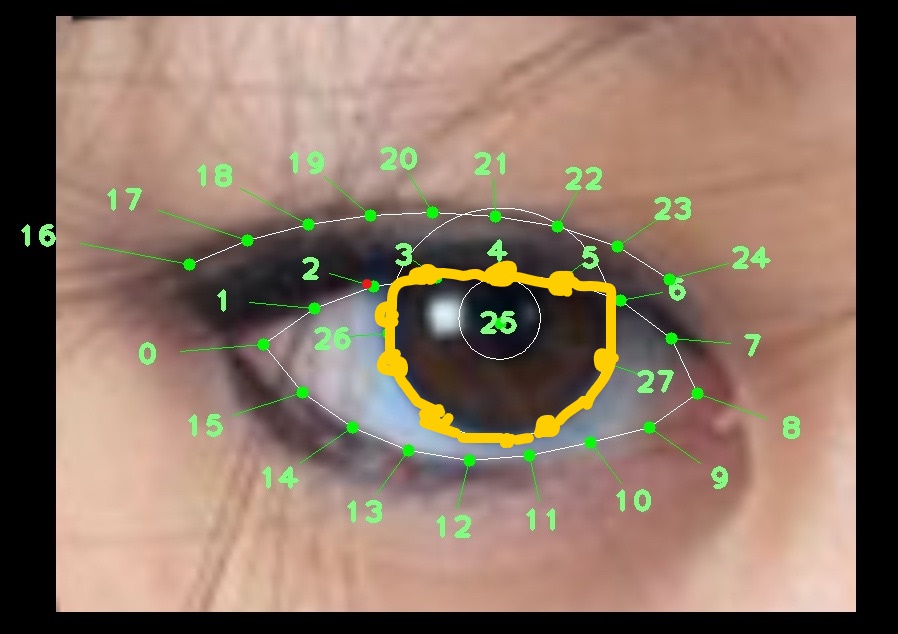
In SleepDriver, we approximate this using MediaPipe landmarks:
EAR = eye_height / eye_width
Where:
eye_heightis the vertical distance between upper and lower eyelidseye_widthis the horizontal distance between eye corners
The EAR value:
- Open eyes: Higher values (typically 0.2-0.3)
- Closed eyes: Lower values (typically <0.2)
- Drowsy state: Consistently low values over time
MediaPipe's Face Mesh provides a 3D mesh representation of the face with 468 landmarks:
Key advantages over traditional methods:
- Works in varying lighting conditions
- Handles different head poses
- Precise sub-pixel landmark locations
- Fast real-time performance
To reduce false alarms, we employ:
- EAR value smoothing using a 5-frame rolling average
- Consecutive frame counting with hysteresis
- Gradual counter reset for seamless operation
| Component | Minimum | Recommended |
|---|---|---|
| CPU | Dual-core 2.0 GHz | Quad-core 2.5 GHz+ |
| RAM | 4 GB | 8 GB+ |
| Camera | 640x480 @ 15 FPS | 720p @ 30 FPS |
| GPU | Not required | Integrated/dedicated |
- Reduce frame resolution for better performance on slower systems
- Adjust the tracking parameters in
config.pyfor your specific camera - Close other resource-intensive applications for better performance
| Issue | Potential Solution |
|---|---|
| Camera not detected | Check camera index, permissions, and connections |
| False alarms | Increase EAR and frame thresholds |
| No detection | Improve lighting, adjust camera position |
| Poor performance | Reduce resolution, close background applications |
| No sound alerts | Check speaker connection, volume settings |
Enable debug mode to visualize system performance:
python sleep_detector.py --debugThis provides real-time visualization of:
- Face mesh landmarks
- Eye contours
- EAR values
- Detection states and thresholds
Contributions are welcome! Please feel free to submit a Pull Request.
- Fork the repository
- Create your feature branch (
git checkout -b feature/AmazingFeature) - Commit your changes (
git commit -m 'Add some AmazingFeature') - Push to the branch (
git push origin feature/AmazingFeature) - Open a Pull Request
- Head pose estimation for improved drowsiness detection
- Machine learning model for personalized thresholds
- Mobile application port
- Integration with vehicle systems
This project is licensed under the MIT License - see the LICENSE file for details.
- MediaPipe team for their excellent face mesh implementation
- OpenCV community for computer vision tools
- PyGame for audio playback capabilities
- Contributors to the field of driver drowsiness detection research