Currently running Windows 11
Repository with scripts to get productive ASAP on Windows.
- Have an open low privileged windows local account
- Be able to do 99% of the everyday things without requiring admin privileges
- Have a strong password on the administrator local account
- Have latest software updates
The most often used applications are pinned to the taskbar (manually). The icons toolbar is cleaned up (manually) to only show icons that facilitate easy control over my hardware. The desktop has no content, most of the time, and should only display stuff I'm working on at the moment.
Other files are organized anyway;
- Doctors notes, taxes, identity documents, books => documents library, also backed up to the cloud
- Personal music collection => music library, also backed up to other system
- Sentimental images, desktop/phone wallpapers => images library, also backed up to cloud
- (Old) video projects => videos library, also backed up to other system
At every folder level I keep a simple inbox/archive structure. Almost all files are toplevel where I can quickly see and access them. When a file/project becomes stale I move the file/folder into the archive folder. Requires minimal thinking.
 |
|---|
| My serene windows desktop. Click for wallpaper source |
 |
|---|
| The toplevel directory contents of my music library. |
 |
|---|
| The archive folder directory contents of my music library. These archive folders also exist within project folders. |
I daily drive firefox for browsing, and Progressive Web Apps (PWA's) for app-like experiences for Discord, Outlook Mail, Spotify and diagrams.net.
Firefox still has lots of knobs to tweak and attune to your liking. I've installed a bunch of add-ins and modified the window chrome (removed the horizontal tab bar). Firefox is in permanent In-Private mode, which means it will remove all history and cookies automatically when the process closes. There are a few websites I keep whitelisted (excluded from automatic removal) for ease of access.
 |
|---|
| The new tab page in my Firefox browser. I have not found positive netto effect by customizing (modding) the startpage. |
See Philosophy for more explanation about software choices, their configuration, and intended use.
Manual steps.
- Download Windows 11 IoT LTSC
- Create installer with Rufus, add installer customizations
- Automatically create local admin account
- Unplug network
- Launch installer
- Give entire SSD to install, let it rip
- Get into the system
- Set password for local admin account
- Create user account for everyday use
- give it admin privileges (for now)
- don't set a password
- mark password as "never expire" !
- Logon to new user
- Relocate user libraries to other persisted disk
- (manually) open each library (documents, music, videos, images) and point them to the corresponding folders on the other disk
- TODO !! Setup locally managed mobile device management (MDM)
- TO DEPRECATE !! Run scripts to configure computer (see .ps1 scripts)
- The point is to have a single configuration file that is enforced by the local MDM server
- Verify (and change) computer name
- Verify (and change) logical drive letters
- Restart if necessary
- Plug in network
- Perform windows activation
- Proceed to install and configure software/software updates (see winget_install.ps1)
- Remove Administrator group membership for everyday user account
- Apply windows updates (if any)
- Restart computer
- DONE
| Filename | Description |
|---|---|
| emergency.ps1 | Windows activation stuff, also edition switching activation, re-arming volume licensing etc |
| set_acl.ps1 | The script updates the access control records of the library folders on another disk/partition. Update the value of variable $User and the target paths. |
| set_groups.ps1 | The script adds the user to certain groups for higher privileges. For example, the group "Hyper-V Administrators" allows non-admin users to control hyper-V virtual machines. Update the value of variable $User and the target groups. |
| set_system.ps1 | The script configures basic system behaviour. More info within the script file. |
| set_features.ps1 | The script configures windows optional features. More info within the script file. |
| windows_appstore_reset.ps | The script performs a cleanup and reset of the windows app store. Useful when your windows channel has no app store application or a broken application. |
| winget_install.ps | Installs and updates winget so it's setup and ready as a storefront for the windows app store and the winget package index. The script needs to run with administrator privileges (recommended) to install winget and reset the winget index sources. |
| software_install.ps1 | Install software through winget. The script needs to run as the everyday user, with administrator privileges (recommended). More info within script file. |
| firefox*.css | Files to fix Firefox' UI to accommodate my tabs setup. |
I'm using a single computer monitor, but for no special reason (anymore). As of april 2026 it's been about two years since I got rid of my secondary monitor on my desk. The dedication that made me just do it™️ did result in a productivity boost which could be wrongly attributed to the effect of only having to focus on a single monitor (and the reduced virtual desktop area). By now this effect is gone.
With two monitors at work, and a single one at home, I can convincingly say that my productivity is not (meaningfully) influenced by the amount of monitors I have. And continuing making bold claims, a larger usable virtual desktop space also does not (meaningfully) influence my productivity!
I've recently acquired a good deal on the Xiaomi G27 Pro, which has been talked about a lot in the communities that worship good image quality. It's a microLED monitor with good coverage of the extended color spectrum, but in my opinion it doesn't come well calibrated out of the factory (at least my unit). Together with the complicated mess that is Windows, Windows color profiles, hardware communications, built-in firmware issues, and Windows HDR, I would not recommend this monitor to anyone unless they know what they're doing.
My general recommendation would be to buy an OLED monitor that is well received by independent testers (like RTINGS).
However, this monitor is very capable in my hands (which should also be capable), and I took some time to configure it to my liking! The information below is my own summary of information spread on the internet, likely not expert-level to be generalizable, and applies to my own unit/situation (but yours could be very similar).
Caution
REF; xanderfrangos/twinkle-tray#1204
The Xiaomi G27 Pro monitor does not like to be tickled through software (DDC/CI). This issue is permanent because there is no (easy) way to upgrade its firmware, which is the biggest downside of this monitor. All other issues could be solved one way or another if this monitor just accepted firmware updates!
Manual configuration on the Xiaomu G27 Pro, start from factory reset settings;
- Picture mode > Select mode = Movie
- Picture mode > Contrast = 11
- Picture mode > Color temperature = Custom
- Picture mode > Saturation = 45
- Picture mode > Gamma = 2.2
- Picture mode > Color space = Native
- Advanced > HDR = Auto
- Advanced > Local dimming = Off **
- System > Backstrip lighting = On
- System > Backstrip lighting > Light effects = Breathing
- System > Backstrip lighting > Default color = [Red]
Software configuration;
; HDRTray-Colorprofile settings

[Monitor]
DisplayId=1
[Profiles]
EnableColorManagement=1
SDRProfile=Xiaomi 27i Pro_Rtings.icm
HDRCalibration=xiaomi_miniled_1d.cal
EnableSDRProfile=1
EnableHDRProfile=1
EnableColorPresetChange=1
[SDR]
Brightness=25
RedGain=45
GreenGain=51
BlueGain=53
[HDR]
Brightness=100
RedGain=45
GreenGain=51
BlueGain=53
ColorPreset=12
The above configuration is given to the software HDRTray-Colorprofile. The purpose of this software is to switch between Standard (Colour) Range (SDR) mode High Dynamic (Colour) Range (HDR) mode with a single click. **
The software, with all companion files, is packaged at assets/HDRTray-ColorProfile.zip. Unpack it to a non-changing path, like in your documents folder, and make the software auto-start after windows login.
Note
** Switching to HDR is completed after manually changing monitor setting 'Advanced > Local Dimming' to 'High'.
Switching back to SDR is completed after manually setting Local Dimming back to 'Off'.
I have not had the patience to verify if the monitor accepts an instruction to change local dimming mode. If anyone found out, please let me know :)
I'm not using the xiaomi_miniled_1d.cal file while switching to HDR, the settings refer to a nonexistent path because the calibration filename is suffixed with .bak.
Instead I created an adjusted mapping curve srgb_to_gamma2p2_200_1000nit.icm (original from win11hdr-srgb-to-gamma2.2-icm) that needs to be applied directly into the Windows Colour Management tool (colorcpl.exe) for HDR mode.
 |
|---|
| Color Management control window, with colour profiles applied for SDR and HDR. |
F.lux adjusts the colour calibration matrix at the video card level. The software should recognize HDR mode switching and apply its color temperature adjustments at the end of all changes (on top of the active icm file). The only thing to pay attention to is to make sure HDRTray starts before F.lux does, the rest is up to eventual consistency. When you need to force correct calibration mapping; disable F.lux, toggle HDRTray, re-enable F.lux.
Since ~march 2026 Firefox started integrating with Windows HDR. In short, this whole HDR topic is a can of worms, and I've already experienced that images look "washed" (desaturated + overexposed) in SDR mode! Chromium/Edge do already integrate with Windows HDR and seems to work as expected (from my limited testing)
This washed-effect is fixed using the following procedure;
- Open Firefox
- Navigate to
about:config - Search for setting
gfx.color_management.native_srgb - Set setting to
true - Restart Firefox
Twinkle Tray doesn't properly work with the Xiaomi G27 Pro. Expect the brightness slider to work 10% of the time, success is related to recent monitor commands sent by the computer.
The cause of this issue is the monitor not responding well to configuration commands, read the CAUTION note above.
My monitors are kept at reduced brightness all the time. I started doing this to keep the transmitted light balanced against the ambient lighting. At my desk I'm facing an outside window so my monitor never outshines the incoming atmospheric light. This has a downside that, depending on my activity (gaming, watching films, color sensitive work), the monitor output needs to be brighter.
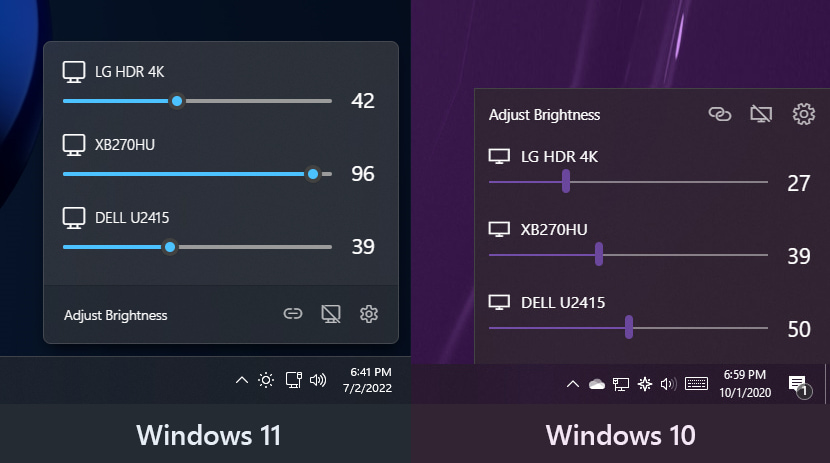
I had probably changed the brightness manually a thousand times before I figured this manual action HAD to be controllable from software, enter Twinkle Tray!
 |
|---|
| Twinkle Tray doesn't like to be screenshotted, so here is the look and feel demo from their code repository. |
F.lux has been installed on my computers since (probably) 2010. All this time I have a permanent tint on my monitors that filter blue light. It's awesome software, literally set-and-forget forever!
Research coming out since 2018 claims that blue light filters doesn't improve sleep. I'm used to the color shift now, and the automations help me as part of the ritual before going to bed, so I kept using the software.
A very late addition to my power toolset (approx since 2020)! I use it to quickly draw and type text on top of my desktop session before taking screenshots. The screenshots are either sent off as-is, or a bit post-processed and go into documentation files.
As someone who takes professional documentation seriously, this little tool has saved me tens of hours per year!
 |
|---|
| As I'm literally writing the above description, the time it took me to take the screenshot above was below 15 seconds! |
The newest tool under my belt since Windows 11's User eXperience (UX) went even more down the drain! Windhawk is an absolutely fantastic tool, made by a very cool developer, to tweak your windows' anything.
My only gripe with it is that opening the main window, and managing plugins, requires administrator permissions. I've talked about this with the dev but that approach has not and is not gonna change in the short term. This is an issue for me because I'm daily driving a low privilege windows account, one without admin privileges and without password. But on the other hand Windhawk is a self-updating set-and-forget tool, so no complaints from me!
I recommend it, very very much. Use it! You'll get used to managing all your audio devices easily and effortlessly and it's a million times better than the whatever the embarrassment is that microsoft puts into windows audio controls.
This tool is at the same level, or even higher, of usability improvement as Twinkle Tray!
 |
|---|
| Easily control individual output volumes and easily redirect application audio between output sinks? Check! |
My brains needs the confirmation that when I copied something from A to B, every bit has been copied correctly! By default, Windows does not verify file copies! Anno 2024 this is unacceptable behaviour!
But thankfully, 3rd party to the rescue which bring a file copy manager that works intuitively and verifies your files are bit for bit OK! It even magically integrates with explorer (if you want it to.)
 |
|---|
| Details of the copy information, provided by teracopy, after a succesful file-copy. |
- Bitwarden Password Manager
- uBlock Origin
- Tree Style Tab
- OneTab
- Consent-O-Matic
I still don't care about cookies
- Modern for Hacker News
I have the following installed but disabled until I need them;
- eID Belgium
- Let's get color blind
- Canvas capture
- Table Capture
- cookies.txt
- Video DownloadHelper
- CSS Stacking Context inspector
- Ecosia - The search engine
- I swapped back to google because the underlying engine of ecosia (mostly Bing) returned bad results very often
The following extensions aren't required anymore because they became Firefox native! (Yippeeeee 🎉);
- Firefox containers (built-in, see settings)
- SingleFile (built-in, see contextmenu > Take screenshot)
- [SOON] Tree Style Tab (SOON ™️, at this rate maybe in 2 years**)
** WHY IS IT SO HARD TO JUST IMPLEMENT ONE OF THE MOST POPULAR EXTENSIONS (FOR LITERAL YEARS) IN A NATIVE WAY?
Login to restore extensions, bookmarks, and settings.
To remove the topbar, where the browser tabs are located, we have to style the browser windows (the "chrome"). This method is marked as deprecated, but no alternative/better method is currently known.
- Locate user profile folder
- about:profiles -> open roaming folder
- C:\Users\Bert\AppData\Roaming\Mozilla\Firefox\Profiles*
- Create folder 'chrome'
- Copy file userChrome.css into 'chrome' folder
- C:\Users\Bert\AppData\Roaming\Mozilla\Firefox\Profiles*\chrome\userChrome.css
- Enable legacy user modifications
- about:config -> toolkit.legacyUserProfileCustomizations.stylesheets = true
Go into settings and configure the extension like below;
- Style contents for left side
- Theme: Proton
- Disable animation effects
- Add firefox/treestyletab.css into Advanced > User style sheet
- Better file sizes in Explorer details
- Middle click to close on taskbar
- Show all apps by default in start menu
- Taskbar labels for Windows 11
- Taskbar thumbnail reorder
- Taskbar tray system icons tweaks
Integrated platform for managing and running virtual machines. I do a bunch of development in and for linux so having a VM ready is nice!
See also; Nix configuration
Quickly open up a "clean" windows installation for idempotency testing or isolating some quirky code and application behaviour. Works amazing with custom shortcuts that facilitate data sharing between host and container(-vm).
See also; Windows container shortcuts
- Discord
- Outlook live mail
- Spotify
Best support is when the website publishes their own PWA manifest (basically an installation config file), but policies and manual "app creation" can be setup by using the above links.
Use Edge as PWA platform, since Firefox doesn't support the "single-desktop app" that allows to pin web pages as their own window to start and taskbar. The important Edge settings are follows;
- Profile preferences >
- Automatic sign in on Microsoft Edge [DISABLED]
- Allow single sign-on for work or school sites using this profile [DISABLED]
- Privacy, search, and services >
- Choose what to clear every time you close the browser >
- Browsing history [ENABLED]
- Download history [ENABLED]
- Cookies and other data [ENABLED]
- Passwords
- Auto-fill forms
- Choose what to clear every time you close the browser >
- Cookies and site permissions >
- Location [BLOCKED]
- Notifications [BLOCKED]
- Extensions >
- Install UBlock Origin (fork by Nik Rolls)
- Prepare to install UBlock Origin Lite (original source by Raymond Hill) ??
- When manifest V3 goes in effect on Edge, this will be the alternative
The PWA's open links within the edge browser itself, which is foookin annoying because my tools and active sessions are in Firefox. Use the extension Open In, extension set by Andy Portmen, with a whitelist !! IN REVERSE MODE !! to open all external links with the default browser!
- Open with leftclick;
cdn.discordapp.com, discord.com, outlook.live.com, open.spotify.com - Reverse mode [ENABLED]
- Path to executable;
C:\Program Files\Mozilla Firefox\firefox.exe
Also install, sadly, the native bridge application. This is a node app that executes commands from the extension. One of the commands is starting a new browser tab/window with the clicked link. This node app installs in %localappdata%, search by reference of com.add0n.node.
- Don't show folder sizes
- Use MB/GB for larger sizes
- Use IEC terms (KiB instead of KB)
- Hide sound icon
- Hide bell icon when there are no new notifications
Just a better approach to ungrouped taskbar windows than the default (half-assed) into Windows 11.
{"taskbarItemWidth":120,"runningIndicatorStyle":"centerDynamic","progressIndicatorStyle":"sameAsRunningIndicatorStyle","fontSize":12,"leftAndRightPaddingSize":10,"spaceBetweenIconAndLabel":8,"labelForSingleItem":"%name%","labelForMultipleItems":"[%amount%] %name%","minimumTaskbarItemWidth":50,"maximumTaskbarItemWidth":176}Set-and-forget location and earliest wake-up time. Then you can tweak color temperature a bit.
The icon can be displayed (or use the keyboard shortcuts) to quickly enable/disable the temperature shift.
- Disable when;
- Using VLC
- Fullscreen apps (? i toggle this on and off)
- Effects;
- Use dark mode at sunset
- Options > Transition speed; Very fast
- Options > Tuning;
- Use display data for better color accuracy
- Use GPU for better quality with warm colors
 |
|---|
| Personal color temperature settings within the F.lux program. |
Disable all modules except for "Draw". To disable a module you set the shortcut to None, AKA click inside the shortcut field and press backspace.
Draw shortcut is keys are [CONTROL]+[2].
- Monitor settings;
- Rename monitors; eg "main", "left", "up-right"
- Reorder monitors, however you like
- Normalize brightness, equalize lightlevels for locking (see below)
- Main flyout; Tick the chain to sync brightness levels between all monitors
Nothing to configure, but EarTrumpet by default shows all enabled audio devices. You want to disable audio devices you do not use to remove them from the flyout window.