Et tu, Brute?
A personal AI agent control web app. Uses A²gent/brute terminal agent as a backend.
A modern, responsive web interface for managing AI agent sessions, jobs, tools, and knowledge base. Main use-case is having personal knowledge base (Obsidian-style second brain) used by the persistent, self-improving AI agent.
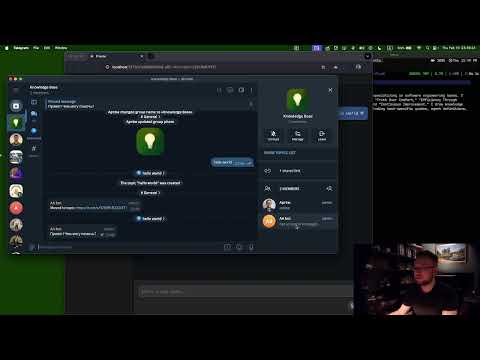

- My Mind - Personal knowledge base and memory management. Navigate .md files, prompt in their context, use as reference for recurring jobs.
- Voice Input - Speech-to-text input support for hands-free interaction
- Session Management - Create, browse, and manage AI chat sessions with full conversation history
- Real-time Chat - Interactive chat interface with markdown rendering and streaming responses
- Audio Playback - Text-to-speech notifications with play/pause/stop controls
- Mobile Responsive - Adaptive layout with collapsible sidebar for mobile devices
- Notification System - Real-time notifications for session completion with audio alerts
- Jobs - Schedule and monitor background agent tasks
- Tools - Browse and configure agent tools and capabilities
- Skills - Manage agent skills and specialized behaviors
- Thinking Process - Visualize agent reasoning and thought chains
- Todo List - Track and manage agent task progress in real-time
- LLM Providers - Configure multiple AI providers (OpenAI, Anthropic, Ollama, etc.)
- MCP Servers - Model Context Protocol server management
- Integrations - Third-party service integrations
- Resizable Sidebar - Draggable sidebar width with persistence
- Theme Customization - Customizable app title and branding
- Keyboard Navigation - Full keyboard accessibility support
- Auto-refresh - Real-time polling for session updates
Prerequisites - you have cloned this repo along with brute.
npm install
npm run dev
open 'http://localhost:5173'flowchart TB
subgraph Frontend["A2gent Web App (React + TypeScript)"]
UI[User Interface Components]
Router[React Router]
State[Local State Management]
Storage[(localStorage)]
end
subgraph Backend["A2gent HTTP API"]
API[REST API Endpoints]
Agent[AI Agent Core]
DB[(SQLite Database)]
end
subgraph External["External Services"]
LLM[LLM Providers<br/>OpenAI/Anthropic/Ollama]
MCP[MCP Servers]
TTS[Text-to-Speech]
end
User --> UI
UI --> Router
Router --> State
State --> Storage
UI -->|HTTP/REST| API
API --> Agent
Agent --> DB
Agent --> LLM
Agent --> MCP
API --> TTS
sequenceDiagram
    actor User
    participant UI as SessionsList
    participant API as api.ts
    participant Backend as A2gent API
    participant Agent as AI Agent
    participant LLM as LLM Provider

    User->>UI: Create New Session
    UI->>API: createSession()
    API->>Backend: POST /sessions
    Backend->>Backend: Initialize Session
    Backend-->>API: Session ID
    API-->>UI: Session Object

    User->>UI: Send Message
    UI->>API: sendMessage()
    API->>Backend: POST /sessions/{id}/messages
    Backend->>Agent: Process Request
    Agent->>LLM: Generate Response
    LLM-->>Agent: AI Response
    Agent->>Agent: Execute Tools (if needed)
    Agent-->>Backend: Updated Session
    Backend-->>API: Messages + Status
    API-->>UI: Render Response

    loop Polling (every 4s)
        UI->>API: listSessions()
        API->>Backend: GET /sessions
        Backend-->>API: Session List
        API-->>UI: Update UI State
    end

    alt Session Completed
        Backend->>Backend: Status = completed
        UI->>UI: Show Notification
        opt Has Audio
            UI->>API: fetchSpeechClip()
            API->>Backend: GET /assets/audio
            Backend-->>API: Audio Blob
            API-->>UI: Play Audio
        end
    end
flowchart LR
    subgraph State["State Management"]
        Local[React useState]
        Refs[useRef]
        Storage[localStorage]
    end

    subgraph Data["Data Layer"]
        API[api.ts]
        Types[TypeScript Types]
    end

    subgraph UI["UI Layer"]
        Components[React Components]
        Events[Custom Events]
    end

    subgraph External["External"]
        HTTP[HTTP/REST API]
        WS[WebSocket Events]
    end

    Components --> Local
    Local --> Refs
    Refs --> Storage
    Components --> API
    API --> Types
    API --> HTTP
    Components --> Events
    Events --> Components
    HTTP --> WS
src/
├── App.tsx                 # Main application component with routing
├── api.ts                  # HTTP API client and data types
├── main.tsx               # Application entry point
├── global.d.ts            # Global TypeScript declarations
├── index.css              # Global styles
├── App.css                # Application-specific styles
│
├── Views (Page Components)
├── ChatView.tsx           # Chat interface
├── SessionsList.tsx       # Session management
├── JobsList.tsx           # Job listing
├── JobDetail.tsx          # Job details
├── JobEdit.tsx            # Job editing
├── ToolsView.tsx          # Tools management
├── SkillsView.tsx         # Skills configuration
├── IntegrationsView.tsx   # Integrations page
├── IntegrationsPanel.tsx  # Integration settings panel
├── MCPServersView.tsx     # MCP server management
├── ProvidersView.tsx      # LLM provider list
├── ProviderEditView.tsx   # Provider configuration
├── MyMindView.tsx         # Knowledge base
├── ThinkingView.tsx       # Thinking process visualization
├── SettingsView.tsx       # Settings page
├── SettingsPanel.tsx      # Reusable settings panel
├── FallbackAggregateCreateView.tsx  # Fallback provider creation
│
├── Shared Components
├── Sidebar.tsx            # Navigation sidebar
├── ChatInput.tsx          # Chat input with voice
├── MessageList.tsx        # Message rendering
├── InstructionBlocksEditor.tsx  # Instruction editor
│
├── Services/Utilities
├── audioPlayback.ts       # Audio playback utilities
├── markdown.ts           # Markdown processing
├── thinking.ts           # Thinking process utilities
├── skills.ts             # Skills data/types
├── toolIcons.ts          # Tool icon mappings
├── toolResultEvents.ts   # Tool result event handling
├── webappNotifications.ts # Notification system
├── myMindNavigation.ts   # Knowledge base navigation
├── instructionBlocks.ts  # Instruction block types
├── integrationMeta.tsx   # Integration metadata
└── assets/               # Static assets
    └── react.svg
// Session
interface Session {
  id: string;
  title?: string;
  status: "active" | "completed" | "failed" | "pending";
  parent_id?: string; // For session threading
  job_id?: string; // Associated background job
  project_id?: string; // Project grouping
  messages: Message[];
  created_at: string;
  updated_at: string;
}

// Message
interface Message {
  id: string;
  role: "user" | "assistant" | "system";
  content: string;
  timestamp: string;
  tool_calls?: ToolCall[];
  tool_results?: ToolResult[];
}

// Job
interface Job {
  id: string;
  name: string;
  description?: string;
  schedule?: string; // Cron expression
  status: "active" | "paused" | "completed" | "failed";
  last_run?: string;
  next_run?: string;
}

// Provider Configuration
interface ProviderConfig {
  id: string;
  type: "openai" | "anthropic" | "ollama" | "fallback-aggregate";
  name: string;
  api_key?: string;
  base_url?: string;
  model?: string;
  priority?: number; // For fallback aggregates
}# Install dependencies
npm install
# Start development server
npm run devDefault dev URL: http://localhost:5173
Build and preview:
npm run build
npm run previewBy default the app connects to:
http://localhost:8080
Override options:
- Build time: Set
VITE_API_URLenvironment variable - Runtime: Set via local storage key
a2gent.api_base_url
npm run dev- Start Vite development server with HMRnpm run build- Type-check and build production assetsnpm run lint- Run ESLint for code qualitynpm run preview- Preview production build locally
Current implementation supports:
- Parent-child relationships via
parent_idfield - Job-associated sessions via
job_idfield - Project isolation via
project_idfield (e.g.,THINKING_PROJECT_ID)
The app implements a polling-based notification system:
- Polls session status every 4 seconds
- Detects terminal states (
completed,failed) - Supports rich notifications with images and audio
- Auto-plays speech notifications when available
- Framework: React 19.2.0
- Language: TypeScript 5.9.3
- Router: React Router DOM 7.13.0
- Build Tool: Vite 7.2.4
- Linting: ESLint 9.39.1 + typescript-eslint
- Styling: CSS Modules + Custom CSS Properties