It's so funny that I have to Reinvent the Wheel, lol~
But you couldn't oppose it because it can improve ur comprehension of the target🤣 🤣 🤣
There usually have two type of databases: SQL(Sequel) and NoSQL in computer system, here has a table showing the difference:
| Relational Databases(SQL) | Non-Relational Databases(No-SQL) |
|---|---|
| Organize data into one or more tables | Organize data is anythong but a traditional table |
| Each table has columns and rows | Key-Value Stores; Documents, Graphs |
| A unique key identifies each row | Key-Value stores |
The NO-SQL database manage system seems like a document manage system, it's usually be used in Big Data analysis which needs massive data in which the SQL shows poor performance. Compared with the non-SQL, SQL is not friendly with opening source, that means u need pay some money to rent the software(e.g: SqlYoung), but SQL is very popular in dialy traditional data analysis like the finance, shopping data, warehouse data and so no.
So if ur data is stuctured and has relation with each other, it's a best choice to use the SQL database, and if distributed and fragmentization is the main feature of the data, may the non-SQL performs well. But in fact, we usually combine the two brothers in dialy work.
The SQL:
Structured Query Language, is a common programming language which offen is used in RDSMS(Relational Database Management System) and RDBMS to control the relational database system. And it's known as a basic component for Backend developers and many other IT engineers.
About the history of SQL, you can visit the WiKi Page for more information.
The MySQL:
which is know as the most popular SQL tripartite in recent 20 years, has been used in most internet companies all over the world, it began as an opening source software at first but was been bought by The Oracle Company finally in 2009. It has become a component of the four masterpieces which is called LAMP of opening source softwares.
And here is its Wiki page that you can find more information about it.
There have four basic parts in this chapter: Add, delete, set, select and it's easy for you to understand its means if your English is good. BTW, it's very useful for your computer science learning if you try improving your English.
Before Beginning1
-
Install the SQL service Download the suitable version of MySQL software. You should config the configuration file at first and take care of the client port and service port settings. Then just keep going with this tutorial and finish your installation.
-
Config the environment variables Use the
Win + R'shortcut to runsysdm.cplto find the computer's environment variables setting, which hids in the advanced option. Add the path of MySQL service into the user variables' path dict to run the MySQL in shell. Use the commandmysqld installin shell with adminstrator to install the service so that you can set the status inservices.mscand start it with Wndows. -
Connect the SQL Service
-
After creating the SQL service and completing the configuration, there we need to connect the database system. U should use the command
mysqld --initializeto initialize the SQL service and theterminalwill give u the root administrator's initial password, input the commandmysql -h localhost -P port -u root -pto connect the local SQl service and if it completed, there will showmysql>in the terminal and u can continue ur command with it.
Notice: u should change the root user's password using the commandalter user set authentication_string=password("123456") where user='root';at first!
Create some datebase about...
There usually use the simple English words to express the SQL syntax as well as the other programming language:
create database db_name; -> To create DB library;
use db_name; -> SWitch the cursor to dbname;
create table table_name(column1_name column1_type, column2_name colume2_type, etc); -> To create an table named tablename in the database library you selected, which includes column1 and column2;
After creating some empty table, the next thing we should solve is insert data into the target table,
insert into table_name(column1, colume2, etc) values(column1, colume2, etc), (column1, colume2, etc); -> To add data into the target column of the table. Attention: the numbers of the data should keep equality with the number of the columns.
so we have inserted some data into a table.
Query is the basic part in daily data analysis work, it can help u filter data, integrate data and analyse the necessary data.
Basic syntax:
    select <col.name> from <table.name> # (left join <table.name> on <requirement>)
    where <requirement1> group by <col.name>
    having <requirement2>
    order by <col.name> limit <number, page>;
It seems a little complex, but u can divide this command into three groups by the program execution order:
-
Data Source ->
from <table.name> (left/right join <table.name> on <requirement>);, this SQL command means it'll select data from table1 and table2 and present their Cartesian Product and filter the result by the conditional statement(requirement). -
Conditional Statement ->
where <condition1> group by <col.name> having <condition2>;, as the main filterable factor, it prefers putting its power on the output.The execution order is 'where' -> 'group by' -> 'having', u should use the aggregate function like 'max(), min(), sum()',
-
Result Filter ->
select <col.name> ... order by <col.name> limit <num, page>;, this command determines the result we'll select from the association list, and how to show the result: order and page setting.
Extension:
In daily work, it's normal to combine different queries together.
The child quiry will become a part of the father query, it usually plays the role as result, conditional statement, the combined table.
For example:
   select *, (select s_name from students) stu_name from students
   left join (select s_id, s_name, c_id, c_name from sourc) sources
   on students.s_id = sources.s_id
   where sources.s_id in (select s_id from teachers);
About the join, please read the combination part.
This part is an important baisc part of SQl.
We use these two commands to realize update/delete data operation.
Basic Syntax
-
Update:
update <table.name> set <col.name1> = <value1>, <col.name2> = <value2> where <conditional.statement>; -
Alter:
alter table <table.name> <command>; -
Delete Data:
delete from <table.name> where <conditional.statement>;
Delete Database:drop database <database.name>;Delect Table:drop table <table.name>;
Difference between drop, delect and truncate:
Delete command just do the special data deletion from table, but when the condition is set refer to the whole table, it seems like the truncate table <table.name> statement.
It shows that Delete and Truncate won't delete table itself but this table's content, with the Drop command will delete the table wholly from database.
Delect command is a DML program statement, which means roll back operation is callable while drop and truncate are DLL statement without roll-back.
The difference between ALTER and UPDATE:
-
Alter: use to update the structure of the table in the database(like add, delete, modify the attributes of the tables in the database).alter table teacher drop column teacher_id;-> this command will delete the column named 'tercher_id'.alter table teacher add teacher_gender char(10);-> this'll add a char column named 'tercher_gender'.alter table teacher rename to T;-> rename the table.alter table teacher alter column teacher_id varchar(20);-> change the column's type into varchar. -
Update: use to manipulate the data of any existing column. But can’t be change the table’s definition.
It's inevitable for us to extract data from different tables in a relational database when analysing data in dialy work, so there comes the combination syntax.
The combination rule relies on Cartesian product, the command will return a Cartesian table based on target tables. And the left we need do is filtering out the impurites.
Let's import some tables:
select * from Character; select * from Stories;
Character:
| s_id | s_name | s_birth | s_gender |
|---|---|---|---|
| 01 | Leon | 1977-12-21 | man |
| 02 | Jack | 1992-05-20 | man |
| 03 | Sherry | 1986-07-01 | woman |
| 04 | Wesker | 1960-08-06 | man |
| 05 | Ada | 1974-03-02 | woman |
| 06 | Criss | 1973-01-20 | man |
(the main characters' data from Resident Evil, but there have lost the birthday data so I concoted them.)
Stories
| story_name | main_character | publish_time | good_review_rates |
|---|---|---|---|
| Resident Evil 4 | Leon | 28 Feb, 2014 | 91% |
| Resident Evi 6 | Jack | 22 Mar, 2013 | 80% |
| Resident Evil VII | Eason | 24 Jan, 2017 | 94% |
| Resident Evil Village | Criss | 7 May, 2021 | 95% |
Syntax:
- inner join:
select <col.name> from <table.name> join <table.name> on <conditional.statement> - outer join:
select <col.name> from <table.name> full join <table.name> on <conditional.statement>
If the condition is unnecessary, why not ignore it?
Outer Join, as known as Full Join, returns all records when there is a match in any one of the target tables, it'll fill the inexistent element with Null, in additional;
select * from Character full join Stories on Character.s_name = Stories.main_character;
| s_id | s_name | s_birth | s_gender | story_name | main_character | publish_time | good_review_rates |
|---|---|---|---|---|---|---|---|
| 01 | Leon | 1977-12-21 | man | Resident Evil 4 | Leon | 28 Feb, 2014 | 91% |
| 02 | Jack | 1992-05-20 | man | Resident Evi 6 | Jack | 22 Mar, 2013 | 80% |
| 03 | Sherry | 1986-07-01 | woman | Null | Null | Null | Null |
| ... | ... | ... | ... | ... | ... | ... | ... |
| Null | Null | Null | Null | Resident Evil VII | Eason | 24 Jan, 2017 | 94% |
(I just list the table's head part here, but please pay attention to the Null.)
Inner Join, the default join type, will return the records when all target tables match the rules;
select * from Character join Stories on Character.s_name = Stories.main_character;
| s_id | s_name | s_birth | s_gender | story_name | main_character | publish_time | good_review_rates |
|---|---|---|---|---|---|---|---|
| 01 | Leon | 1977-12-21 | man | Resident Evil 4 | Leon | 28 Feb, 2014 | 91% |
| 02 | Jack | 1992-05-20 | man | Resident Evi 6 | Jack | 22 Mar, 2013 | 80% |
| 06 | Criss | 1973-01-20 | man | Resident Evil Village | Criss | 7 May, 2021 | 95% |
In fact, we can image the tables as gathers in math.
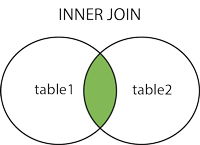 |
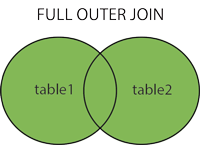 |
The Syntax:
- Left Join:
select <col.name> from <table1.name> left join <table2.name> on <condition.statement>; - Right Join:
select <col.name> from <table1.name> right join <table2.name> on <condition.statement>;
The Collection Form
 |
 |
This two syntax will ofter great help with our query work through combinated with different conditional statements. Let's try some examples:
we wanna know the main characters' private information and the main stories they participate in, there we should try the next SQL code.
select Character.*, Story.story_name as story from Character left join Story on Character.s_name = Story.main_character;
The result:
| s_id | s_name | s_birth | s_gender | story |
|---|---|---|---|---|
| 01 | Leon | 1977-12-21 | man | Resident Evil 4 |
| 02 | Jack | 1992-05-20 | man | Resident Evi 6 |
| 03 | Sherry | 1986-07-01 | woman | Null |
| 04 | Wesker | 1960-08-06 | man | Null |
| 05 | Ada | 1974-03-02 | woman | Null |
| 06 | Criss | 1973-01-20 | man | Resident Evil Village |
Similar with the function in other program languages, SQL will execute the packaged codes in a transaction and return its result.
The Syntax:
-
start-> The signal keyword meaning the begin of a transaction; -
commit-> commit the change to DB repositories; -
savepoint <savepoint_name>-> create a tomporary checkpoint in a transaction; -
rollback [to <savepoint_name>]-> rollback the changes to the beginning or a specified savepoint;
For example:
  start:
    create temporary table temp (
      select * from teacher
      where teacher_id in (01, 03, 07, 11)
    );
    -- here i create a temporary table;
    update temp set teacher_name = 'Bob Lee' where teacher_id = 01;
    update temp set teacher_name = 'Alice' where teacher_id = 03;
  commit;
Footnotes
-
u should import the practice SQL data into ur database, here we have three database to practice and it's easy to find some practice questions in many websites. ↩